
fkkdenmnhcegejeopipahgacpkcdiopa
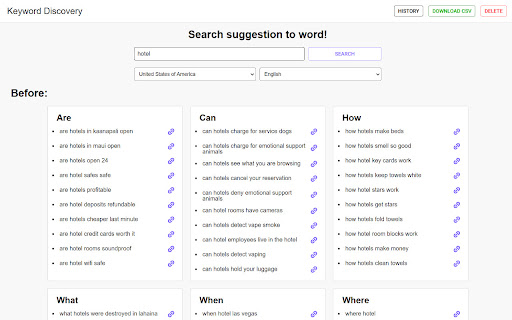


Uncover Lucrative Long-Tail and Google Suggest Keywords with Precision! Are you seeking an indispensable SEO tool that focuses on finding the most powerful long-tail keywords and Google Suggest keywords for your website's success? Look no further than the Keyword Discovery SEO Tool – your ultimate partner for unlocking untapped keyword potential and dominating search engine rankings! Laser-Focused Long-Tail Keyword Insights: Dive deep into our specialized database of long-tail keywords that hold the key to targeted, high-conversion traffic. Identify those hidden gems that your competitors might be missing. Google Suggest Keyword Harvesting: Harness the predictive power of Google Suggest to unearth real-time, user-driven search queries. Stay ahead of the curve by incorporating trending keywords into your content strategy. Local and Global Keyword Insights: Tailor your SEO campaigns to specific geographic locations or go global with a comprehensive array of long-tail and Google Suggest keywords suited for every market. User-Friendly Interface: Seamlessly navigate our intuitive interface and effortlessly extract valuable keyword data for your SEO endeavors. Precision Targeting: By focusing solely on long-tail and Google Suggest keywords, our tool allows you to reach users at the peak of their search intent, boosting your chances of conversion. Save Time and Effort: No need to sift through irrelevant keywords. Our tool streamlines the process, delivering the most relevant and high-performing keywords at your fingertips. Explosive Organic Growth: Supercharge your website's visibility and organic traffic with strategic long-tail and Google Suggest keyword integration. Future-Proof SEO Strategies: Adapt to rapidly evolving search trends with real-time keyword suggestions powered by Google Suggest. If you're ready to take control of your SEO game and harness the true potential of long-tail and Google Suggest keywords, the Keyword Discovery SEO Tool is your ultimate secret weapon. Watch your website soar to the top of search engine results and experience unparalleled success today!

SEOquake
SEOquake is a free plugin that provides you with key SEO metrics, along with other useful tools such as SEO Audit and many others SEOquake allows you to: ★ Review all major metrics in a heartbeat ★ Get a thorough analysis of SERPs and export the results in CSV format ★ Estimate keyword difficulty instantly ★ Set parameters for a search query ★ Run a complete SEO audit of a webpage, including a check for mobile compatibility ★ Check your social statistics for Facebook ★ Use a wide range of default parameters or create a custom set ★ Get a full report for internal/external links ★ Determine a keyword’s density and configure a stop-word list ★ Compare URLs/domains SEOquake consists of several tools you can use depending on which specific SEO endeavors you’re pursuing. The SEO bar is an additional toolbar located at the top of the browser window, and it presents core metrics – a number of which can be customized. The SERP overlay is a bar that appears below each SERP result. Once enabled, it gives you detailed metrics associated with each listing along with another sidebar section that allows you to sort and export your results. Also, you can get detailed reports for a specific page you are analyzing. SEOquake has other useful tools, including, the SEO Audit tool, the Keyword Density report, Internal/External Link analysis and even social metrics. SEOquake is really easy to install and work with. The SEOquake plugin is compatible with several browser extensions and is constantly updated. So far, SEOquake has been downloaded more than three million times and counting. If you have any questions, comments or suggestions, contact us at mail@seoquaketeam.com.

Webpage Analyzer - SEO Tool
The official extension to discover on-page SEO meta data Webpage Analyzer: Instant On-Page SEO Insights & Optimization Unlock your webpage's SEO potential in one click! The Webpage Analyzer Chrome extension provides instant, actionable insights into your on-page SEO metadata, helping you quickly identify areas for improvement and boost your search engine rankings. Designed for SEO professionals, marketers, and web developers, this powerful yet intuitive tool allows you to analyze critical webpage elements right in your browser. No more digging through source code or waiting for lengthy reports! Key Metrics & Features at Your Fingertips: Comprehensive Page Overview: Instantly view Title, Meta Description, Published Date, Last Modified Date, Author, URL, Canonical Tag, Sitemap, Robot.txt status, and Language. Header Analysis: Get a detailed breakdown of all H1-H6 headings, helping you understand your content structure. Link Insights: Quickly see the total number of links, distinguish between internal and external links, and identify nofollow attributes. Direct Access to Powerful Tools: Seamlessly launch external SEO diagnostic tools (PageSpeed, Mobile-Friendly Test, Rich Results, and more!) directly from the extension, pre-filled with your current page's URL. Data Export: Easily export all collected SEO data to JSON or CSV for further analysis and reporting. The Webpage Analyzer is your essential, real-time companion for optimizing webpages with speed and precision. Gain the edge you need to create better, more discoverable content. Love the tool? Your positive review helps us grow! Have feedback or suggestions? We'd love to hear from you! Email us at: contactsitereform@gmail.com

SEO | ASO | Search Ranking & Keyword Tool
SEO & ASO optimization tool. Complete on page ASO & SEO Analysis. Find rankings, ratings & short description Play Store, Google SERP 🔍 𝗢𝗽𝘁𝗶𝗺𝗶𝘇𝗲 𝗬𝗼𝘂𝗿 𝗦𝗘𝗢 & 𝗔𝗦𝗢 𝗘𝗳𝗳𝗼𝗿𝘁𝗹𝗲𝘀𝘀𝗹𝘆 𝘄𝗶𝘁𝗵 𝗢𝘂𝗿 𝗖𝗵𝗿𝗼𝗺𝗲 𝗘𝘅𝘁𝗲𝗻𝘀𝗶𝗼𝗻! Track keywords on Google SERP and Play Store instantly. With this all-in-one SEO ranking toolbar and ASO keyword tool, you can analyze rankings, ratings, descriptions, installs, and on-page SEO in just a few clicks. Forget manual rank checks—our search ranking tool gives you real-time insights into keyword positions and competitor strategies. Perfect for marketers, developers, and SEO specialists. Analyze Title tags, Meta descriptions, and result snippets. Track indexed pages, Core Web Vitals, and SERP result count. Interlinking and outgoing link checker (Ahrefs-style attributes). One-click detailed SEO report for deep analysis. Detect gaps in page rankings Track rankings for your own site by adding a URL in config Check keyword rankings from 1 to N with installs, ratings, and character counts. Get AppVector Keyword Difficulty Score and ASO keywords suggestions. Generate keyword tables from Title and Short Description using our ASO keyword tool. Track images, videos, and review URLs. With one click, run a complete site SEO analysis: Page Speed Insights Detailed image data with missing alt text Use the search ranking tool to get: Exact SERP result count for any keyword. Live search rankings for websites across regions. All-in-one SEO ranking toolbar for on-page audits. Integrated ASO keyword tool for Play Store optimization. Smart SEO search keyword tool for competitor analysis. Accurate search ranking tool for SERP tracking. 👉 Optimize your search & app strategies with ease—download our Chrome extension today

Meta Explorer - SEO Meta and On-Page SEO tools
Meta Tag Explorer is the best SEO tool to find SEO Meta of any website you browse Meta Explorer - The easiest and fastest way to find SEO Meta. - Find issues with your on page SEO in seconds (You can export issues as csv). - Pin the extension to keep it open across page refreshes. This comes in handy if you want to check SEO Meta of your content pages like your blog. - Works well on single page apps - Pleasant and modern UI All the existing tools need you to either click on an extension or copy paste the url in a tool to check the on page SEO. This gets very cumbersome if you have to check the on-page SEO for multiple pages, like a blog. With Meta Explorer, you don't need any clicks or copy-paste. Pin the extension & navigate to any page whose meta & on-page SEO you want to check and voila! you have the info in the sidebar. It also has a modern and pleasing UI. You won't get tired of looking at bad UI anymore. Key Features ✅ View & Copy meta tags ✅ View social tags (OG, Twitter) ✅ View header element count ✅ View header hierarchy ✅ Image file names & alt text ✅ Internal & External link count ✅ Links with Anchor text ✅ Scroll links into view ✅ Show schema markup if present ✅ Keyboard shortcut to toggle extension open/close (Cmd+Shift+E / Ctrl+Shift+E) 🐜 Issues - Check & Fix issues to improve your on page SEO. - Check Web Vitals - Export issues as CSV. 🔗 LINKS - Internal, External, No Follow link count - Links with Anchor text. - Check broken links - You can scroll the link into your view with a single click. 💬 Social - Check social preview of the site (Google, Twitter/X, Facebook, Linkedin, Slack) 🔧 Tools - Page speed insights - Ahrefs website authority checker - Partner SEO tools - Some links are affiliate links. Using them supports me to keep improving the extension. 🧐 Privacy - We don't collect any personal data or track any of your usage metrics. - We make network requests only to check broken links on your site, after you click on `Check Broken Links` button.
