
idpmfbffaojgchhbhkbcjjpagniekokn

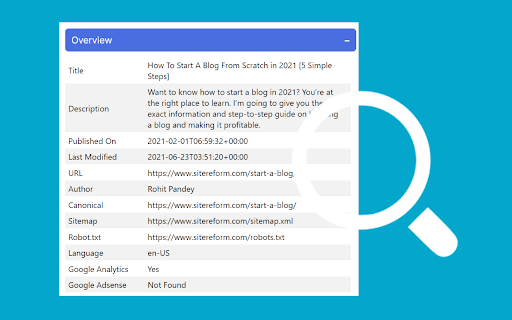
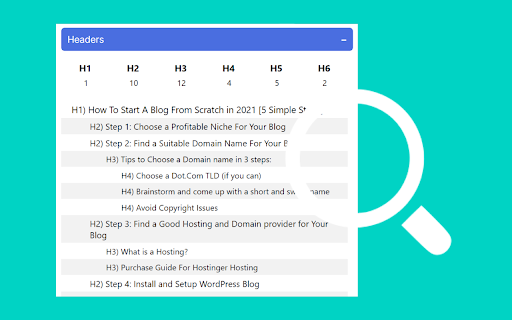


The official extension to discover on-page SEO meta data Webpage Analyzer: Instant On-Page SEO Insights & Optimization Unlock your webpage's SEO potential in one click! The Webpage Analyzer Chrome extension provides instant, actionable insights into your on-page SEO metadata, helping you quickly identify areas for improvement and boost your search engine rankings. Designed for SEO professionals, marketers, and web developers, this powerful yet intuitive tool allows you to analyze critical webpage elements right in your browser. No more digging through source code or waiting for lengthy reports! Key Metrics & Features at Your Fingertips: Comprehensive Page Overview: Instantly view Title, Meta Description, Published Date, Last Modified Date, Author, URL, Canonical Tag, Sitemap, Robot.txt status, and Language. Header Analysis: Get a detailed breakdown of all H1-H6 headings, helping you understand your content structure. Link Insights: Quickly see the total number of links, distinguish between internal and external links, and identify nofollow attributes. Direct Access to Powerful Tools: Seamlessly launch external SEO diagnostic tools (PageSpeed, Mobile-Friendly Test, Rich Results, and more!) directly from the extension, pre-filled with your current page's URL. Data Export: Easily export all collected SEO data to JSON or CSV for further analysis and reporting. The Webpage Analyzer is your essential, real-time companion for optimizing webpages with speed and precision. Gain the edge you need to create better, more discoverable content. Love the tool? Your positive review helps us grow! Have feedback or suggestions? We'd love to hear from you! Email us at: contactsitereform@gmail.com

AI SEO AEO Optimizer
Key Features of the AI SEO AEO Optimizer Meta-Title Checker- Meta title is a very important element of any website because it conveys the primary topic and purpose of the website or a webpage. That is why it is crucial to optimize the meta-title. With our extension you can easily find out the meta-title of any website in one click only. Meta-description Checker- The Meta description tag of a page is included as the search snippet on a search engine result page (SERP). The Meta description gives users an idea of the content and how it is related to their search query. So just download our ads-free & simple to use extension to review and optimize Meta-description. H1-H2 Heading tag checker – Confused about which is the H1 heading tag on the webpage or want to check H1 tags for other websites? If yes then please save your time with our extension which gives the information of all the heading tags be it H1, H2, H3, H4, H5 or H6. Anchor Text Checker – Now with our extension, you can have a close look at anchor texts on any website to keep track of inbound and outbound links very easily. You can also use our tool to analyse competitor’s on-page anchor texts. Alt tag checker – Google Images are used by hundreds of millions of people every day to visually search for web content. According to the research, image search accounts for 27% of all queries across the top 10 US web search properties.

ROSSK SEO Extension: Free SEO Checker, Link Analyzer, SEO Toolbar & Audit.
Gain SEO insights on any site you're visiting with just a click. Made by SEO Expert with 15+ years of experience. The simplest way to run an SEO website audit of your current browser window. Click on the extension icon and watch as it pulls on-page insights, including analysis of metadata, indexing, canonical tags, hreflang tags, web vitals, H tags, robots.txt, sitemap.xml, and server status. Additionally, use advanced features like the page rendering analyzer, disabling AI overviews, disabling JavaScript, user agent switcher, schema markup analyzer, Open Graph, and link analyzer with our 5-star, top-rated seo extension. No bloat, no ads, no unnecessary permissions—just a simple way to get an SEO report for any web page in a few clicks. Key Features of ROSSK SEO EXTENSION 💻 1️⃣ On-Page SEO Report ✅Quickly assess crucial on-page SEO elements such as meta tags, word count, heading structure, hreflang tags, X-robots, robots.txt, sitemap and canonical URLs. 2️⃣ Page Rendering Checker ✅This feature will allow you to compare client-side rendering (CSR) versus server-side rendering (SSR) for SEO, you can overlay the two versions of a webpage to visualize where differences occur. 3️⃣ User-Agent Switcher ✅User-Agent Switcher is a tool or browser extension that allows you to change the user agent string that your browser sends to websites. 4️⃣ Disable AI Overviews ✅This feature will allow you to test how search engines & users experience a webpage with or without JavaScript, ensuring that critical content & links are accessible & indexable even when JavaScript is turned off. 5️⃣ Disable JS ✅This feature disables AI-generated overviews from Google search results. Not all users value AI-powered summaries and insights that may clutter search results, this tool delivers a legacy, clean, simplified interface that prioritizes traditional search results. 6️⃣ Open Graph Markup ✅Checks social tags like Open Graph Tags and Twitter Cards, along with image optimizations. 7️⃣ Structured Data Checker ✅ Displays JSON-LD structured data in a concise view, eliminating the need to dig through page code. 8️⃣ Link Checker and Highlighter ✅Identifies and categorizes all outgoing links on a page. ✅ Highlights links based on different attributes such as external, internal, do follow and nofollow and exporting feature. ✅Detects broken links and redirects, providing actionable insights for link optimization. 9️⃣HTTP Header Reader ✅Our SEO toolbar allows users to inspect HTTP response headers for any visited URL. ✅Essential for diagnosing redirect issues and optimizing page load times. 1️⃣ 0️⃣ Additional Information about this extension ✅ User Data Handling: The SEO toolbar respects user privacy by not storing or disclosing browsing details beyond what is necessary to provide the specified functionalities. ✅ Terms and Privacy: ROSSK SEO EXTENSION general terms and conditions and maintains a strict privacy policy to safeguard user data. Extension Policy https://rossk.com/extension-policy

SEO Analyzer: One-Click Website Audit
Quickly access your website's SEO metrics. Analyze titles, tags, links, headings, and more for a complete overview. Want to know how your site is performing in search results? Our 𝗦𝗘𝗢 𝗔𝗻𝗮𝗹𝘆𝘇𝗲𝗿 is a powerful SEO optimization checker that gives you instant insights into your website’s performance. With this website page SEO checker, you can run a complete SEO on-page analysis and identify areas for improvement in seconds. ✅ 𝗧𝗶𝘁𝗹𝗲 & 𝗟𝗲𝗻𝗴𝘁𝗵 𝗖𝗵𝗲𝗰𝗸 – Ensure your page title is optimized and within the ideal length for better visibility. ✅ 𝗠𝗲𝘁𝗮 𝗗𝗲𝘀𝗰𝗿𝗶𝗽𝘁𝗶𝗼𝗻 𝗥𝗲𝘃𝗶𝗲𝘄 – Analyze your description for engagement, length, and click-through improvements. ✅ 𝗨𝗥𝗟 & 𝗖𝗮𝗻𝗼𝗻𝗶𝗰𝗮𝗹 𝗧𝗮𝗴𝘀 – Verify main and canonical URLs to follow SEO best practices. ✅ 𝗠𝗲𝘁𝗮 𝗥𝗼𝗯𝗼𝘁𝘀 𝗖𝗼𝗻𝘁𝗿𝗼𝗹 – Check robots tags to manage crawling and indexing efficiently. ✅ 𝗛𝗲𝗮𝗱𝗲𝗿𝘀 𝗢𝘃𝗲𝗿𝘃𝗶𝗲𝘄 (𝗛𝟭–𝗛𝟲) – Get a clear breakdown of your headings for structured on-page SEO analysis. ✅ 𝗜𝗺𝗮𝗴𝗲 𝗖𝗼𝘂𝗻𝘁 & 𝗔𝗟𝗧 𝗧𝗮𝗴𝘀 – Find missing ALT attributes to improve SEO and accessibility. ✅ 𝗟𝗶𝗻𝗸 𝗔𝗻𝗮𝗹𝘆𝘀𝗶𝘀 – Review internal and external links for better navigation and authority flow. ✅ 𝗢𝗽𝗲𝗻 𝗚𝗿𝗮𝗽𝗵 & 𝗧𝘄𝗶𝘁𝘁𝗲𝗿 𝗗𝗮𝘁𝗮 – Optimize your content for social sharing and visibility. ✅ 𝗥𝗼𝗯𝗼𝘁𝘀.𝘁𝘅𝘁 & 𝗦𝗶𝘁𝗲𝗺𝗮𝗽.𝘅𝗺𝗹 – Confirm essential files for proper search engine indexing. 💡 With this free SEO checker, you’ll uncover hidden issues, fix technical gaps, and optimize your website for higher rankings. The SEO analyzer is perfect for webmasters, marketers, and businesses looking to maximize visibility and improve performance.

Free SEO Audit & Website Checker by Semalt
Get a comprehensive SEO Audit report for your website. Pinpoint technical errors and other issues that stand in your website’s way to ranking higher in the SERPs and attracting more visitors. Free SEO Audit & Website Checker is a special-purpose Google Chrome SEO extension. It allows you to analyze any website for as many as 47 performance indicators and find out where it stands in terms of today’s SEO. Each performance indicator comes with a detailed description and expert tips on making your website Google-friendlier and improving the user experience. SEO Audit & Website Checker looks into your website’s performance from all sides, including: - On-page SEO - Indexing - Structured Data - Mobile Adaptability - Performance and Page Speed - Domain - Server & Security - Social Media Presence - Analytics and Counters Features and benefits of SEO Audit & Website Checker by Semalt: - Lightning-fast website checks. By clicking on the extension icon, you instantly start an audit of the website opened in one of your tabs. - Audits trusted by hundreds of thousands of users. So far, over 2 million websites have been analyzed by https://semalt.com/ users with this SEO Audit tool. PDF reports. Once your website is audited, you can customize and download an SEO Audit report in PDF. - Free to use. Adding this extension to your browser is free, and you don’t need to sign up, enter an API key, or get through tons of intrusive ads. How to install this extension? It takes 5 (literally) seconds to install SEO Audit & Website Checker: - Click #1 — Hit the Add to Chrome button - Click #2 — Add the extension - Click #3 — Pin it to your Chrome toolbar by clicking the Pushpin icon to always have it at your fingertips How to get started with SEO Audit & Website Checker? Go to a website you’d like to check and left-click the Free SEO Audit & Website Checker icon in your Chrome Extensions menu. You’ll get analysis data for this website in a heartbeat. About Semalt Semalt has been providing SEO analytics data and SEO services since 2013. We’ve helped over 600,000 businesses grow so far and are ready to help yours. Learn more about Semalt at semalt.com/about. Privacy Policy Your privacy means everything to us. SEO Audit & Website Checker does NOT collect data on how you use Chrome, search, or navigate websites. It only uses the URL of the web page you enable it on, as well as additional elements associated with this page. Learn more about Semalt’s Privacy Policy at semalt.com/privacy-policy. Support If you have any questions, comments, or suggestions, contact us at extension@semalt.com or our Support page – semalt.com/support.
