
fkecbfbndmnajomdcemkigcecoigalcm
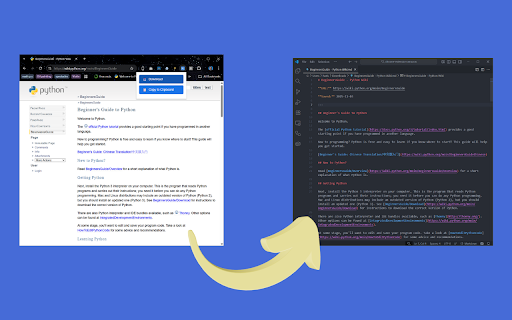
Convert web pages to Markdown format with reader mode extraction and preview Transform any web article into beautifully formatted Markdown with a single click. Get Markdown uses your browser's Readability technology to extract the main content from web pages, removing ads, navigation, and clutter. • **Reader Mode Extraction** - Intelligently identifies and extracts the main article content, filtering out ads, sidebars, and navigation • **Clean Markdown Formatting** - Preserves tables, code blocks, lists, headings, and text formatting • **One-Click Download** - Simply click the toolbar icon to save the current page as a .md file • **Rich Metadata** - Automatically includes article title, author, source, URL, and save date • **Smart Filenames** - Generates clean, readable filenames from page titles **📝 Perfect For:** ~ Vibe coders, when you have supply extra context from a web page to your AI coding agent like Gemini CLI, Claude Code, Codex, etc. • Researchers and students archiving articles • Content creators building reference libraries • Developers documenting technical guides • Note-takers using Markdown-based systems (Obsidian, Notion, etc.) • Anyone who wants clean, portable text versions of web content 1. Navigate to any article, blog post, or web page 2. Click the extension icon in your toolbar 3. The page is automatically converted to Markdown and downloaded 4. Open the .md file in your favorite text editor or Markdown app ✓ Article title and headings ✓ Paragraphs with proper formatting ✓ Tables with alignment preserved ✓ Code blocks with syntax highlighting indicators ✓ Links and images ✓ Lists (ordered and unordered) ✓ Blockquotes ✓ Author byline and publication info - Uses Readability library - Converts HTML to Markdown with Turndown - Works on most article and blog sites - Respects content structure and formatting - No data sent to external servers - all processing happens locally in your browser Your data stays on your device. This extension doesn't collect, transmit, or store any personal information or browsing data. Content is processed entirely within your browser. - Works best on article pages, blog posts, and documentation sites - Wait for pages to fully load before clicking the icon - Some content-protected sites may not extract properly - JavaScript-heavy sites may require scrolling to load all content first

Markdown Reader
The best way to preview Markdown in your browser. Markdown Reader is a powerful browser extension that allows you to preview Markdown documents in your browser at great speed! ❗️❗️ Please manually enable the Chrome extension's “Allow access to file URLs” permission before browsing local files. ❗️❗️ Features: - Document formats: Preview file://, http://, https:// protocols, .md, .mkd, .mdx, .markdown and other extensions. https://example.com/example.md (online Markdown link) file:///Users/my-project/readme.markdown (local Markdown file, * requires specific permissions to be enabled) - Syntax Plugins: Support emoticons, superscripts/subscripts, checkboxes, mathematical formulas, flowcharts, Gantt charts, table of contents, insertion of content, abbreviations, comments, reminders, and so on. - Themes: Provide high-quality dark and light themes and code highlighting. - Real-time refreshing: support real-time document changes and centered display to improve the reading experience. - Document Organization: Includes sidebar table of contents, original content preview and image media preview. - Shortcuts: support for browser extension shortcuts to quickly invoke the function. ❗️❗️ Before browsing [local files], please manually enable the [Allow access to file URLs] permission of the Chrome extension ❗️❗️: In Chrome Extension Manager, go to the details page of Markdown Reader and enable the “Allow access to file URLs ” option. I hope Markdown Reader helps you :)

Copy Title and Url as Markdown Style
Copy the title and url of the page as Markdown style This extension enables you to copy title and url of current page as Markdown style with 1 click (or 1 shortcut key). Source: https://github.com/zaki-yama/copy-title-and-url-as-markdown Donation for the author: https://www.buymeacoffee.com/zakiyama

HTML to Markdown
Select and convert headers, paragraphs, images or links on the web into Markdown text quickly and effortlessly

Modrinthify
Redirect Curseforge mod pages to Modrinth and show Modrinth notifications When looking at Minecraft mods on curseforge.com, Modrinthify automatically searches modrinth.com for the mod and shows you a redirect button if it finds it. If you click on that button you will be taken to the mod's Modrinth project page It also does the same on spigotmc.org The extension also show modrinth notifications in the browser toolbar, making it easier than ever to check for updates to your favorite mods!
