
kgfecdionnddbhjfeanngjbpnnglnpho
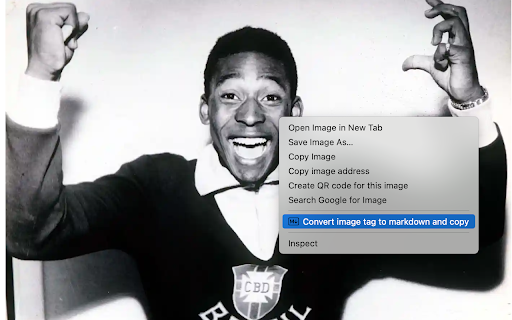

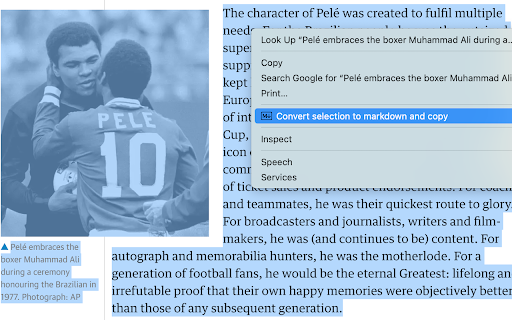


Select and convert headers, paragraphs, images or links on the web into Markdown text quickly and effortlessly

HTML to Markdown
HTML to Markdown – a straightforward Chrome extension designed to convert most web pages into markdown format effortlessly. As a developer, I often found myself needing to pull high-quality documentation from websites and reformat it for use with AI chat tools. That's why I created the "HTML to Markdown" Chrome extension. This free tool quickly converts web page content into clean Markdown, making it perfect for feeding into large language models or any other AI powered chats. Bloggers & Content Creators: Easily grab content from articles or research pages for your own posts. Developers: Copy code snippets and documentation into README files, project notes, or for use with large language models. Students & Researchers: Quickly extract information from online resources for papers and reports. Technical Writers: Convert website content to create guides and documentation. AI Integration: Extract and convert relevant website information into markdown for input into AI powered chat tools.

Website To Markdown
Transform any webpage into clean, formatted Markdown with just a click! This lightweight extension offers three powerful conversion options: 🌐 Convert Entire Page Convert complete webpages into well-structured Markdown, perfect for saving entire articles or documentation. 📑 Convert Main Content Smart detection of the main content area ( tag) for cleaner conversions without navigation bars and sidebars. ✨ Convert Selection Convert only the text you select - ideal for capturing specific paragraphs or sections. Key Features: • Clean, formatted Markdown output • One-click copy to clipboard • Direct Markdown file download • Preserves headings, lists, and basic formatting • No account required • Works offline • Zero ads Perfect for: • Writers and content creators • Developers • Students • Researchers • Anyone who needs to save web content in Markdown format This extension respects your privacy and requires minimal permissions - only accessing the current tab when you choose to convert content. Free and open-source. Convert web content to Markdown effortlessly!

Markdown↔HTML Dual Converter
Convert between Markdown, HTML, and Rich Text.Convert from markdown to HTML & HTML to markdown automatically. HTML↔Markdown Converter - Chrome Extension Store Description Short Description (132 characters max) Bidirectional HTML to Markdown converter with real-time preview, auto-copy, themes, and persistent content storage. Detailed Description Transform Your Content Workflow with the Ultimate HTML↔Markdown Converter Streamline your content creation and documentation workflow with this powerful, feature-rich HTML to Markdown converter Chrome extension. Whether you're a developer, technical writer, blogger, or content creator, this tool provides seamless bidirectional conversion between HTML and Markdown formats. Convert Mode: Traditional side-by-side HTML ↔ Markdown conversion with separate input/output areas Preview Mode: Real-time live preview with instant conversion as you type Seamless switching between modes without losing your work Smart Auto-Copy System: Auto-save functionality preserves your work automatically Session persistence - never lose content when switching tabs or reloading Cross-tab content preservation maintains your workflow Intelligent debounced saving prevents performance issues Professional Theming: Multiple built-in themes for different preferences Dark mode and light mode options Expandable workspace for enhanced productivity Responsive design adapts to any screen size Developer-Friendly Features: Works both as Chrome extension and standalone web application Clean, semantic HTML output Proper Markdown formatting with standard syntax No external dependencies or data transmission 💼 Perfect For: Developers & Programmers: Convert HTML documentation to Markdown for README files Transform legacy HTML content for modern documentation systems Create Markdown content for GitHub, GitLab, and other platforms Convert between formats for different CMS requirements Technical Writers & Documentation Specialists: Migrate content between documentation platforms Convert HTML articles to Markdown for static site generators Transform legacy documentation to modern formats Create consistent formatting across different platforms Bloggers & Content Creators: Convert HTML blog posts to Markdown for different platforms Transform rich text content for Jekyll, Hugo, or Gatsby sites Create platform-agnostic content that works everywhere Maintain formatting consistency across multiple publishing platforms Students & Researchers: Convert web content to Markdown for note-taking applications Transform HTML research materials to readable Markdown format Create clean, formatted documents for academic work Export content for LaTeX or other academic publishing systems Project Managers & Team Leads: Convert HTML reports to Markdown for team wikis Transform meeting notes between different collaboration tools Create standardized documentation across team platforms Maintain consistent formatting in project documentation 🎯 Use Cases & Scenarios Content Migration: Creating README files from existing HTML documentation Converting API documentation between formats Transforming HTML comments to Markdown documentation Preparing content for version control systems Publishing & Distribution: Converting articles for multiple publishing platforms Creating cross-platform compatible content Preparing content for different CMS requirements Standardizing content format across team projects Educational & Research: Converting web articles to readable study materials Transforming HTML research papers to Markdown format Creating clean notes from web content Preparing academic content for different publishing systems ⚡ Why Choose This Extension? Reliability: Offline functionality means your sensitive content never leaves your browser Speed: Instant conversion with real-time preview capabilities Flexibility: Works in any environment - extension or standalone application Persistence: Never lose your work with automatic saving and session management User Experience: Intuitive interface designed for productivity and efficiency 🔧 Technical Specifications Conversion Engine: Advanced HTML parsing with semantic Markdown output Storage: Local browser storage with Chrome extension API integration Compatibility: Works in Chrome extension context and standalone web environments Performance: Optimized with debounced operations and efficient DOM manipulation Security: No external API calls - all processing happens locally 📱 Cross-Platform Compatibility Chrome Extension (recommended) Standalone web application Works on Windows, macOS, and Linux Responsive design for desktop and tablet use No installation required for web version 🎨 Customization Options Multiple theme choices for different working environments Expandable workspace for large content projects Configurable auto-copy behavior Persistent user preferences across sessions Customizable layout options 🚀 Get Started Instantly Install the extension from Chrome Web Store Click the extension icon in your browser toolbar Choose Convert or Preview mode based on your needs Paste your HTML or Markdown content Get instant, accurate conversion results Copy to clipboard with one click or use auto-copy

WebInk: Intelligent Web to Markdown Converter
Transform web pages into Markdown with AI conversion, smart TOC generation, multi-language translation, and seamless reading. 🌐 WebInk: Smart Web-to-Markdown Browser Extension Transform any webpage into Markdown with WebInk, your intelligent reading and content management assistant. 🧠 **Smart Conversion** Automatically detects and accurately converts web content to Markdown. 📑 **Smart TOC Generation** Automatically generate table of contents with clickable navigation and smart indentation for better document structure. 🌍 **Multi-language Translation** Translate content to 15+ languages with AI-powered accuracy and real-time preview. 👁️ **Real-time Preview** Enjoy a native browser-like reading experience with sidebar Markdown preview. 📥 **Notion Integration** Save content directly to Notion for seamless workflow. 📝 **Template System** Use and customize templates for consistent content formatting. WebInk streamlines your web reading and content organization. Install now to experience efficient digital note-taking and content management!
