
fjbonpakihikkocmockbkndhooihpijo
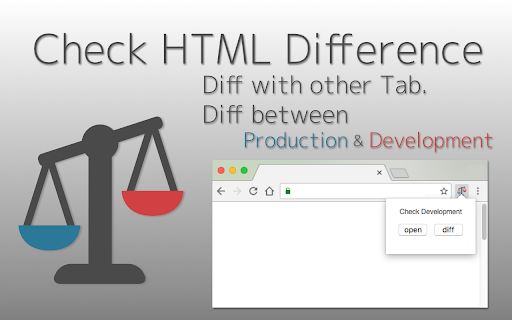
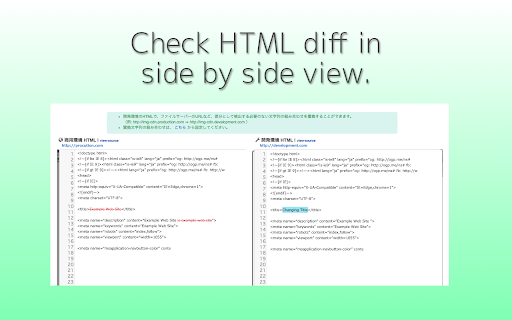
Tool for checking HTML difference between tabs ,or between production and development environment. HTML Diff Check Tool is chrome addon for checking difference between tabs or between Production and Development. You can check HTML diff with other tab. You can open the URL of production and development server each other with pre-register pairs of those URLs. Also, you can check HTML diff of them. [usecase] - To check the difference between a testing and production environment before/after deployment. - When your co-worker asks you to check a testing environment which he/she updated. [How to use] 1. In the settings register the combination of a testing and production environment domain (including a subdomain). 2. Turn on the "balance scale" icon or select from context menu at the web page where you want to check a testing or production environment. 3. Click the "open" button then a testing or production environment domain will be opened. 4. Click the "diff" button so you can check the difference between the HTML sources. [about privacy] - The registered domains, URLs or HTML sources are not sent to third parties. - According to correspond to manifest v3, analyzed via Google Analytics is stopped. -v.2.0.0 Add function for checking diff with other tab. -v.1.3.0 Nex/Prev Diff and Search Functions are added. -v.0.2.0 You can also use in incognito mode. Fix bug and strings. - v.0.1.11 You can also check HTML diff include JavaScript rendered HTML. Change option for that, if you need.

Alt & Meta viewer
This extension show alt and meta.

Pasty
Pasty is a very simple multiple URL opener. ================================ http://google.com/ http://gmail.com/ http://maps.google.com/ ================================ Please copy the URL list above and then click/touch the Pasty icon. No need to paste, just click the icon. Changelog: v1.8 - Remove the options page. v1.7 - Reimplement. v1.6 - Manifest v3. v1.5 - Update manifest. v1.4 - Automatic paste with clipboardRead permission. v1.3 - Remove "tabs" permission. - Remove background page. - "ttp://" and "ttps://" support. v1.2 - Textarea resizer disabled / etc. v1.1 - New url finder. v1.0 - Initial release. I do not sell this extension to anyone. Please do not email me for such purposes.

Chat Thread Getchu
You will be able to get thread links for chat It is a function that you can get the URL of each thread with google chat. It's easy to lose track of the thread because it runs quickly, and it was difficult to tell this thread even if you wanted to share it with someone, so please use this extension to get the URL and record or share it.

HTML Validator
🧩 This Chrome extension provides a comprehensive set of features designed as an HTML checker to identify in code HTML error checker. With a user-friendly interface, it allows you to conduct validate HTML right from your browser, simplifying your workflow and enhancing productivity. ❗ With the extension it is possible: 1️⃣ to do Real-time; 2️⃣ to scan; 3️⃣ check W3C compliance; 4️⃣ check HT ML for errors; 5️⃣ fix markup; 6️⃣ to optimize each page. ➤ HTM L Syntax Checker: The tool highlights syntax errors and suggests corrections, making it easier to write error-free code. It supports both new and older standards, ensuring comprehensive coverage. ➤ Error Explanation and Guidance: The H T M L Validator offers detailed explanations and potential fixes for each detected error, serving as an educational tool valuable for both novice and experienced developers. ➤ Customizable Features: Tailor the Hyper Text Markup Language verifier rules to fit the specific requirements of your project, creating a versatile HTML verify environment. Options include disregarding certain rules or setting unique validation parameters for a customized approach. ➤ User Experience Focused: With a clean and intuitive design, the H TML corrector ensures that HTML check is a seamless part of your development process. It integrates smoothly into your development environment, providing tooltips and contextual menus for easy access to its features. 1. Extensive HTML check review alerts you to errors, outdated tags, and additional problems. 2. Immediate HTML code checker verification enables rapid modifications. 3. Validate HT ML online confirms your web markup's compliance with W3C standards. 4. The online HTML validator is capable of operating offline. 5. HTM L validation online is designed to process multiple files at once swiftly and effectively. 6. Validate web document markup system in real-time as you draft or modify your markup. 🎯 Offline Capabilities: Need to check markup language for web pages for errors but don’t have internet access? No problem! Our HTML Validator works offline, so you can perform language for creating web pages validation wherever you are. 🎯 One-Click Operation: With just one click, the Hyper Text Markup Language check is underway. It’s that simple to validate H T M L online and ensure your code is polished and professional. 🎯 SEO Enhancement: Clean and correct Web markup is a critical component of SEO. Validator helps ensure your markup is free of errors that could impact search engine rankings. 🖥️ W3 HTML Validator and CSS Web Markup Validator: Ensure your website's coding language and CSS meet the industry standards set by the World Wide Web Consortium (W3C). 🖥️ HTML code validator: Instantly scan and fix your internet markup to ensure it meets the latest web standards and SEO practices. ✅ HTML validatpr and HTML validator online: Quickly validate your HTMLvalidator against the latest web standards. With both offline and online capabilities, you can check your code directly in your browser or as part of your development workflow. ✅ Validate H T M L: This feature provides immediate feedback on the structure of your digital document, ensuring it is free from syntax errors and fully compliant with standards. ✅ Use validator to prevent runtime errors on your website, make sure to perform an HTML syntax check during development. 🧩This Chrome extension reduces the complexity of validate HTML online and testing, for maintaining excellence in your code. ⭐Include Validator HTML, HTML Validate, and w3c HT ML validator in your daily Internet development toolkit and watch your website climb in search engine rankings. ❓ How do I check my H T M L code? 💡 To check your Hyper Text Markup Language, simply install our extension. ❓ How do I install the extension? 💡 To add the extension, click the "Add to Chrome" button. The installation is quick, and you'll soon be able to check code directly on the website. ❓ Is it necessary to register or create an account to use the extension? 💡 You can use our extension immediately without the need for signing up or creating an account. ❓ Is my privacy protected while using the extension? 💡 The extension operates solely within your browser, safeguarding your privacy and security. It does not gather or store any personal data. ❓ Can I share ideas and feedback with the developers of the extension? 💡 We welcome feedback from our users. Please feel free to share your suggestions, ideas, or reviews. Your input is highly valued. ❓ If I run into issues while using the extension, is customer support available? 💡 Should you encounter any issues, please do not hesitate to reach out to us via email or submit a ticket in the Chrome Web Store. We are here to assist you
