
fihdhgobfdmbgggnnlpcokjlflopomji

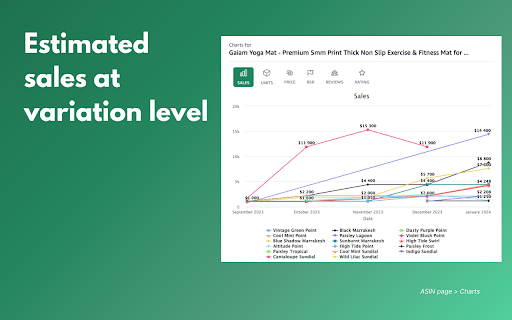


Display useful insights for an Amazon seller such as sales estimate, review analysis, keywords, ads gallery, listing generator etc.. It is a free extension developed by the Advigator team, the Amazon advertising automation software. The extension is a companion tool for Amazon sellers with various features: - 1. Estimated Sales Discover estimated sales for any keyword/marketplace at ASIN (variation) level. - 2. Listing Generator (AI) Generate a draft of the title, bullet points, secondary images, and video script. - 3. Images View and compare the main and secondary images for all products associated with a keyword. - 4. Ads Gallery View Sponsored Brand and Sponsored Brand Video campaigns run by other brands. - 5. Customer Questions Group customer questions by topic for a keyword or on a product page to discover missing information to add to your page. - 6. Customer Reviews Extract positive and negative points for which customers are satisfied / not satisfied. - 7. SEO overview and listing analyzer Identify main actions to take to improve the product page. - 8. Keywords Extract relevant keywords for a product and see its ranking in search results. - 9. Charts View the trends of the price, Best-seller rank (BSR), reviews, rating over time for any product. ------- ADVIGATOR ADVERTISING SOFTWARE Advigator is an Amazon PPC Software to create and optimize advertising campaign

Sellerise for Amazon Sellers
Game-Changing Tools for Amazon Sellers Sellerise Chrome Extension is one of the best free extensions for Amazon sellers. It helps Amazon sellers work faster and smarter by bringing essential tools together in one place. Instead of switching between multiple extensions, you can handle product research, bulk review requests, and review downloads directly on Amazon. It’s fast, easy to use, and built to simplify your daily workflow. Start with unlimited free product research using Sellerise’s core features. Advanced research tools are available with a paid plan for sellers who need deeper insights and more functionality. Supported marketplaces: North America, Germany, France, the UK, Spain, and Italy. More marketplaces are coming soon! What Can You Use the Sellerise Extension For? • Research products directly on Amazon • Analyze market opportunities and competition • Request reviews in bulk • Download reviews for deeper analysis • Simplify your daily Amazon workflow • Access multiple seller tools in one extension • Save time on repetitive tasks • Make faster, more informed decisions Find product opportunities for your next Amazon launch. • View sales, revenue, price history, FBA fees, and other key insights while browsing Amazon • Quickly evaluate whether a product or niche has potential • Save interesting products and share findings with your team • Understand whether a market looks competitive, weak, or promising • See what buyers love, complain about, and expect • Spot weak listings and areas where competitors underperform • Identify gaps you could fill with a better offer • Find the best supplier faster - Easy-to-use bulk review request feature that appears on your Amazon order list page, letting you save the time spent requesting reviews individually for each order - Ability to submit mass review requests (up to 100 requests per page) and global review requests (up to 10,000 requests) - No need to worry about the page closing or getting stuck - the extension will finish all the tasks for you in the background after the request is submitted - Automatically skips Non-Amazon, refunded, canceled, or pending orders - Uses official Amazon-generated email templates containing both product review and seller feedback requests, auto-translated to your customer’s preferred language, 100% compliant with Amazon’s policies - Functional on every Amazon marketplace Have you ever thought of downloading Amazon reviews? If so, then you have landed at the right place. Everything you need to do is select the "Review Downloader" feature, then visit an Amazon product page or enter ASIN manually, and click the "Load Reviews" button. 1. Install Sellerise Chrome Extension • Add the Sellerise Chrome Extension from the Chrome Web Store 2. Create Your Sellerise Account • Log in or sign up for a free Sellerise account to start using the extension’s features. 3. Launch the Extension on Amazon • Open the Sellerise Chrome Extension on Amazon pages to access real-time product insights, research tools, and additional features built to support your workflow. • Research product opportunities, analyze market insights, request reviews in bulk, and download reviews directly within the extension. 4. Explore Sellerise Tools • Use the extension to simplify product research, save time on review management, and gather valuable customer feedback for deeper analysis. • Access Sellerise features directly on Amazon pages and make faster, better-informed decisions in one place. USE THE SELLERISE CHROME EXTENSION FOR FREE Sellerise offers FREE and UNLIMITED access to the extension’s core features, so you can start researching products and exploring essential tools without any upfront cost. Advanced features are available with a paid plan for users who need deeper research and more functionality. You can unlock 7 days of full access to product research data, including advanced research features, by connecting your Seller Central account when creating your Sellerise account. After the trial period, you can continue using the extension’s core features for free, while advanced functionality remains available with a paid plan.

AMZ Suggestion Expander
Chrome extension to expand the number of search suggestions that are shown in the Amazon search bar. For Amazon Sellers! This Chrome extension expands the number of search suggestions that are shown in the Amazon search bar by showing the keywords that Amazon would suggest before and after the keywords you have entered. This makes searching for new product niches easy! Works in US, CA, MX, UK, DE, FR, IT, AU and ES markets. Updates: v2.1.50: Bug fixes v2.1.49: Bug fixes v2.1.48: Bug fixes, improvements v2.1.47 Bug fixes v2.1.46: Bug fixes v2.1.45: Bug fixes v2.1.43: Bug fixes and maintenance v2.1.42: Bug fixes v2.1.41: Bug fixes v2.1.40: Bug fixes v2.1.39: Fix issue with keywords not downloading. v2.1.38: Bug fixes v2.1.37: Added search volume in search bar results (Pro only). Changed keyword download to sort by search volume (Pro only). v2.1.36: Bug fixes v2.1.35: Fix issue with keywords not displaying. v2.1.34: Bug fixes v2.1.33: Added full amazon.com.au support. v2.1.32: Bug fixes v2.1.29: Pro Version: Added keyword search volume estimates to downloaded keywords. v2.0.27: Bug fixes v2.0.26: Major update! Faster keyword display. New Pro version with keyword download functionality and other features. v1.0.25: Bug fixes v1.0.23: Update to support changes in future versions of Chrome. v1.0.22: Bug fixes v1.0.19: Added amazon.com.au support. v1.0.18 : Bug fixes v1.0.11 : Bug fixes Tip display. v1.0.10 : Bug fixes v1.0.9 : Added display of Amazon Suggestions when you press the down arrow key to move thru the list of original suggestions.

Amazon Product Finder - AMZScout PRO Extension
Find a profitable product and start selling on Amazon quickly! Amazon product research made easy! See sales estimates and FBA fees. How to check sales data for any product: 1. Install the AMZScout PRO Chrome Extension. Begin your FREE trial by entering your details with a quick sign-up. 2. Access Amazon and search for any items you want to analyze. 3. Open the extension. 4. Review the product and niche information. You can review sales history for both the product and the niche, as well as estimated net margin, sales, and revenue. You can also use a built-in FBA calculator to help you identify profitable products, and much more! What can you use the AMZScout PRO Extension for? • Evaluate niche potential • Check niche and product trends • Calculate potential product profitability • Check product and niche sales, price, and rank history • Evaluate competition in the niche • Estimate FBA costs • Find reliable suppliers • Monitor your competitors' sales, pricing, and keywords ✅ More than 300,000 users already trust AMZScout’s product analysis tools, keyword search, and much more. AMZScout PRO is simple to use and navigate. Here are some hacks for anyone who’s interested in become a seller: [Quickly assess the potential of your niche and product] AMZScout Product Finder provides a niche score rating and a product score for both the private label and reselling business models. With this tool, you can immediately determine if the product is worth considering without having to look deeper into detailed product analytics. [Find the best supplier] Find things to sell on Amazon, or any other marketplaces, to scale your business. Save time by filtering suppliers according to country and price range. [Improve your ranking] Export niche and product keywords to improve product listings and use them in your PPC campaigns. Help your listing rank higher in organic searches and get more sales. This smart product research tool is often considered to be the most accurate tool by sellers. It helps you find unsaturated opportunities, get sourcing options, monitor your competitors, and even improve your keyword research. Base your product choice on concrete data to protect your investment. Find a product to launch with FBA that will bring you $5,000/month or more! The AMZScout Chrome Extension works in the United States in addition to these other Amazon marketplaces: the UK, Germany, France, Italy, Spain, Canada, Mexico, India, Japan, UAE, Saudi Arabia, Australia, and Brazil. You can research 15 niches for free with the trial version. No credit card information is required. Download the PRO Extension and give this fantastic software a try! Q: How are the estimated values calculated? A: These values are calculated using formula-based, top-level categories (for example, Home & Garden or Books) and rank in one of these categories. Q: What does the “LQS” column mean? A: “LQS” is Listing Quality Score. AMZScout analyzes a variety of product description criteria and computes a score for it. A higher score indicates a higher position in the search results. To see details, place your cursor on any LQS value. Q: What does the “RPR” column mean? A: “RPR” means Revenue Per Review. A higher RPR means a better selling opportunity. Q: Can I also get help with how to start selling on Amazon? A: Of course, the AMZScout team publishes useful articles and videos every month that you can find on our blog. You can also participate in an AMZScout Seller's Course and free webinars. Q: If I have any other questions or problems with AMZScout, where can I get support? A: The fastest way to get support is by emailing your question to support@amzscout.net.

Amazon Index Checker
Free keyword ranking & index check tool by SellerApp - The most accurate seller tool for all amazon market places. Don’t have the time to track the right keywords for your listings? We don’t blame you. We understand that your time is valuable to you. Heck, that’s why we've got you the Keyword Rank Tracker. Amazon SEO takes time. Tracking keywords manually takes time. Marketing takes time. It’s not much freedom if you’re spending all of your time in front of a computer instead you could be spending doing what you love — spending your time your way. The combined Index Checker and Keyword Rank Tracker is built with focus on ease of use and effectivity. Save your time, benefit from the indexing information, page ranking, and the keyword position all on one screen. Helps you accurately identify the keyword ranks for you to know the position of your product listing for the most important keywords - Check your current Amazon keyword ranking, indexing information, Page Rank and positions - Helps you check ranking on all marketplaces - US, EU, UK, CN, JP, FR, DE, IT, NL, CA, MX, BR, AU - Helps monitor the effectiveness of your marketing efforts with changes in your PPC campaigns, keywords in your listings - Manually refresh your real time keyword ranking results - Export your daily keyword indexing, ranking and other ranking information to a Google spreadsheet for custom analysis and backup Keyword research, on-page and off-page optimization are just small parts of the SEO puzzle. It is more critical to control how your listing is performing in search. It's really important to understand what is going on your listing, and to track your most important product keywords to be alerted whenever something is going wrong -to know if you're losing rankings for a certain keyword or a pool of keywords. If you're not ranking for your most important keywords anymore, you could lose a lot of money in sales. The listing keyword search ranks keep constantly changing and you should stay vigilant against your keyword performance. Rank tracking also helps you find out how your competitors are ranking in search and find the best ways to outrank them. Make sure you keep an eye on the competition with the ranking tracker. Q1. How to check keyword ranking on amazon? Enter all the your most important keywords in the keyword tracker and click on ‘Analyze’. The Extension crawls through the Amazon listing pages to analyze your listing position in the search results. Q2. How to index keywords on Amazon? Keywords on Amazon are indexed based on the sales made by the listing for the keyword. Amazon considers the product making the most sales as the most relevant one and places it on the top of the search results for the keyword. Q3. How to enter keywords in listing? The keywords can be entered in different parts of the listing including the title, bullet points, the product description and the backend keywords. Amazon’s search engine picks up the keywords from your listing under all these portions to index it for your product listing.
