
fhmmdobpcofodcpkehjaiodhahbfkkgn

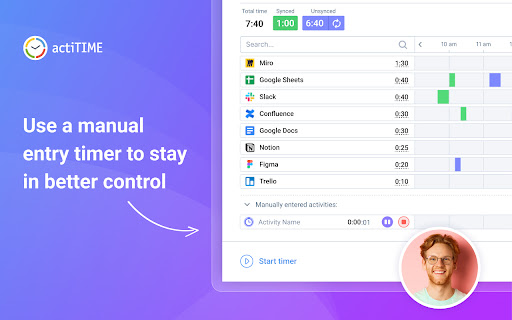
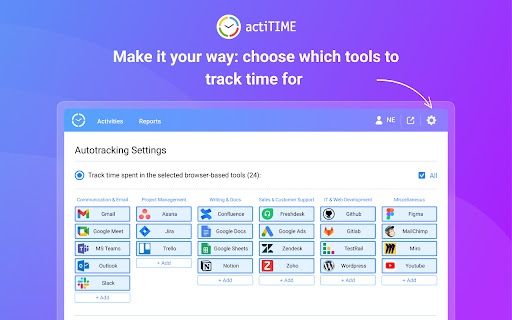
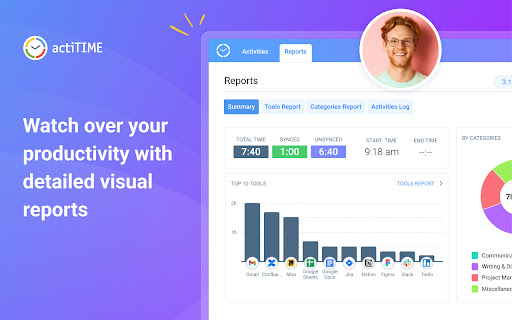

Track all your online activities automatically to see how much time you spend on different platforms and get accurate time track. Find it hard to remember which tasks you worked on, when, and for how long? This browser extension automatically tracks all your online activities, so you can see how much time you spend using versatile online platforms and easily get 100% accurate time tracking data whenever you need it. It also lets you: - Limit activity tracking to only specific websites and online apps. - Divide your activities into different types and categories. - Analyze the collected data via visual charts and reports. 1. Install Time Management Assistant. 2. Connect it to your actiTIME account or sign up using an email. 3. Indicate which online tools and types of activities you want to track + set exceptions via time tracking settings. 4. Configure your own mapping rules via sync settings to seamlessly export your time tracking data to actiTIME. 5. Start working on your tasks in the selected tools, and the Assistant will begin tracking time for your online activities automatically. 6. If you ever need to make a time entry manually, use the built-in one-click timer at the bottom left corner of the extension’s interface. 7. Open the Reports tab to analyze your time tracking statistics or view the real-time activity log in the Activities tab.

Time Buddy - Time Management Assistant
Time Buddy is your secret to productivity. Block distractions, manage screen time, and enforce healthy breaks. Time Buddy is a professional productivity tool designed for users who need to improve their time management and focus. The time management software has a comprehensive distraction blocking function that can effectively block various distractions from websites, applications and notifications to help users stay focused. This efficiency tool provides advanced screen time management functions that can monitor and count the time users spend on different applications and websites in real time. Through detailed time tracking and data analysis, users can clearly understand their digital device usage habits and develop more reasonable time allocation strategies. Time Buddy's focus assistant function supports setting work time blocks and study time periods, and automatically blocks distracting websites and applications during the specified time. The time tracking tool also integrates an intelligent reminder system that can automatically arrange healthy rest time according to the user's work rhythm to ensure a combination of work and rest. The software's rest reminder function adopts a scientific time management concept to regularly remind users to rest their eyes, move their bodies or relax for a short time. This mandatory healthy rest mechanism helps prevent fatigue and health problems caused by long work hours. The productivity tool also provides detailed time usage reports and analysis charts to help users identify the source of time waste and room for improvement. By using this software to improve concentration, users can develop better work habits and improve overall work efficiency and quality of life. Time Buddy is suitable for students, office workers, freelancers and other user groups who need time management optimization. Whether preparing for exams, completing work projects or cultivating good digital device usage habits, this time management tool can provide effective help and support.

TimeOWare: Be aware & block!
Be aware of where you spend your time online. ➤ Know how much time you spent on a website today just by glancing over the icon. ➤ View your daily usage stats. ➤ Safe & open source: github.com/timeoware/chrome-extension TimeOWare never accesses or reads any content from any web page you visit. Your stats are saved securely in your browser and this data never gets transmitted anywhere; internally or externally.

Web Activity Time Tracker - Block Websites, Pomodoro & Web Analytics
Track time of your web activity, limit and block distracting websites. Monitor your web usage. Web Activity Time Tracker keeps track of how you spend time on the web and presents the stats in a useful and intuitive way. Take control of your online time! Tracking and limiting your use of any website helps you stay productive and focused. Stay focused and maximize your productivity. Whether you're managing work projects, studying for exams, or simply want to understand your browsing habits better, this tool is your go-to companion. Web Activity Time Tracker is a powerful Chrome extension designed to help you monitor and optimize your online productivity. Effortlessly track the time you spend on each website, set goals, and get detailed reports to boost efficiency and focus. With a sleek, user-friendly interface and real-time insights, this tool empowers you to make the most of your web browsing. You can set a daily visit limit for sites and block them after the expiration of the limit. Alternate work and rest times with Pomodoro Mode. ✅ Real-Time Tracking: Get instant insights into the time spent on each website you visit. ✅ Daily and Hourly Reports: Receive summary reports that highlight your browsing habits and patterns. Comparison of time by day. ✅ Limit and Block Distracting Websites: Set daily time limits for specific websites to help you stay focused. ✅ Usage Statistics: Effortlessly monitor the time you spend on different websites. ✅ Notifications for Websites and daily summary notification. Set goals and receive notifications to stay on track. ✅ Pomodoro Mode ✅ Track files in the browser, including .pdf, .png, .json and so on ✅ Export Data to CSV Web Activity Time Tracker helps you: 🍀 Stay focused 🧠 Understand how you use the internet 👀 Reduce distraction 🍅 Overcome web addiction ⏲️ Self-control 💯 Boost productivity 🚀 Increase your digital wellbeing 💪 Reduce wasted time This version introduces an OPTIONAL banner widget powered by Media IntelliView. When enabled by the publisher of a participating website, the extension may display a small contextual banner on that website's page. What is sent over the network when the widget is enabled: - The page origin (e.g. "https://example.com") — never the full URL or page content - A randomly generated per-install identifier (no personal data, no account, no login) - Banner display/click/dismiss event timestamps The widget is fully described in our prominent disclosure shown on install AND update (Welcome page), and you can disable it at any time in the Options page. Local time tracking and blocking features continue to work exactly as before — they do NOT depend on the widget. Take control of your online habits and make every minute count with Web Activity Time Tracker.

Jibble Time Tracker
Track time from anywhere and boost productivity. Easily track work hours with Jibble's FREE time tracking extension, trusted by tens of thousands worldwide. From small businesses to enterprises like Tesla, Virgin Hotels, and Pizza Hut, we provide precise and hassle-free time tracking. Perfect for individuals and teams, Jibble offers a powerful and easy-to-use time tracking solution right in your browser. With just a few clicks, you can clock in/out, log hours, and manage tasks and projects in real-time. Key Features: - Easy Clock In/Out - Start and stop timers directly from your Chrome browser. - Keyboard Shortcuts - Use shortcuts to quickly start or stop time tracking. - Start Timer from Text - Easily track time for specific tasks by selecting text and starting a timer. - Activity and Project Tracking - Log time against activites, projects, or clients for organized and billable tracking. - Multi-Device Sync - Sync your data across devices for seamless time tracking. - Integrations - Sync time tracking with tools like Asana, Trello, and more for seamless workflow. - Detailed Reporting - Generate comprehensive timesheet reports to analyze productivity and performance. Take the hassle out of time tracking with Jibble's 100% FREE timer extension. Download Jibble’s Chrome extension today and start managing your time effortlessly!
