
fhdeahmddgflanbgilcglipaeofmcabc

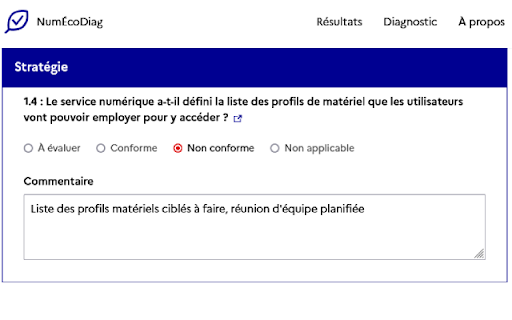

Cette extension web facilite l'auto-diagnostic de l’écoconception d’un service numérique. L'extension se présente comme un formulaire reprenant tous les critères du RGESN, Référentiel Général d'Écoconception de Services Numériques. Pour chaque critère, 4 options sont disponibles : À évaluer, Conforme, Non conforme et Non applicable. Les données sont stockées uniquement dans votre navigateur. Aucune donnée n'est collectée. L'extension fonctionne seule sans communication réseau. Un export CSV est disponible pour exploiter les résultats du diagnostic. Le code source est disponible sur Github est est publié en licence libre.

PerfectPost: makes Linkedin 10x better
A browser extension to improve your LinkedIn writing experience PerfectPost is a Chrome extension designed to transform your LinkedIn experience and help you create, organize, and publish content more effectively, directly within the LinkedIn interface. It is built for content creators, freelancers, entrepreneurs, marketing teams, and community managers who want to structure their LinkedIn presence, save time, and engage with the right people at the right moment. Everything happens where you already work: on LinkedIn. Key features of the PerfectPost extension Rich text editor for LinkedIn Easily add bold text, italics, and emojis to your LinkedIn posts. Instantly see the final rendering without using external tools or copy-paste tricks. Built-in writing assistant Get help while writing your LinkedIn posts to improve clarity, impact, and overall quality. Publish faster while staying relevant and engaging. LinkedIn draft management Save your ideas and post drafts directly from LinkedIn. Prepare content in advance, organize your drafts, and come back to them anytime without losing your work. Post scheduling Schedule your LinkedIn posts in advance directly from the LinkedIn interface. Maintain a consistent posting rhythm without daily effort. Post preview before publishing See exactly how your post will look before publishing, including formatting, line breaks, and emojis. Mobile preview Preview how your LinkedIn posts will appear on mobile devices. Essential to ensure readability and impact on smartphones. “See more” line preview Know exactly where LinkedIn will cut your post with the “see more” line. Optimize your hooks and place key messages before the cut. Custom LinkedIn Feeds Create personalized LinkedIn feeds directly inside LinkedIn. Custom Feeds allow you to group specific profiles and follow only the posts from people that matter most to you. Perfect for • Tracking prospects • Engaging with clients • Following strategic connections • Never missing important posts Custom Feeds replace the standard LinkedIn feed with a focused, engagement-driven view. Engagement and interaction tracking Access key metrics to better understand your LinkedIn performance. Identify your best posts, top commenters, and quickly spot comments that still need a reply. Organization and productivity PerfectPost turns LinkedIn into a real content and engagement workspace. You centralize your posts, interactions, and daily LinkedIn activity in one place. • Save time every day • Publish higher-quality content • Focus on meaningful engagement • Clear and structured workflow • No need to leave LinkedIn PerfectPost does not modify LinkedIn. The extension adds powerful features directly into the existing interface, seamlessly and naturally. Easy installation and instant onboarding Once installed, the extension automatically activates on LinkedIn with no complex setup required. PerfectPost is the ideal tool to write, organize, schedule, and engage effectively on LinkedIn, directly from your browser.

WAVE Evaluation Tool
Evaluate web accessibility within your browser. WAVE is a web accessibility evaluation tool developed by WebAIM.org. It provides visual feedback about the accessibility of your web content by injecting icons and indicators into your page. No automated tool can tell you if your page is accessible, but WAVE facilitates human evaluation and educates about accessibility issues. All analysis is done entirely within the Chrome browser allowing secure valuation of intranet, local, password protected, and other sensitive web pages. To run a WAVE report, simply click on the WAVE icon to the right of your browser address bar, or select "WAVE this page" from the context menu. WAVE errors align with WCAG 2.2 failures. The WAVE interface facilitates human evaluation of many other aspects of accessibility and Web Content Accessibility Guidelines, ADA, and Section 508 compliance. Version 3.3.1.0 (May 2026) - Various bug fixes and performance enhancements. Update AIM score to align with 2026 WebAIM Million. Version 3.3.0.4 (December 2025) - Bug fix for scripting exception with some pages with small text. Minor interface improvements. Version 3.3.0.3 (November 2025) provides performance, interface, and testing improvements. Improved support for ARIA headings and prefers-reduced-motion user settings. Version 3.3.0.0 (October 2025) adds numerous new features, enhancements, and bug fixes. Resetting the extension no longer refreshes the page, thus supporting better testing of dynamic content. The Summary and Details panel are now combined. The AIM Score is presented. Viewing the Order, Structure, or Contrast tabs now filters to only relevant page icons. The WAVE sidebar can now be collapsed out of view. Version 3.2.7.2 (September 2024) fixes a bug that disallowed checking of local files and suppresses errors in some cases where role="presentation" is present. Version 3.2.7.0 (August 2024) adds compatibility with Manifest v3. Inputs with aria-disabled=true are no longer considered for contrast checking. Version 3.2.6.0 (August 2024) adds support for contrast checking when foreground alpha/opacity is defined. The Contrast sidebar tools are updated to support foreground alpha. Also numerous minor bug fixes and improvements. Version 3.2.5.3 (February 2024) fixes numerous minor bugs and adds testing refinements. Some hidden inputs are no longer incorrectly flagged as not labeled. Version 3.2.4.4 (October 2023) fixes a few minor bugs with testing hidden content and with the sidebar contrast tools. Version 3.2.3.9 (June 2023) removes the warning message on UserWay pages due to them removing code that changes page content when the WAVE extension is activated. Version 3.2.3.8 (June 2023) includes numerous accessibility test enhancements, several minor bug fixes, and simplification of the contrast checking tools. Users are informed that WAVE results may be manipulated on pages that utilize UserWay or accessiBe overlays. Version 3.2.3 (March 2023) includes several minor bug fixes. A previous update to test for contrast errors in hidden elements has been reverted. While this was useful for finding contrast errors in drop-down menus, tab panels, dialog windows, etc., identification of errors in hidden elements caused user confusion and, in some rare cases, false positives. Version 3.2 (December 2022) includes over 100 bug fixes and performance enhancements. The extension no longer utilizes jQuery, resulting in faster testing and better compatibility with a variety of pages. A new Navigation Order panel is available that shows the navigation order, element roles, and accessible names (what is read by a screen reader) for all navigable elements. Version 3.1.6 (October 2021) includes numerous bug fixes and test rule enhancements for better testing contrast (filters, background images, and other complex color definitions are better handled), document language (IANA-defined language values are now tested), empty links and buttons (better ARIA support for accessible name computations), broken ARIA references, etc., etc. Performance and accessibility has been improved. Version 3.1.3 (November 2020) includes performance enhancements and fixes several minor bugs, including fixes for multiple alerts for some pseudo-lists and disabled controls being incorrectly flagged for contrast failures. Version 3.1.2 (October 2020) fixes several minor bugs, including with the Structure tab sometimes incorrectly showing no structure, and improves performance and accessibility testing reliability. Version 3.1 (September 2020) includes new accessibility tests (region, figure, possible list, select element missing label, and image with title), improved contrast checking, expanded lang attribute value checking, and numerous other bug fixes and improvements. Version 3.0.9 (July 2020) includes numerous bug fixes, improved accessibility, and improved color contrast checking including fewer false positives and expanded contrast checking for form inputs.

Lighthouse
Lighthouse is an open-source, automated tool for improving the performance, quality, and correctness of your web apps. Lighthouse is an open-source, automated tool for improving the performance, quality, and correctness of your web apps. When auditing a page, Lighthouse runs a barrage of tests against the page, and then generates a report on how well the page did. From here you can use the failing tests as indicators on what you can do to improve your app. * View and share reports online: https://googlechrome.github.io/lighthouse/viewer/ * Github source and details: https://github.com/GoogleChrome/lighthouse

GreenIT-Analysis
The extension allows: - to measure the ecoIndex of a web site as defined by the ecoindex web site http://www.ecoindex.fr/quest-ce-que-ecoindex/ - to verify the application of web eco-design best practices defined by the "Collectif numérique responsable": https://collectif.greenit.fr/ecoconception-web/ The extension needs the following permissions: activeTab: permission used to access the current tab and allow the analysis of the web page content : permission used to access urls for analysis browsingData: permission used for the clean browser cache feature. tabs: permission used to display the analysis history in a specific tab
