
fgcokeipnkbcjndbhcmdcjpigplhfkbk

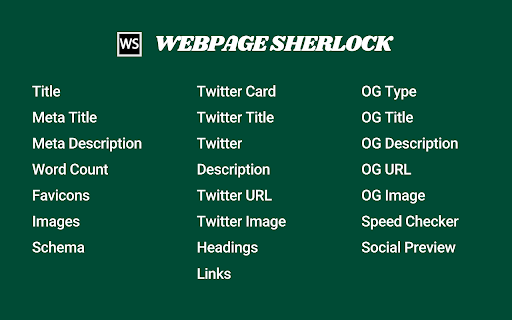
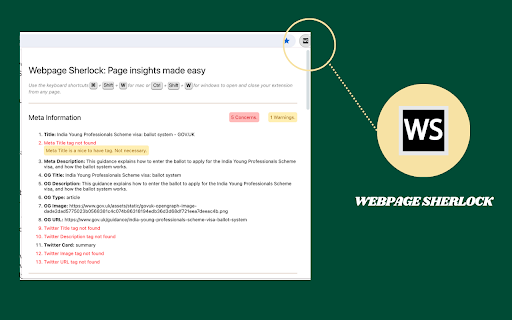
Explore Title, Meta Description, Social Preview, Word Count, Favicons, Schema, Links, Speed, Social Previews, and more in one click. The idea is to make website analysis a breeze, without the need to inspect the page, run complex tools, or visit a website to check rich previews. With just a single click on the extension icon or a quick keyboard shortcut, you'll unlock a comprehensive snapshot of the webpage you're exploring. This is a game-changer for SEO analysis making on-page optimization easy and efficient. - Meta Information: Uncover crucial details like the Title, Meta Title, and Meta Description. - Open Graph Information: Gain insights into OG Type, OG URL, OG Image, OG Title, and OG Description. - Twitter Card Information: Stay informed with Twitter Card, Twitter URL, Twitter Image, Twitter Title, and Twitter Description. - Images: Identify and preview images effortlessly, and receive alerts for missing ALT tags, ensuring accessibility and SEO compliance. Plus, easily spot and address broken images for a seamless user experience. - Favicon: Explore website branding through Favicon. Easily spot and address broken favicon links. - Headings: Instantly view headings to understand content organization. You'll be alerted if there are no H1's or if there are multiple H1s - Schema: Dive into structured data with ease. Get informed if there is a schema error. - Links: Examine the website's linking structure for effective navigation. With a click, check for broken or blocked links. - Social Preview: See how your website will look when shared on social media (Twitter/X, Facebook, LinkedIn and Google) , ensuring your content shines online. - Speed Checker: Optimize website performance with access to Google's speed analysis tool. Don't miss out on the opportunity to enhance your web exploration and analysis. Download our Chrome extension now and stay ahead.

What The Product - Instant Product Summary & Website Analysis with AI
Instantly understand any website or product with AI-powered insights. Summarize and boost productivity with this free analytics tool Transform the way you understand and analyze products and websites with What The Product, a powerful Chrome extension that provides instant, AI-driven insights directly in your browser. Tailored for product managers, investors, startup founders, and market analysts, this tool streamlines your research process, delivering comprehensive summaries that help you make informed decisions faster and more efficiently. 🔍 Instant Product Insights: Gain quick, detailed summaries of any product or website with just a click. Our advanced AI dissects key elements such as problems solved, target customers, alternatives, and use cases, allowing you to focus on strategic planning. ⚙️ Effortless Setup & Usage: What The Product is completely free to use and requires no sign-in. Simply install the extension and start receiving insights immediately. Choose between API connection or ChatGPT web connection for a seamless experience. 🚀 Enhanced Productivity: Focus on the most important information without getting bogged down by unnecessary details. What The Product helps you quickly understand new products and websites, facilitating faster, smarter decision-making. 🔄 Versatile Applications: Whether you're conducting competitive analysis, exploring new market opportunities, or simply trying to understand a new tool, What The Product provides valuable, tailored insights to meet your needs. 🌟 Positive User Feedback: Celebrated on Product Hunt, users praise the simplicity, efficiency, and utility of What The Product. Discover why it's an invaluable resource for quick and accurate product analysis. 🔸 Why Did We Create "What the Product"? 🔸 As someone immersed in the product world, we've often felt the frustration of trying to quickly grasp the essence of new products and websites. We wanted a tool that could cut through the noise and deliver clear, concise insights in seconds. What The Product was born out of our own need for a simpler, faster way to understand the digital world around us. We hope it makes your life a little easier, just as it has ours. 🔸 How "What the Product" Can Help You: 🔸 What The Product saves you time by providing instant, AI-powered reports on any website or product. With one click, get detailed insights on the problems they are solving, their solutions, target customers, competitors, and use cases. This helps you quickly understand and evaluate products, making your research faster and more efficient. Imagine you're researching a new competitor in your industry. With What The Product, you can instantly see what problems their product addresses, who their target customers are, and what solutions they offer. This quick analysis helps you strategize and respond effectively. 🛠️ Install the Extension: Add What The Product to your Chrome browser from the Chrome Web Store. 🌐 Navigate to a Product or Website: Visit any product or website you want to analyze. 🔔 Click the Extension Icon: Activate the extension to receive an instant summary and detailed analysis. 🔸 Why Choose What The Product? 🔸 🤖 AI-Powered: Utilize advanced AI for in-depth insights and summaries. 👌 User-Friendly: Enjoy an intuitive interface designed for ease of use. 🚪 No Sign-In Required: Start using the extension immediately after installation. 💸 Free to Use: What The Product is completely free, with no hidden fees or sign-in requirements. Q: How do I install What The Product? A: Simply visit the Chrome Web Store, search for "What The Product," and click "Add to Chrome." The extension will be added to your browser, and you can start using it immediately. Q: Is What The Product free to use? A: Yes, What The Product is completely free to use. There are no hidden fees or sign-in requirements. Q: How does the AI-powered analysis work? A: Our advanced AI algorithms analyze various aspects of a product or website, including the problems it solves, target customers, competitors, and use cases, to provide you with a detailed summary in seconds. Q: Can I use What The Product for competitor analysis? A: Absolutely! What The Product is perfect for competitor analysis, providing you with quick insights into competing products and their market positioning. Q: What kind of insights can I expect from What The Product? A: You can expect detailed insights into the problems a product solves, its solutions, target customers, competitors, and potential use cases. Q: Do I need to create an account to use What The Product? A: No, there is no need to create an account. You can start using What The Product immediately after installation. Q: Is What The Product suitable for market research? A: Yes, What The Product is an excellent tool for market research, helping you quickly understand and evaluate products and websites within your industry. Q: How often is What The Product updated? A: We continuously work on improving What The Product, adding new features and enhancing its capabilities. Updates are rolled out regularly to ensure the best user experience.

Sprout SEO Extension 🌱
Speed up your daily SEO routine, get one-click insights on any page you're on. Sprout is for marketers who take SEO seriously. Introducing the Ultimate Chrome Extension for Every SEO Expert and Web Developer: Sprout SEO Extension 🌱 Transform your Chrome browser into an SEO powerhouse with the newly enhanced Sprout SEO Extension. Say goodbye to time-draining manual checks and hello to instant insights! 🛠️ One-click validate your page's schema markup directly in your browser with our innovative extension, while direct links to schema-type documentation empower you to enrich your site's metadata. Whether you're aiming for perfect structured data or seeking to ace Google's rich results, this extension is your new go-to solution. Gone are the days of toggling between tabs and tools. 📊 Get a comprehensive view of on-page SEO elements plus Core Web Vitals at a glance – optimization has never been this straightforward. 🚀 Dive into detailed SEO analyses with one-click access to 18 essential SEO tools, from Google Search Console to Ahrefs, without ever leaving your page. 🔗 Fix faulty redirects post-migration with our archive.org CSV download feature, saving you hours of troubleshooting ✅ Instantly determine Indexability and Canonical status, which is crucial for SEO excellence. 🔗 Fix faulty redirects post-migration with our archive.org CSV download feature, saving you hours of troubleshooting. 👽 With Reddit's rising popularity in the SERP (on average, showing up 77% for all product review terms), you can view directly if your content is shared on Reddit and join the discussion, or start sharing your content straight to Reddit. In the digital age, flawless technical SEO is not just a perk – it's a necessity. It's the backbone that helps search engines easily crawl, understand, and display your content effectively, boosting your visibility and SEO performance. New in version 4.4 We've added AI Search Insights to reveal hidden queries from ChatGPT and Gemini, plus extract AI overviews and citations. Also adds Copy as Markdown for clean page content extraction. New in version 4.3 Adding JavaScript debugging tools (disable JS and view rendered source), keyword ideas from Google SERP (10/day limit), SE Ranking in quick tools and right-click menu, copy-to-clipboard for schema markup, plus cross-browser improvements. New in version 4.2 Discover how web performance impacts your SEO rankings with the Sprout SEO Extension 🚀 New in version 4.1 🖼️ Image support! Optimizing images just got a whole lot easier! Our new Images tab gives you a comprehensive overview of all images on the current page, helping you identify optimization opportunities at a glance. Sprout SEO 4.0: The Ultimate Content & Research Upgrade 🚀 We’ve listened, and 4.0 brings you three major new tools that make day-to-day content research a breeze. Say hello to: Google Trends Integration – Get live Google Trends data directly in the search results. No more toggling back and forth; just instant insights to spot seasonal trends and activity spikes in seconds. Location Changer for Google Search – View search results from any location to help you rank-check with ease, no VPN needed. People Also Asked Extractor – Uncover, export, and build on PAA questions to enrich your content and connect with your audience better. With a fresh visual overhaul and boosted speed, 4.0 is designed to make content research easier, faster, and a lot more fun! New in version 3.6 Speed improvements 🏎️, incorporated a whole bunch of caching and async loading of external checks to improve the speed of the extension opening up and showing the data you're looking for. New in version 3.5 Better robots exclusion checker 🤖, checking not only the meta robots tag, but also verifies the current page against the robots.txt and the x-robots-tag header. New in version 3.4 Better sitemaps, remove breadcrumbs from the SERP, add position numbers to the SERP. New in version 3.3: Hreflang checker. Take a readout of a URL's hreflang tags, and then crawls them to assess if they back reference your current URL, together with an http-status check on the URLs itself to see if they are redirected to their final destination or give a straight http 200 status. New in version 3.2: #1 Link sections, showing all internal and external links. Ability to export them and highlight them on the page. #2 Right-click-contextual menu to access most validation techniques straight from a simple right-click (schema validation, page speed test, SEO tools, highlighting of links) 1️⃣ On-page SEO analysis: What's the appearance of the website in Google SERP? Are there any on-page errors? 2️⃣ Instant validation of schema markup using the schema.org validator. 3️⃣ Quick checks with Google's rich results and schema.org validator for optimal SEO. 4️⃣ User-friendly interface integrated directly into your Chrome browser. 5️⃣ Time-saving and efficient, ideal for busy web professionals. 6️⃣ Instantly view all available Schema Types on a page 7️⃣ Export all Schema markup found on a page or each individual type so you can easily backup your schema or study what makes your competitors outrank you 🙃 8️⃣ See full headers of the page you're on, and the potential redirect path that took you there 9️⃣ Check how your content in shared across social platforms, and join the discussion on the most used social community on the planet (Reddit) 🔟 A quick and easy way to test the currently open tab with 18 of the most commonly used SEO tools (Google Search Console, Majestic, Ahrefs, Semrush, to name a few) 1️⃣1️⃣ Had a bad site migration? Download a CSV straight from archive.org with all the pages stored in their memory, saving you time to build that redirection map Empower your SEO efforts with the Sprout SEO Extension 🌱. Ensure your site's SEO and content is impeccable, enhancing your search presence and paving the way for rich, engaging search results. Don't just hope your technical SEO is correct – know it. Add the Sprout SEO Extension 🌱 to your Chrome browser today and take the guesswork out of SEO

Image info
Select any image on a page, including background images, to view its detailed information, a full-size preview, and easy download. Select an image using the "Image info" icon in the toolbar, and a popup will open, showing information about the image and a button to download it. • Supports background images, local images and SVG images. • Allows to select which image to inspect when several images are stacked. • Lets you decide which information to show: - Image source/address - File name - File type - File size - File date - Image dimensions - Image title - Image description - Full image preview • Allows to quickly show or hide all the information from the list above 🚫 No data is sent, nothing is tracked or recorded. Only your preferences are saved on your computer v1.23.9.10: • Upgraded to Extension Manifest version 3 and updated code structure accordingly • Improved the detection and calculation of the images size, date and dimensions

Subdomain Finder - Find Hidden Subdomains
The best Subdomain Finder tool for bug bounty hunters and security researchers. Find hidden subdomains quickly and easily. 🚀 Subdomain Finder - The Essential Tool for Bug Bounty Hunters Discover hidden subdomains quickly and easily with our powerful Subdomain Finder extension. Perfect for bug bounty hunters, security researchers, and penetration testers. Key Features: ✅ Fast & Efficient Scanning ✅ Clean, Modern Interface ✅ Export Results ✅ Copy Subdomains with One Click ✅ Active Domain Status Check ✅ No API Key Required ✅ Zero Configuration Needed How It Works: 1. Click the extension icon 2. Enter a domain name (or use current tab's domain) 3. Click "Scan" to discover subdomains 4. View, copy, or export results Perfect for: • Bug Bounty Hunters • Security Researchers • Penetration Testers • IT Professionals • Security Enthusiasts
