
fgbajdlddblimpajlokkmkdngpnmmaja

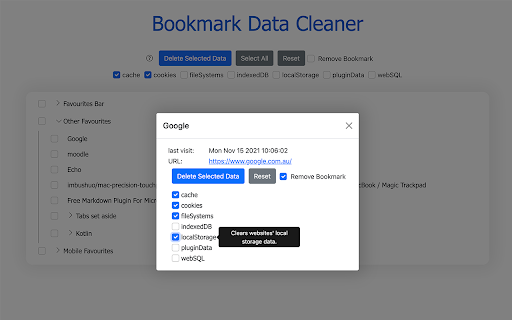
Bookmark Data Cleaner allows you to efficiently clear related browsing data saved from your bookmarks/favourites (you can also remove the bookmarks/favourites at the same time). * Cache: Clears the browser's cache (including app caches and cache storage). * Cookies: Clears the browser's cookies and server-bound certificates modified within a particular timeframe.

Clear Browsing Data
Delete browsing data directly from the browser toolbar. Clear cookies, history and cache with a single click. Clear Browsing Data is a browser extension which enables you to delete browsing data, such as cookies, history and cache, directly from the browser toolbar. The toolbar button can be configured to clear all browsing data with a single click, or to show a list of data types available for clearing. Clear Browsing Data is an open source project made possible thanks to a community of awesome supporters. If you'd like to support the continued development of the extension, please check out https://armin.dev/go/patreon. The extension also supports closing and reloading tabs, these features can be configured from the extension's options. Supported data types: • Cookies • Browsing history • Cached images and files • Cache storage data • Autofill form data • Download history • Service Workers • Local storage data • IndexedDB data • Web SQL data • Website file systems • Application Cache The data types and their order can be customized from the extension's options. The extension is also available for Edge and Firefox: https://github.com/dessant/clear-browsing-data#readme The developer does not collect any personal data from this extension, visit the extension's privacy policy for more information. Reviews are not monitored for bug reports, please use GitHub for issues and feature requests.

History Cleaner
Chrome extension that deletes history older than a specified amount of days. * Behavior * Decides what history the extension will delete when it triggers. * Either disabled, delete old history, or delete all history. * Defaults to disabled, so the extension doesn't do anything until you configure it. * Number of Days to Keep History * Delete history older than midnight on the specified number of days ago. * Only has effect if behavior is set to delete old history. * Defaults to 0. * Trigger Mode * Whether the extension triggers on browser startup or at a set interval. * Defaults to timer. * Timer Interval * Interval in minutes between triggering. * Only has effect if trigger mode is set to timer. * Defaults to 1440 (24 hours), Minimum 1 * `history` * Used to clear browser history * `storage` * Used to save user options * `idle` (Prior to 1.6.0) * Used to detect when the browser is idle for the idle trigger mode * `notifications` * Used to send a notification when history is cleared * Notifications are only sent if the user enables notifications in options * `downloads` * Used to clear download history * Download history is only cleared if user enables the option * `alarms` * Used to set a timer for the timer trigger mode.

Clear Cache
Clears your app cache and browsing data with a click of a button NEW UPDATE: Clear Cache v2 with new UI and features! What's new in this update: 1. Revamped UI 2. Dark and Light Mode. 3. More data clearing features. Delete browsing data directly from the browser toolbar. Clear cookies, history and cache with a single click. Clear Cache enables you to delete browsing data, such as cookies, history and cache, directly from the browser toolbar. The toolbar button can be configured to clear all browsing data with a single click, or to show a list of data types available for clearing. Supported data types: • App Cache • Browsing history • Cached images and files • Cache storage data • Autofill form data • Download history • Local Storage • Passwords Instructions: 1. Once Added to Chrome navigate to the icon and right click on it. 2. Select any data that you want to clear along with the time range. 3. Close the window and when ready left click on extension icon. 4. The selected data will be cleared!

Delete Specific Websites History
Quickly deletes specific websites history from your browser. Easily manage and delete browsing history for multiple URLs — all stored securely in your own browser. Perfect for maintaining privacy during screen sharing or presentations by preventing accidental exposure of visited sites in the address bar. ✅ Simple, user-friendly interface ✅ One-click deletion of all saved URLs ✅ Removes both https and http history variants
