
appfmjhoobioppbehccakejenccnlfbi
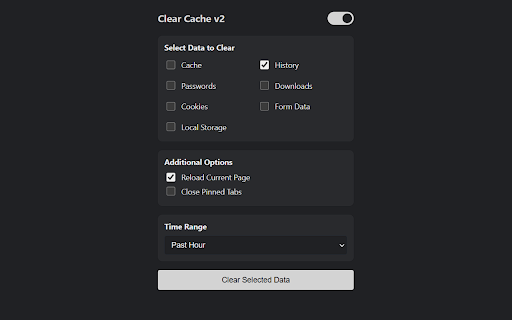


Clears your app cache and browsing data with a click of a button NEW UPDATE: Clear Cache v2 with new UI and features! What's new in this update: 1. Revamped UI 2. Dark and Light Mode. 3. More data clearing features. Delete browsing data directly from the browser toolbar. Clear cookies, history and cache with a single click. Clear Cache enables you to delete browsing data, such as cookies, history and cache, directly from the browser toolbar. The toolbar button can be configured to clear all browsing data with a single click, or to show a list of data types available for clearing. Supported data types: • App Cache • Browsing history • Cached images and files • Cache storage data • Autofill form data • Download history • Local Storage • Passwords Instructions: 1. Once Added to Chrome navigate to the icon and right click on it. 2. Select any data that you want to clear along with the time range. 3. Close the window and when ready left click on extension icon. 4. The selected data will be cleared!

Clear History & Web Cache
Clear your browser history, cache and cookies for Google Chrome in just one click! Clear History and Web Cache is a useful plug-in that helps you quickly clear data from Google Chrome. This helps remove all traces of your online activities to protect your privacy. ★ Clear browsing data from your user profile. ★ Make your Google Chrome browser faster and protect your personal data! ★ This extension supports Chrome 19 and later. ★★★ Main Features ★★★ ★ Instant removal of cache, history, cookies and much more with one click ★ Clear Chrome History ★ Clear download history ★ Clear cache ★ Delete cookies and other sites and plugin data ★ Clear saved passwords ★ Clear saved form data ★ Ability to select a period of time to clear the cache ★ This software is 100% free and does not require payment. Enjoy browsing the web faster if you use Clear History & Web Cache

Clear Cache for Current Tab
Clears the browser cache for the current tab only. Unlike most cache-cleaning extensions, this one targets the current tab only. This is particularly useful when developing and testing a web app. With this extension, clearing the browser cache no longer affects your experience on other websites. To use it, click the extension icon or assign a keyboard shortcut. This is the full list of items that the extension clears. Chromium does not allow clearing anything more than that when targeting a specific tab: In the future, I will add an option to select which of the above categories to clear.

Fingerprint Spoofer
Browser fingerprinting refers to the practice of collecting information about a user's web browser and using it to create a unique digital profile that can be used to track the user's online activities across different websites. This can include information about the user's device, operating system, browser version, installed plugins, screen resolution, and more. A combination of these attributes can be used to identify the user. We want to safeguard the user against this profiling. Here is a Chrome extension that anonymizes the user. -It can spoof the navigator values. It replaces real value with dummy values. -It can protect against Canvas fingerprinting. It replaces canvas elements with a dynamically generated image, which is unique every time. -It can spoof the User Agent to a random device -Block Images -Block Javascript from running on pages try out our Chrome extension here: -https://amiunique.org/ -https://coveryourtracks.eff.org/ -https://browserleaks.com/canvas - for canvas fingerprinting Note: - that only one spoofing feature works at a time. you can try multiple but they are not guaranteed to work - if you spoof the canvas element it causes a gray-scale/ gibberish/ garbage screen to appear. Commonly spotted while playing YouTube videos above the progress bar. just disabling canvas spoofing will make it go away. This is due to creating a unique canvas element every time fooling the fingerprinters.

WebRTC Control
Have control over WebRTC (disable | enable) and protect your IP address. WebRTC Control is an extension that brings you control over WebRTC API in your browser. The toolbar icon serves as a toggle button that enables you to quickly disable or enable the add-on (note: the icon will change color once you click on it). This addon does not a have toolbar popup UI. When WebRTC is enabled in your browser, your real IP address will be exposed to the public (even if you're using a masking service such as VPN). But preventing WebRTC leaks helps you protect your IP address. WebRTC Control add-on will also disable the following WebRTC components (see add-on options page): To report bugs, please visit the extension's homepage (https://mybrowseraddon.com/webrtc-control.html) and fill the bug report form.
