
ffmgnhmbppbhmhnehfjelgnbcbaehofe
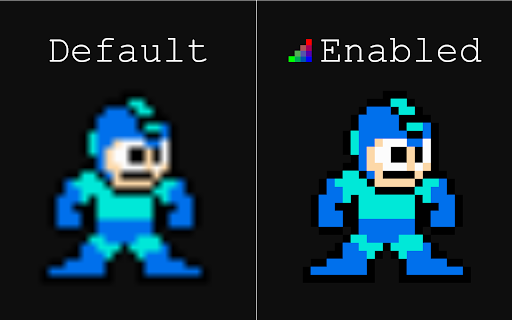
Toggle pixel-perfect image rendering on webpages and files Have you ever zoomed in on pixel art in Chrome, only to find it extremely blurry? This extension offers the ability to quickly enable or disable pixel-perfect image rendering to maintain sharp pixels when zooming in. It is comparable to the nearest-neighbor interpolation option in most graphics programs. Supports images on websites and individual image files opened in Chrome (local and web). To enable for local files, activate the "Allow access to file URLs" option in the extension settings. *Note: Not supported for images on the Chrome Web Store or in Chrome settings menus.

Page Filter Effects
Fun filter effect for webpage. Fun effects for same old sites. You can make any site Blur, Greyscale, Sepia, Bright, Invert using this tool. If you want it as normal choose "Reset" If you have heard about UFO on Google map http://bit.ly/UFOinGMAP , you can see that UFO in high contrast image live on Google Map. I have not update it since long, I am planning to update it soon. So if you are using it and want to report bug or want any feature please mail me at tusharvaghela@gmail.com

Pixel Tab
Give that New Tab of yours a digital squares flavor and put some awe inspiring pixelart on it! Pixel Tab includes 60+ pixelart pieces from various artists that are sure to bring new life to your experience. Not only that, it also includes the following features! - Date and Time indicators - Custom greeting - Inspiring quotes - Simple To-Do list - Google search box - Access to artist's website/gallery All of the artwork provided in "Pixel Tab" was granted permission by the author of the work to be used only within the extension. If you'd like more information, contact @dotalek(https://twitter.com/dotalek)

Video Image Control ( new gamma )
The extension regulate sharpness, contrast, brightness, saturation and other settings for video and images on the all websites. The settings can be applied to video, pictures, flash players, as well as to any items you select. Opens the video in a separate window (picture in picture mode) Used Picture-in-Picture Web API Extension works in YANDEX BROWSER It supports GOOGLE MAPS, and YANDEX MAPS, 2D and 3D games, and many other other applications built on HTML5. Just press the FLASH button ;) ALLOWS YOU TO SHARE VIEWED PAGES IN SOCIAL NETWORKS!!! ADJUST VIDEO SETTINGS ✫ Sharpness ✫ Brightness ✫ Contrast ✫ Color Balance ✫ Saturate ✫ Gamma ✫ Grayscale ✫ Sepia ✫ Crazy mirror ✫ Decrease or increase the video speed (from 0.1x up to 4x) ✫ The ability to rotate or flip video, pictures, flash players, and any other content ✫ Connected smart sharpening allows more flexible editing of video and other graphics You can control the extension from both the extension panel and the player (the button is located in the upper left corner) The extension supports players based on both HTML5 and Flash. You improve video in this video editor. Enhance video will make clean and bright video color the picture. Correct video image in real time. Video correction settings are saved, all the parameters of the video effect stored. Edit quality sharpen video can in the range from 0 to 3 Speed control works in the range from 0.1x to 4x in increments of 0.1 You can control the speed by holding down the CTRL + ALT keys and pressing the ↑ ↓ arrows on the keyboard

Fullscreen Image
Right-click any image to view it in fullscreen mode, cropped to fit the entire screen for maximum immersion. Note: If you want to view images from your hard drive, you must first open the extension options, close the small dialog that appears, and check "Allow access to file URLs" on the page behind it.
