
fficfkginiidknkbmlcdiojphhkokggh

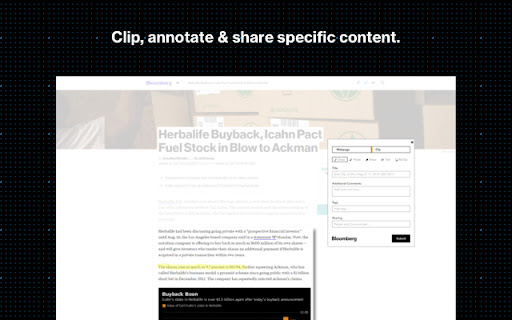

Capture web content into NOTE on the Bloomberg Terminal Capture images, ideas and information, tag them to specific securities or themes and share with your network via NOTE on the Bloomberg Terminal. • Create Bloomberg notes from a screenshot of whatever web page you are on. • Indicate the note title, content and Bloomberg tags. • Share notes with selected communities or individual users. • Annotate screenshots with a digital highlighter pen. • Add text boxes. • Once a note is created it is viewable via NOTE on the Terminal.

Stock Analysis Overlay (Simply Wall St)
Replace your new tab page with financial stock analysis from the US, UK or AU market and a natural landscape to calm your mind and increase your focus. This extension (for US, UK and AU primary markets only) also joins the dots between the companies you're reading about (for example) on Bloomberg, and our analysis. It works by finding and highlighting potential listed companies (from a selected default market) within the news articles you're reading. Then gives you access to our analysis for those companies with one click. There are 2 ways to trigger the extension: ➤ Visit one of the extension's watched sites (e.g. bloomberg.com, TechCrunch, Forbes, CNBC, plus many more) ➤ Right click the extension's icon in your Chrome toolbar. By default, it will look to highlight companies from US markets. However, you can update your default market via the extension's options page (left click the extension's icon and select options). You can choose between US, Australian and British markets. What can you do with Simply Wall St’s Stock Analysis Overlay? ➤ Keep an eye on the latest stock market news and developments See how the market performed over the last 7 days, 3 months, and year-to-date with highlights on the strongest sectors driving gains. Want to know which individual stocks are moving the market? The market movers tab updates daily to show you the biggest gainers and losers making waves. Whether you use the extension at home or at work, staying up to date with the market has never been easier. With the stock analysis overlay, you can discover new stocks with just one click. Explore companies from new markets and sectors across the world or learn more about the competitors of a company you’re invested in. Powered by Simply Wall St’s exhaustive analysis on every listed stock worldwide we’ll help you uncover the hidden gems. Find new companies or learn more about the competitors of a company you’re invested in. Cut through the noise of analysts and articles online with easy to use analysis tools at your fingertips. Simply click on the overlay button to access recent updates, fair value analysis, and future growth charts to get a quick overlook of a company’s prospects. You can even create notes to review later. Looking for more information on a particular stock? Just click through the full report on Simply Wall St where we make stock research easier than ever before.

Chrome Terminal
A command line interface for chrome. *Important Note*: For a listing of possible commands, type HELP. For information about a specific command, type HELP . A "terminal" for chrome which implements common chrome tasks as command line functions. For a more user-friendly bookmark opening experience, check out SMP Bookmark Opener: https://chromewebstore.google.com/detail/smp-bookmark-opener/fkmeadklbnpemgmonhnlbadgpcpflibd - tab - open a new tab or bookmark - tab new - tab new google.com - tab open Google - close an open tab - tab close Google - tab close -i 1652151025 - view info about open tabs - tab ls - tab info Google - tab info -i 1652151025 - select a tab - tab activate Google - tab activate -i 1652151025 - tabgroup - add ungrouped tabs to new or existing group - tabgroup new Google - view open tab groups - tabgroup list - bookmark - save a new bookmark - bookmark new - bookmark new Google - bookmark new -rq Google - Remove query params before saving - bookmark new -i 1652151025 - Save new bookmark from tab ID - open a bookmark - bookmark open Google - view existing bookmarks in current folder - cd Bookmark bar/ - ls -al - delete a bookmark - rm Google - view details about a bookmark - bookmark info Google - bookmark info -i 65 - find - find a bookmark or open tab based on given search term using asterisk (*) as a wildcard - find Google/ *ke*p* - find -s *keep - find -i *keep - find -t keep - history - list recent history - history ls - history ls google - reopen - List recently closed tabs/windows - reopen ls - reopen ls google - Reopen recent tabs/windows - reopen - reopen -s (silent - does not activate the tab or remove from recent tab history) - reopen Google - reopen -i 1652151025 - google - open a google search in new tab - google search term

AlphaSense Web Clipper
The intelligent way to search web clippings. AlphaSense is the “Google” for company research and utilizes the power of machine learning and natural language processing to allow users to search across a universe of curated content. Clip any web page using this Google Chrome extension, store them to be searched alongside other content in AlphaSense. Highlight, annotate and share content, as desired, with colleagues. Web Clipper helps increase workflow efficiency by organizing relevant content within AlphaSense, eliminating the need to parse through numerous bookmarks to locate an article or website of interest, and helps provide context and a more comprehensive story for research when combined with existing AlphaSense content. Access to AlphaSense requires a subscription. Visit www.alpha-sense.com for more information.

WebTerminal
A browser terminal designed for programmers, you can use the command line to control the browser, it is small, and very beautiful. This terminal can help you to do some automated tasks on the page, such as regularly log in to a website, and then do some automated operations, of course, you can also quickly use the search engine, json engine, translation engine, curl, etc., everything is just the beginning, We hope to bring more surprises to you.
