
fogdlgjnkolhbefbbpghbafdkhcdgdnk


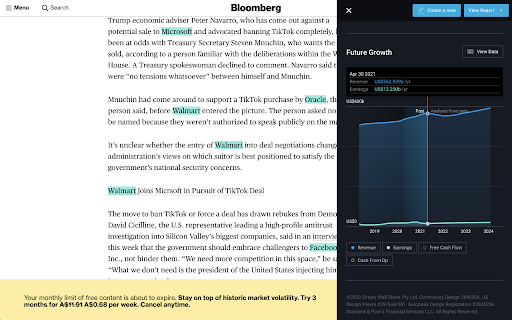
Replace your new tab page with financial stock analysis from the US, UK or AU market and a natural landscape to calm your mind and increase your focus. This extension (for US, UK and AU primary markets only) also joins the dots between the companies you're reading about (for example) on Bloomberg, and our analysis. It works by finding and highlighting potential listed companies (from a selected default market) within the news articles you're reading. Then gives you access to our analysis for those companies with one click. There are 2 ways to trigger the extension: ➤ Visit one of the extension's watched sites (e.g. bloomberg.com, TechCrunch, Forbes, CNBC, plus many more) ➤ Right click the extension's icon in your Chrome toolbar. By default, it will look to highlight companies from US markets. However, you can update your default market via the extension's options page (left click the extension's icon and select options). You can choose between US, Australian and British markets. What can you do with Simply Wall St’s Stock Analysis Overlay? ➤ Keep an eye on the latest stock market news and developments See how the market performed over the last 7 days, 3 months, and year-to-date with highlights on the strongest sectors driving gains. Want to know which individual stocks are moving the market? The market movers tab updates daily to show you the biggest gainers and losers making waves. Whether you use the extension at home or at work, staying up to date with the market has never been easier. With the stock analysis overlay, you can discover new stocks with just one click. Explore companies from new markets and sectors across the world or learn more about the competitors of a company you’re invested in. Powered by Simply Wall St’s exhaustive analysis on every listed stock worldwide we’ll help you uncover the hidden gems. Find new companies or learn more about the competitors of a company you’re invested in. Cut through the noise of analysts and articles online with easy to use analysis tools at your fingertips. Simply click on the overlay button to access recent updates, fair value analysis, and future growth charts to get a quick overlook of a company’s prospects. You can even create notes to review later. Looking for more information on a particular stock? Just click through the full report on Simply Wall St where we make stock research easier than ever before.

EZ Stocks: Just simple financial positions
6/30/24: updated look and some functionality. Mostly the same. 8/6/23: back from vacation. Updated the tool to allow stock removal. Sorry for the delay. 6/19/2023: Got help with finding a new free stock fetching API. Thanks to Peter! I added a lightmode and darkmode for y'all! I have seen a lot of extensions for looking at the stock market that just don't work. Some work but are too complicated and do too much for a casual user. This is my solution to that. Artwork: Caity: www.imcaity.com API: FinnHubb.io 6/14/2023: Unfortunately the API I use for retrieving stock data has moved to a paid service. I'm not gonna show you guys ads and I am not gonna pay out of my pocket for it so.... I think we're toast. It's been a fun couple of years. Thanks for using the toolbar. 1/30/22: Updated the list which retrieves the stocks. Now implementing NASDAQ & NYSE. You may now search by stock symbol. 2/26/20: The API we're using is erroring out, currently working on it. Sorry for the delay. 10/1/19: updated stock fetching so you can add stocks again! 6/17/19: API bit the dust. I found a way around it, but it looks like free options are going away.... any angel investors? :) 1/24/2019: Added sorting and a new color scheme. 1/17/2019: After Robinhood API betrayed us and stopped allowing public use of their API... we had to find a new one! IEXtrading swooped in and saved us. Coming soon is being able to reorder the stocks. Hey how about I throw in charts too? Everyone loves a good pie... chart.

TrendSpider
An extension that enables TrendSpider users to quickly see a chart whenever they encounter a ticker on a webpage. This extension enables TrendSpider users to quickly and easily see a chart for any stock or crypto symbol they encounter on the web simply by hovering their mouse over the symbol in their browser. This makes the process of investment research online easier by giving users quick access to their TrendSpider charts, complete with indicators, drawings and automated pattern recognition. To use this extension, you need a valid and active TrendSpider account. You may authenticate your account after installing the extension. Please note, this is a BETA feature and may contain some bugs. If you encounter any issues, please report it to the TrendSpider support team and we will address them. Thank you and enjoy!

Realitime US & Indian Stock Prices Toolbar
A realtime US & Indian Stock prices chrome extension toolbar with realtime prices display. Real-Time Stock Price Tracker & Market Ticker - Chrome Extension Transform your browsing experience with live stock market data directly in your browser. This powerful Chrome extension displays real-time stock prices, market updates, and portfolio tracking in a customizable toolbar overlay. Live Stock Prices: Real-time updates for NYSE, NASDAQ, and NSE (Indian) stocks Customizable Stock Ticker: Scrolling toolbar with your favorite stocks (AAPL, GOOGL, TSLA, RELIANCE, TCS, etc.) Multiple Themes: Dark, light, blue, and green color schemes Portfolio Management: Easy add/remove stocks with search functionality Performance Tracking: Live price changes, percentage gains/losses Responsive Design: Works on all websites and screen sizes 📈 Perfect For: Day traders and investors Financial professionals Stock market enthusiasts Portfolio managers Anyone tracking market performance 🔧 How It Works: Install the extension and click the toolbar icon Search and select your favorite US and Indian stocks Customize toolbar position, speed, and theme Get instant market updates while browsing any website 💡 Why Choose Our Stock Ticker: ✅ No account required - instant setup ✅ Lightweight and fast performance ✅ Privacy-focused - no data collection ✅ Regular updates with new features ✅ Free to use with premium customization options Stay ahead of market movements with the most intuitive stock price tracker for Chrome!

Bloomberg Terminal: Clip to NOTE
Capture web content into NOTE on the Bloomberg Terminal Capture images, ideas and information, tag them to specific securities or themes and share with your network via NOTE on the Bloomberg Terminal. • Create Bloomberg notes from a screenshot of whatever web page you are on. • Indicate the note title, content and Bloomberg tags. • Share notes with selected communities or individual users. • Annotate screenshots with a digital highlighter pen. • Add text boxes. • Once a note is created it is viewable via NOTE on the Terminal.
