
fdcjfccjfkjbhpmaiomkbclokacahenl
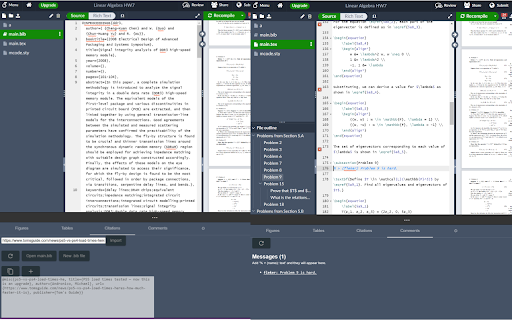
Handy tools for Overleaf This adds a bottom panel to Overleaf documents which provides an ever-growing list of tools in order to maximize your productivity while writing papers. When this is installed, a small toolbar will appear at the bottom of an Overleaf document. When you open the toolbar, you'll find several tools that can run locally and interact with your document. Some tools include: - Citations: You are able to add a link and automatically generate the appropriate BibTeX content and insert it into your document - Comments: You can quickly find TODOs and FIXMEs scattered throughout the document - Math Catalog: Helpful reference material for using various math formulas and processes in your document - Timer: Set and manage timers to help you focus in brief sprints - Word Cloud: See a count of characters, words, paragraphs and most frequent words Tools can be updated or added over the course of the product lifecycle. I welcome ideas and feedback on what you want to see next to boost your productivity.

SLext
SLext enhances your editing experience on Overleaf by providing tabs, themes and more to the Overleaf website. Open source ShareLatex/Overleaf extension that adds features for an improved editing experience! Features include: - File tabs - Custom color schemes for the interface - Favorite tabs with Alt+d - Quick-open files with Alt+p - Set a main file to compile with the "Compile main" button - Quickly closing a tab by pressing Alt+w - Opening the file under your cursor in a document by pressing Alt+g - Hiding remote cursors and flags

Overleaf Copilot
Copilot for Overleaf This extension is to provide a similar experience to GitHub Copilot in VSCode, for Overleaf users. For any issues or feature requests, visit https://github.com/dsp05/overleaf-copilot/issues or directly shoot me an email. It supports the following features: - Content Suggestions: It's triggered when you type a space at the end of a line, or when you press "Enter" to start a new line. Press "Tab" to accept the entire suggestion, or Ctrl/Command + "Right Arrow" to accept the next word. - Content Rewriting: Select a piece of text and click the pencil icon to rewrite it. You have full control of all actions and prompts in the toolbar. - Relevant Content Search from arXiv: Select a piece of text and click the search icon. You can use it without providing your own OpenAI API key. The free server is just to give you an idea of how it works. Requests are rate-limited, and custom configurations are unavailable. It is recommended to use your own API key for heavy usage. You can customize the prompts for suggestions and rewrites, use more advanced models, and access larger token limits. Your API key is stored in your browser and is never shared.

Overleaf Copilot
Seamlessly incorporate ChatGPT to power and accelerate academic writing in Overleaf. Features: 1) Deeply integrated with Overleaf editor, providing a fluid, uninterrupted scholar writing experience. Paper polishing without this extension: Open ChatGPT ->Start new chat ->Find a prompt ->Copy & paste prompt ->Copy & paste draft paragraphs ->Copy & replace ChatGPT generation Paper polishing steps with the extension: Select draft paragraphs -> One click to finish polishing using ChatGPT 2) Build-in high-quality prompts, facilitating the success of your next publication. 3) Highly customizable prompts to fit your writing styles. See more features in the demo video in our website: https://overleafcopilot.github.io/

Overleaf Dark Pro
Enhance your Overleaf experience with various dark themes. The extension inverts colors in the Overleaf editor, PDF viewer, and modals, and adds a selectable dark background to most content panes. Open the color menu by pinning the extension and clicking the icon. Feel free to check out the source code and give it a star if you found this extension helpful! https://github.com/jsz-05/jsz-OverleafDark
