
eoadabdpninlhkkbhngoddfjianhlghb
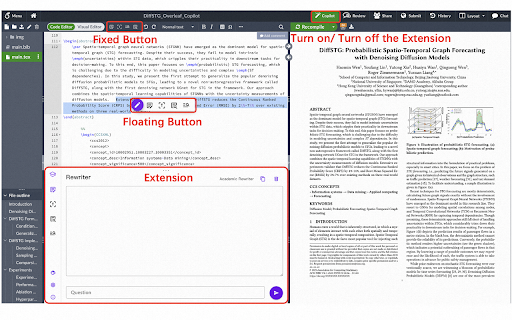

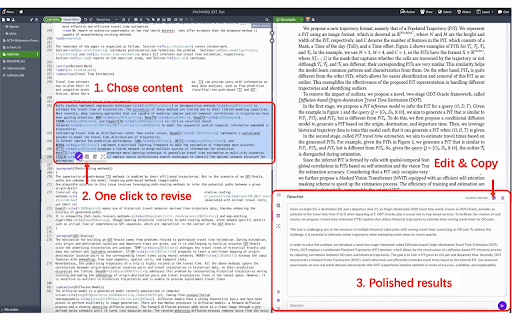
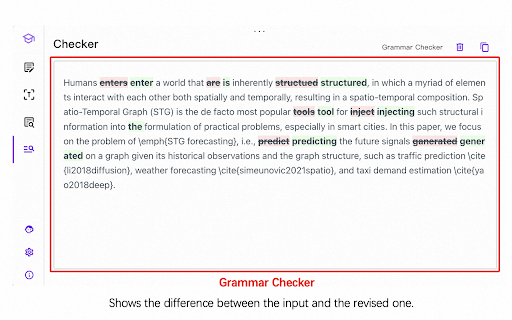

Seamlessly incorporate ChatGPT to power and accelerate academic writing in Overleaf. Features: 1) Deeply integrated with Overleaf editor, providing a fluid, uninterrupted scholar writing experience. Paper polishing without this extension: Open ChatGPT ->Start new chat ->Find a prompt ->Copy & paste prompt ->Copy & paste draft paragraphs ->Copy & replace ChatGPT generation Paper polishing steps with the extension: Select draft paragraphs -> One click to finish polishing using ChatGPT 2) Build-in high-quality prompts, facilitating the success of your next publication. 3) Highly customizable prompts to fit your writing styles. See more features in the demo video in our website: https://overleafcopilot.github.io/

alphaXiv - Understand Research Papers
The official browser extension for alphaXiv. Understand papers in minutes - not hours. For any PDF or research paper (arXiv, bioRxiv, etc.) you can: - Seamlessly chat with AI directly on top of the document. Highlight any section of the paper and "@" other papers to quickly add context and compare results, benchmarks, etc. - Generate beautiful research blogs with figures, key insights, and clear explanations from the paper with just one click. Read in multiple languages. - Bookmark to save and read later. BibTex citations automatically generated. To make this happen, Chrome will ask for permissions to read & change data on all sites. The alphaXiv extension makes no changes other than 1) the presentation of PDFs and 2) the presentation of arXiv abstract pages.

Underleaf | AI & Dark Mode for Overleaf
Enhance your research and writing experience with Underleaf, an AI-powered copilot built for Overleaf. Underleaf is an AI-powered LaTeX tool for Overleaf that transforms how you write, edit, and convert LaTeX documents. Convert handwritten equations to LaTeX, scan math from screenshots, and get AI-assisted writing - all integrated directly into Overleaf. ⚙️ How Underleaf works: 1) Use AI to generate, edit, and polish your LaTeX documents without leaving your Overleaf editor. 2) Convert handwriting to LaTeX directly with Underleaf, and add it directly to your Overleaf document using our AI OCR technology. 3. Turn images, PDFs, Excel files, and CSVs into clean LaTeX tables and code. 4) Stay focused on your research while Underleaf assists in finding and inserting relevant academic citations. 4) Use dark mode for comfortable viewing of your work at night. 📚 Why use Underleaf? • AI Built for LaTeX: Unlike generic AI tools, Underleaf understands LaTeX commands, scientific notation, and academic writing conventions. • Use AI directly within your LaTeX editor: Bring the power of AI into Overleaf. • Handwriting to LaTeX Converter: Snap a photo of handwritten equations or notes and get instant, accurate LaTeX code. • Table Converter: Transform images, Excel spreadsheets, and CSVs into formatted LaTeX tables. • Designed for Researchers: Built with the demands of scientific writing in mind, Underleaf seamlessly integrates into your Overleaf workflow, understanding LaTeX commands and scientific content. • Effortless Revisions: Instantly revise your text, making the editing process faster and smoother. • Citations Made Easy: Find and insert citations into your work without breaking your writing flow. • Dark Mode for Overleaf: Comfortably view Overleaf in dark mode when in low-light environments. 🧠 Underleaf is perfect for: • Graduate students writing theses and dissertations • Researchers preparing journal or conference papers • Professors creating lecture notes, assignments, and exams • Scientists and engineers who frequently work with LaTeX • Anyone using Overleaf who wants faster, clearer, more polished writing Underleaf is the essential tool for academics looking to refine their writing using LaTeX AI, while staying efficient and focused on their research. Join thousands of academics who write better LaTeX with Underleaf. Install now and transform your LaTeX workflow! 🚀

Rafflesia for Overleaf
Handy tools for Overleaf This adds a bottom panel to Overleaf documents which provides an ever-growing list of tools in order to maximize your productivity while writing papers. When this is installed, a small toolbar will appear at the bottom of an Overleaf document. When you open the toolbar, you'll find several tools that can run locally and interact with your document. Some tools include: - Citations: You are able to add a link and automatically generate the appropriate BibTeX content and insert it into your document - Comments: You can quickly find TODOs and FIXMEs scattered throughout the document - Math Catalog: Helpful reference material for using various math formulas and processes in your document - Timer: Set and manage timers to help you focus in brief sprints - Word Cloud: See a count of characters, words, paragraphs and most frequent words Tools can be updated or added over the course of the product lifecycle. I welcome ideas and feedback on what you want to see next to boost your productivity.

Overleaf Dark Pro
Enhance your Overleaf experience with various dark themes. The extension inverts colors in the Overleaf editor, PDF viewer, and modals, and adds a selectable dark background to most content panes. Open the color menu by pinning the extension and clicking the icon. Feel free to check out the source code and give it a star if you found this extension helpful! https://github.com/jsz-05/jsz-OverleafDark
