
liihfcjialakefgidmaadhajjikbjjab
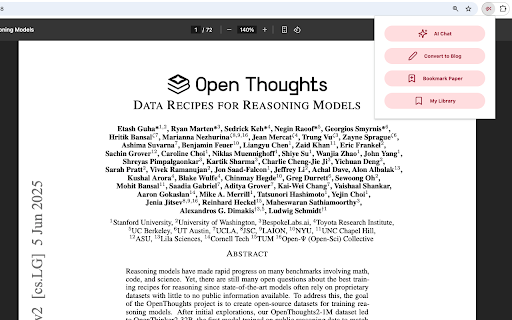


The official browser extension for alphaXiv. Understand papers in minutes - not hours. For any PDF or research paper (arXiv, bioRxiv, etc.) you can: - Seamlessly chat with AI directly on top of the document. Highlight any section of the paper and "@" other papers to quickly add context and compare results, benchmarks, etc. - Generate beautiful research blogs with figures, key insights, and clear explanations from the paper with just one click. Read in multiple languages. - Bookmark to save and read later. BibTex citations automatically generated. To make this happen, Chrome will ask for permissions to read & change data on all sites. The alphaXiv extension makes no changes other than 1) the presentation of PDFs and 2) the presentation of arXiv abstract pages.

AI Code Finder, Alerts, Ask Questions about Papers: CatalyzeX
🧑💻 Get code for AI & other research papers, create alerts, ask authors questions directly on Google, ArXiv, Scholar, PubMed, IEEE CatalyzeX's free browser extension instantly finds and shows open-source code implementations for any research paper (AI and more) you encounter while browsing Google, ArXiv, Scholar, GitHub, Twitter/X, and many other search engines, forums, LLM/AI chats, and scholarly/academic websites. Don't see it on a website you want? Send us a note team+chrome@profillic.com Code for Papers Everywhere: ▶ Browse the web as usual and you'll start seeing [CODE] buttons next to papers everywhere. ▶ These buttons will automatically appear directly on the page for any implementation links found. ▶ Click on any [CODE] button to instantly jump to the open-source implementation and explore! Alert creation: ▶ Click on any bell icon to create an alert for new code for papers/topics, author's newest work, latest developments. Ask authors questions: ▶ Browse the web as usual and you'll start seeing a question box next to papers/articles everywhere. ▶ Type in your question to ask the authors of papers any question you may have! Powered by CatalyzeX.com's repository used by thousands of engineers, researchers, developers, and tech leaders worldwide — to browse algorithms, models, and papers with code for relevant and state-of-the-art developments in artificial intelligence, data science, computer vision, speech recognition, deep learning, and large language models. If you have any feedback/suggestions/requests or run into any issues, please email us at team+chrome@profillic.com anytime. We'd love to hear from you! ____ This extension also works on Opera and UC Browser. Need the Firefox add-on instead? Get it here: https://addons.mozilla.org/en-US/firefox/addon/code-finder-catalyzex/ Need the Edge add-on? Get it here: https://microsoftedge.microsoft.com/addons/detail/get-papers-with-code-ever/mflbgfojghoglejmalekheopgadjmlkm ____ *************** CATALYZEX VALUES YOUR PRIVACY *************** When you add CatalyzeX, it says that we can “Read and change all your data on all websites.” That’s only partially true. A more accurate description is that it allows CatalyzeX to insert [CODE] buttons next to any papers and techniques you see directly on the webpage, whenever available. While we’re sure you’re super interesting (especially as you're using CatalyzeX!), we do not have any interest in tracking what you search for, what you buy, etc. It’s just not what we do. At CatalyzeX, we care about privacy just as much as you do. It's core to our decision-making and how we deliver your CatalyzeX experience.

Codex
Control Chrome with Codex. Codex can now use Chrome on your computer to complete work inside the websites and apps where you’re already signed in. Codex for Chrome lets Codex help with work that happens inside the websites and apps where you are already signed in. Use it when a task depends on browser context, account state, or websites. Codex can help you with research, update records, review dashboards, fill forms, and move through multi-step workflows across logged-in tools like CRMs & internal apps, as well as external websites. Codex works in task-specific tab groups, so it can gather context and take actions without taking over your active browsing session. It will help ask you to take over when needed, and keeps useful pages for review when it's finished. You stay in control. Codex always asks before sensitive actions. It will ask before accessing sites in Chrome, referencing your browser history, and downloading/uploading files. WHAT YOU CAN DO Research and context on specific websites Fill forms or prepare requests, then stop for your confirmation Review dashboards or internal tools and summarize findings Test and validate websites across multiple tabs Organize and clean up your tabs Install the Codex Chrome extension. Install the Chrome plugin inside Codex Ask Codex for help with a browser-based task. Review and approve site access when prompted. Note: Codex does not support other Chromium-based web browsers at the moment.

arxiv-utils
Easy access on ArXiv! Auto-rename tabs to paper title, Quick navigation via button/hotkey, Save PDFs by paper title, and more. For ArXiv PDF / abstract tabs: - Renames the title to paper's title automatically in the background. (Originally is meaningless paper id, or start with paper id) - Add an action button to open its corresponding abstract / PDF page. (Originally is hard to get back to abstract page from PDF page) - Add a direct download link on abstract page, click it to download the PDF with the title as filename. (Originally is paper id as filename) - Open the paper in extra services such as ar5iv and arXiv Vanity. - Better title even for bookmarks! - Firefox has strict restrictions on PDF.js. So it doesn't work well with OneTab, the PDF renaming is achieved by intercepting requests and show the PDF in a container. The bookmark works well though. - Works well with native tab search - `tabs`: On extension button click, open a new tab and move it to the right of the old active tab. - `activeTab`: Read active tab's title and modify it using the tab's url. - `storage`: Save extension configurations. - `contextMenus`: When right-click the extension button, show a help menu item. - `scripting`: Inject content scripts to existing tabs. - `*://arxiv.org/*`: Inject content scripts to existing tabs. - `*://export.arxiv.org/*`: Inject content scripts to existing tabs. - `*://browse.arxiv.org/*`: Inject content scripts to existing tabs. - `*://ar5iv.labs.arxiv.org/*`: Inject content scripts to existing tabs.

Moonlight: AI Colleague for Research Papers
Everything you need to read a paper: explanation, summary, translation, chat, and reference search. Drowning in Papers but Short on Time—and Patience? If you're a researcher or grad student, you've probably felt the pain: endless papers to read, not enough time, and content that's just too hard to digest. Meet Moonlight — your AI companion that lights up the complex path of academic reading, just like the moon on a dark night. Stop reading passively. Start exploring and discussing papers actively with AI—and discover real insights. 🚀 How Moonlight Boosts Your Research Productivity—10x 1. Understand a 1-hour paper in just 1 minute 📝 3-Line & Key Method Summaries Get a quick grasp with a 3-line overview, and dig deeper with half-page method summaries. Perfect for sharing with colleagues too. 🤖 Auto Highlighting Open a paper and instantly see key highlights—novelty, methods, results—picked out by AI. What used to take an hour now takes 5 minutes. 2. Master Complex Tables and Equations with a Click 🧠 Explain Anything Hover over tough sentences, dense tables, or intimidating equations—Moonlight explains them like a personal tutor. 🌐 Smart Contextual Translation More than just a translator—Moonlight compares original and translated text side-by-side, and chooses the most accurate terminology based on academic context. 3. Discover True Knowledge by Debating with AI 💬 Ask Anything “What are this paper’s limitations?” “How does this relate to my own work?” Ask Moonlight and unlock deeper insights. 📚 Smart Citations No more endless scrolling. Instantly view summaries of cited papers right where you are, and stay focused on the big picture. 🎨 Highlight & Annotate Mark key sentences in color, jot down thoughts as you go. Your highlights and notes are automatically organized in the sidebar—your personal research treasure trove. Click [Add to Chrome] and pin Moonlight to your toolbar. Open a PDF paper in your browser, or upload one on the Moonlight website. Step into a smarter world of research with your AI reading companion. 💡 Pro Tip: Open Local PDF Files Too Just type chrome://extensions in your browser, find Moonlight, and enable “Allow access to file URLs.” Q. Is it free to use? A. Yes! Most core features are available for free. For unlimited access and more powerful AI models, consider upgrading to the Pro or Premium plan. Moonlight is here to walk with you from the very first step of your next great research. Install it today—and turn painful paper reading into a joyful knowledge adventure.
