
fckpnnofdcemajmolngfkondfogjbmkh

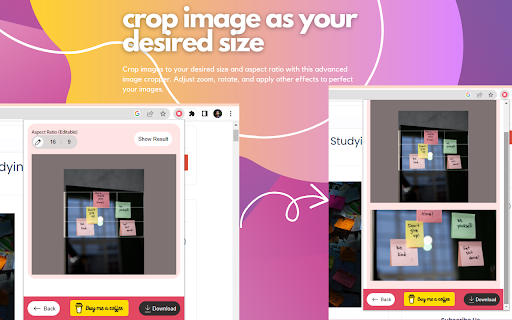

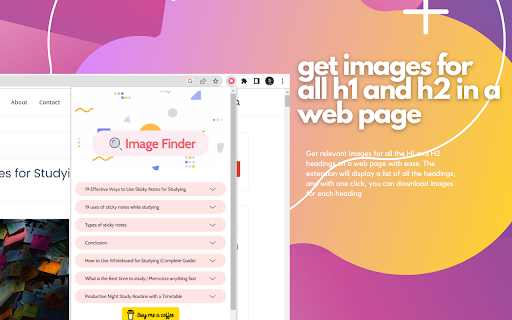

Find free stock images for your blog article or website quickly without wasting time searching. Introducing Image-Finder, the ultimate tool for bloggers and website owners looking to find free, high-quality stock images quickly and easily. Our newly updated Chrome extension now includes even more features to help you find and download the perfect image for your article or website without wasting valuable time. With our user-friendly interface, you can search for images by simply right-clicking on a word or sentence in your article. The extension will automatically generate a list of relevant images for you to choose from, and you can easily crop and download the image in your desired aspect ratio. We've also added the ability to load even more images than before, so you can be sure to find the perfect fit for your content. Plus, you can copy the alt text for each image to ensure your posts are SEO-optimized. Image-Finder is completely free to use, with no ads, and provides high-resolution images that are perfect for blog articles or website content. Whether you're a blogger, web designer, or marketer, this extension is an essential tool to help you save time and improve the quality of your content. If you have any suggestions or ideas on how we can improve this extension, please let us know. We are always looking for ways to make our tools more useful for our users. Download Image-Finder today and start creating visually stunning content for your website or blog! ● Easy image search: Search for images by right-clicking on a word or sentence in your article, and let Image-Finder do the rest. ● High-quality images: Our images are royalty-free and high-resolution, ensuring that your content looks professional and polished. ● Alt text copying: Our extension allows you to copy the alt text for each image, ensuring that your blog posts are optimized for SEO. ● Image cropping: Easily crop your selected image to your desired aspect ratio, without the need for additional editing tools. ● Load more images: With our updated version, you can now load even more images to find the perfect fit for your content. ● Instant download: Download your selected image instantly with one click, saving you time and effort. ● Copy image link: Easily copy the image link to share with others or use in your content. With these added features, Image-Finder is even more versatile and user-friendly, making it the perfect tool for bloggers and website owners looking to enhance their content with stunning visuals.

2026 ▷ AdSense Approval Checklist [Updated]
Get your site approved by Google AdSense in 1st attempt. AdSense Approval Guide With Video Tutorials, Resources and Up To Date Tips. This checklist with Google AdSense Approval tips, step-by-step Guide, and resources was compiled after I binge-watched YouTube tutorial videos and read multiple blog posts over several days. I have compiled the best strategies and methods into a checklist guide to help you create, optimize, and submit your website to AdSense for review without having to do the research. Although we cover some useful website niche selection & setup tips, Content writing formulas best for AdSense Approval, and some tips for getting higher revenue, I haven't gone deeply into the site SEO for AdSense, but I suggest using a Google Search Console, Google Analytics, and Google Trends to help you write quality content and pick trending topics in your niche. ----------------------------------------------------------------- This Checklist Will Be Updated Regularly ----------------------------------------------------------------- Inside you'll find:- Basic Requirements #1 Niche of your blog #2 Site Theme & Design #3 Create Helpful Content #4 Important Pages #5 Good Navigation #6 Submit your site GSC #7 Extra Tips #8 There are a few of the best Video Tutorials Included too (❁´◡`❁) Install the 2024 ▷ AdSense Approval Checklist [Updated] Extension, by following these easy steps: 1) Click the “Add to Chrome” button 2) On the next screen, click the “Add Extension” button 3) That’s it, the extension is now available and ready to use! Recommended Extensions That May Help You Grammarly- To fix grammatical errors in your blog content. Ubersuggest - SEO and Keyword Discovery This extension has been developed by utilizing a collection of top tips from Blogger and content writers Experts who use Google AdSense to Make Money with their Blogs and curated right into one simple to use and functional AdSense Approval Checklist tool.

Blogging Helper Extension
Blogging Helper is your research guide to find all the best blog SEO information in the click of a button on your competitors sites Get instant Blogging Insights with a simple click. This easy to use Blog Chrome Extension quickly analyses the website you are on and gives you easy to understand information to help with your blogging research. It's as quick as a button push on your toolbar and you enter a world on hidden information about any blog post or website you are on. You can look inside their website and see things like their title tag, meta description, how many images they have, and also even see what reading age level their content is at. You will save so much time in research with this nifty extension, enabling you to spend that on creating great blog posts.

Map My Blog - AI-powered Mapping Software
let AI transform your content into an interactive, embeddable map for your blog There’s an easier way to build engaging content. You’ve already put in the hard work of building your blog post, and now with Map My Blog you can quickly transform your content into an attention-grabbing, page view-extending, and conversion-boosting map to accompany your post. Map My Blog instantly transforms your list of places into an interactive map that will inspire and engage your readers like never before. Our AI scans your blog post, extracts the key points and their details, and magically converts them into a stunning Proxi map within minutes, ready to be embedded on your blog. Powered by the advanced geospatial tool Proxi, Map My Blog goes beyond just maps. It leverages proximity to add even more value to your advertising efforts and act as the ultimate conversion tool for your blog. By helping your viewers discover convenient places that cater to their needs, you'll create a personalized and fun experience that inspires action. Make your blog work for you: ✨ Don't settle for a static list. Interactive maps have the power to draw in your readers, immersing them in a dynamic and captivating experience that keeps them hooked, resulting in a significant increase in time spent on your page. ✨ Create with Speed and Ease: No more starting from scratch! Our AI takes your existing content and quickly transforms it into an engaging Proxi map. Scale and supercharge content effortlessly with just the snap of your fingers (err click of the mouse). ✨ Unleash the Insights: Proxi doesn't stop at mesmerizing maps; we equip you with robust insights. Delve deep into your audience's preferences, track engagements, measure time spent on maps, and gather valuable viewer details. Say goodbye to guesswork and hello to data-driven decision-making. ✨ Smart Branding, Savvy Business: Forget about costly and complex in-house development. Experience user-friendly and affordable software that can seamlessly reflect and enhance your brand's identity. Customize each map to perfectly match and elevate the personality of your content, ensuring a cohesive brand experience. Step 1: Capture - Scan your blog and select points with Map My Blog Step 2: Edit - Refine your map and add your brand’s personal touch within Proxi’s no-code tool Step 3: Publish - Easily embed your map on your blog page and share your map link anywhere!

Free » Custom Robots txt Generator for Blogger
Create a perfect custom robots.txt file for Blogger Free ✔️ Optimize your blog for search engines in 2025 Custom Robots.txt Generator for Blogger [Sitemap Generator for Blogger] is a powerful Chrome extension designed to simplify the process of generating custom robots.txt files for Blogger websites. Robots txt is a crucial file that tells search engine crawlers which pages or sections of a website should be crawled or indexed, helping website owners control their site's visibility and ranking in search engine results. ✅ How to Generate Custom Robots.txt for Blogger using this Extension: 1. Install the Custom Robots.txt Generator for Blogger extension from the Chrome Web Store. 2. Click on the extension icon in the browser toolbar to open the popup. 3. Enter the URL of your Blogger blog in the provided input field. 4. Select the desired options, such as allowing/disallowing homepage, pages, search, labels, and blocking specific bots. 5. Click the "Generate Robots.txt" button to generate the custom robots.txt file. 6. Copy the generated robots.txt content using the "Copy to Clipboard button". ✔️ How to Update Robots.txt of Blogger using Custom Robots.txt Generator for Blogger Extension: 1. After generating the custom robots.txt file using the extension, copy the generated content. 2. Log in to your Blogger account with your Gmail account. 3. From the left menu, click on "Settings." 4. Navigate to the "Crawlers and indexing" section. 5. Enable the "Custom robots.txt" toggle button. 6. Click on "Custom robots.txt" and Paste the copied robots.txt content into the provided text area. 7. After adding the code, click on "Save." Custom Robots.txt Generator for Blogger [Free Sitemap Generator for Blogger] extension offers a user-friendly interface and advanced features to help Blogger users effectively manage their site's crawling and indexing directives. Improve your site's search engine visibility and SEO performance with ease using this handy extension!
