
kambmamfjckgbcneopcmbemlmikcnalb


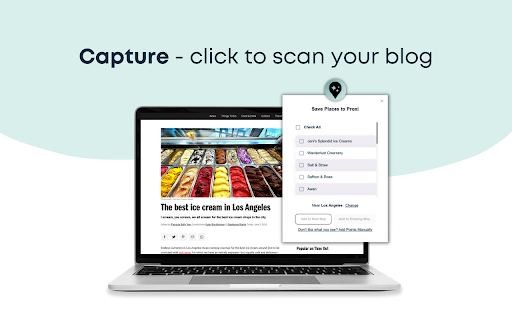
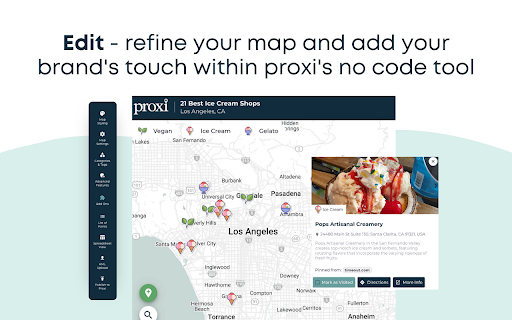

let AI transform your content into an interactive, embeddable map for your blog There’s an easier way to build engaging content. You’ve already put in the hard work of building your blog post, and now with Map My Blog you can quickly transform your content into an attention-grabbing, page view-extending, and conversion-boosting map to accompany your post. Map My Blog instantly transforms your list of places into an interactive map that will inspire and engage your readers like never before. Our AI scans your blog post, extracts the key points and their details, and magically converts them into a stunning Proxi map within minutes, ready to be embedded on your blog. Powered by the advanced geospatial tool Proxi, Map My Blog goes beyond just maps. It leverages proximity to add even more value to your advertising efforts and act as the ultimate conversion tool for your blog. By helping your viewers discover convenient places that cater to their needs, you'll create a personalized and fun experience that inspires action. Make your blog work for you: ✨ Don't settle for a static list. Interactive maps have the power to draw in your readers, immersing them in a dynamic and captivating experience that keeps them hooked, resulting in a significant increase in time spent on your page. ✨ Create with Speed and Ease: No more starting from scratch! Our AI takes your existing content and quickly transforms it into an engaging Proxi map. Scale and supercharge content effortlessly with just the snap of your fingers (err click of the mouse). ✨ Unleash the Insights: Proxi doesn't stop at mesmerizing maps; we equip you with robust insights. Delve deep into your audience's preferences, track engagements, measure time spent on maps, and gather valuable viewer details. Say goodbye to guesswork and hello to data-driven decision-making. ✨ Smart Branding, Savvy Business: Forget about costly and complex in-house development. Experience user-friendly and affordable software that can seamlessly reflect and enhance your brand's identity. Customize each map to perfectly match and elevate the personality of your content, ensuring a cohesive brand experience. Step 1: Capture - Scan your blog and select points with Map My Blog Step 2: Edit - Refine your map and add your brand’s personal touch within Proxi’s no-code tool Step 3: Publish - Easily embed your map on your blog page and share your map link anywhere!

YouTube Video to Blog Convertor
Turn any YouTube video into a fully optimized, AI-generated blog post with just a few clicks! This powerful Chrome extension is designed for content creators, bloggers, and marketers who want to repurpose video content into high-quality written articles effortlessly. ✅ AI-Powered YouTube Video to Article Conversion: Extracts transcripts from YouTube videos and transforms them into well-structured, SEO-friendly blog posts. ✅ YouTube Video to Text in Seconds: Converts spoken words into written content with accuracy and efficiency. ✅ SEO-Optimized Blog Generator: Enhances your content with relevant keywords to rank higher in search results. ✅ Word Count Tool: Helps you meet content length requirements for better SEO and readability. ✅ One-Click Copy to Clipboard: Quickly copy the generated blog post and paste it into your CMS or editor. ✅ Dark Mode: Enjoy an eye-friendly interface with a stylish dark mode. 1. Install the Extension: Get the extension from the Chrome Web Store. 2. Paste the YouTube Video URL: Open the extension and enter the link to the video you want to convert. 3. Generate a Blog Post: Click "Generate Blog" to instantly turn the video transcript into an SEO-optimized article. 4. Copy, Edit, and Publish: Use the word count tool to refine the content, copy it to your clipboard, or make edits before publishing. 5. Switch to Dark Mode: Enjoy a user-friendly dark mode for better readability in low light. - Save Time & Effort: Convert YouTube videos to articles instantly, eliminating the need for manual transcription and writing. - Boost SEO Rankings: AI-generated content includes keyword-rich text, enhancing your website's search engine visibility. - Repurpose YouTube Content: Turn videos into blogs, articles, or social media posts to maximize engagement. - Perfect for Bloggers & Marketers: Ideal for those who want to leverage video content for written media efficiently. Start converting YouTube videos into high-quality blog posts today! This AI-powered Chrome extension is the ultimate tool for content repurposing, SEO optimization, and digital marketing success.

Apiary - Web Highlighter & Annotator
Highlight and take notes directly on what you read online and instantly share them with friends and colleagues. Easily highlight and take notes on what you read online and then easily save them for later and share them with friends and colleagues in one click. Apiary is a free to try chrome extension based product that allows you to easily highlight and take notes on what you read online. After you have annotated something online it will be saved to your Apiary account where you can then organize in any way you like with our folder system. You can than easily share directly from the website where you took the notes or from your Apiary account later on with anyone you want. Just highlight and get a shareable link you can send to anyone with one click. When using Apiary on a website or email online you have two options. You can choose to just highlight some text or you can highlight and add a comment to that highlight. Allowing you to save and share you favorite parts and current thoughts while reading it with others. You can view your annotations live by clicking the chrome extension and having the Apiary sidebar appear showing all the highlights and notes you have made on that page. Or you can view them later in your Apiary account where we save all the contents of what you were reading and the highlights and notes you took. Allowing you to get the full context of whatever you were taking notes on. Annotate, save, and share what you read online instantly today. ----------------------------------------- Key Features: Web and Email Highlighting Take Notes On What You Read Online Apiary Account Access With Organization Systems Quick and Easy Shareable Notes Private Notes That Only You Can See Automatically Saving Notes ------------------------------------------- How To Use: In order to use the Apiary Chrome Extension you will need an account with Apiary. Please visit www.myapiary.io to create an account today. 1) Create An Account On Apiary (www.myapiary.io) 2) Download Chrome Extension 3) Sign Into Chrome Extension w/ Your Apiary Account 4) Select Text (Left Click & Drag) You Wish To Annotate 5) Click On Apiary Popup To Either Highlight Or Take Note On Selected Text 6) Delete An Annotation By Clicking On A Highlight And clicking Delete Icon 7) Share Your Notes For A Page By Clicking The Apiary Share Button On Bottom Left Corner Of Window 8) View A Note By Either Visiting Your Apiary Account Or By Clicking View On A Currently Annotated Web Page ------------------------------------ Pro Tips: 1) Make Sure You Are Logged Into Apiary Chrome Extension If You Are Having Issues Annotating 2) Organize Your Notes Into Folders On Apiary To Easily Find Notes Later 3) Share Your Notes With Friends By Clicking Share Button And Sending Link To Friends. --------------------------- Got Feedback? Please reach out to us at support@myapiary.io If you find bugs please let us know at https://forms.gle/rHvoLZwaXfVcbAMJ7. If you have a feature request please let us know at https://forms.gle/vguFD2Rxi2FCsSQi8. By installing the extension, you agree to Apiary's Terms of Service, Privacy Policy, and Community Guidelines (which can be found here: https://www.myapiary.io/term-services and https://www.myapiary.io/privacy-policy)

ConversAI
Respond to anything in one click with your personal AI chat assistant. 🧠 Introducing the ConversAI Chrome Extension: the ultimate tool for streamlining your online communication! 💬 Say goodbye to time-consuming email and tweet replies, and hello to lightning-fast, AI-assisted responses. 🤖 With advanced AI technology, ConversAI quickly generates intelligent and eloquent answers to your messages. 👍 Set the tone of your response and choose from a variety of options, from positive and negative, to curious or witty! 💻 Effortlessly respond to emails and tweets with just a few clicks – right from your browser! 💡 Save time and increase your productivity, so you can focus on engaging in meaningful conversations. ✅ Start using ConversAI now and experience the power of AI in your online communication!

News Storyline
Know Thy History and Be Notified About Future A Chrome sidebar extension and companion newsletter that gives you an unbiased, context-rich timeline of any news story and quietly watches for what happens next—so you never miss a beat (or waste time scrolling). 📖 On-Demand Timelines in Your Sidebar • One-click access while you’re reading any article: hit the extension icon to slide open a concise, chronological view of past reports on that story. • Facts, not opinions: we aggregate across dozens of reputable outlets, stripping out commentary bias so you see the unvarnished sequence of events. • Top highlights only: instead of drowning you in every mention, we surface a handful of the most relevant milestones—headlines, timestamps, and sources—so you instantly understand “what led here.” 🤖 Background Story Scanning & Positive Alerts • Hands-free monitoring: once you’ve opened a timeline, our service continues scanning in the background for new developments on that very story. • Positive-only notifications: you decide what matters—receive alerts only when something significant (and positive) happens, so your inbox isn’t full of noise. • Peace of mind: no more endless manual refreshes or fear of overlooking a breaking update. 📰 Daily Newsletter & “New Developments” Bulletin • Daily digest delivered each morning: a simple roll-up of every event we tracked across your subscribed stories in the past 24 hours—no grouping, no spin. • On-demand “New Developments” email: when fresh updates arrive mid-day (for critical beats), we’ll ping you separately so you stay in the loop around the clock. 🔔 Story Subscriptions & Future Tracking • Subscribe in one click: any timeline can be turned into a “watched” story. From that moment on, we’ll keep you posted on each follow-up report. • Tailored alerts: choose your stories—finance, politics, tech, climate—and we do the rest, surfacing only the most impactful next chapters. 🔧 Platform & Integration • Chrome-based browsers supported (Chrome, Edge, Brave, Opera). • Privacy-first: minimal permissions, no tracking beyond the stories you opt in to follow. • Lightweight: sits quietly in your toolbar, loading only when you ask. Who It’s For • Journalists & analysts who need quick, neutral context before filing next headlines. • Researchers & students chasing down backstory and evolution of key events. • Curious readers who want more than a single outlet’s perspective—and zero surprises when the story moves on. Why Know Thy History? • Context at your fingertips—instantly see what happened before. • Stop missing updates—positive alerts mean you’ll always catch the next big development. • Save time & mental bandwidth—no more endless feeds or biased roundups. Install now and start each story with the past in view—and the future on your radar.
