
cmdlcebdajhdgnclabfhjidknlpfmidk

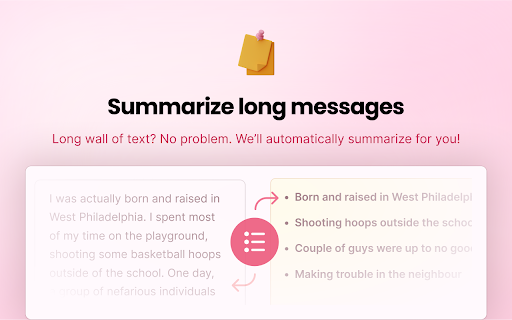
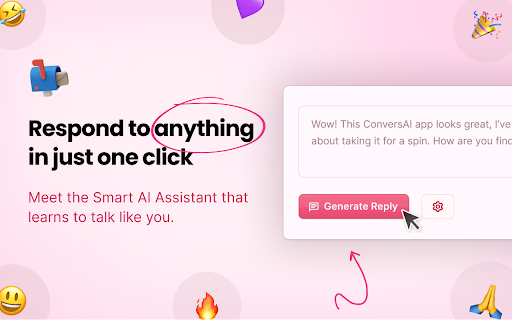


Respond to anything in one click with your personal AI chat assistant. 🧠 Introducing the ConversAI Chrome Extension: the ultimate tool for streamlining your online communication! 💬 Say goodbye to time-consuming email and tweet replies, and hello to lightning-fast, AI-assisted responses. 🤖 With advanced AI technology, ConversAI quickly generates intelligent and eloquent answers to your messages. 👍 Set the tone of your response and choose from a variety of options, from positive and negative, to curious or witty! 💻 Effortlessly respond to emails and tweets with just a few clicks – right from your browser! 💡 Save time and increase your productivity, so you can focus on engaging in meaningful conversations. ✅ Start using ConversAI now and experience the power of AI in your online communication!

Replya - FREE LinkedIn Comment Generator & AI Assistant
Generate perfect LinkedIn comments instantly with AI. Free comment suggestions, personalized tone, and one-click apply. Generate perfect LinkedIn comments instantly with AI. Free comment suggestions, personalized tone, and one-click apply. 🚀 Free LinkedIn AI Comment Generator - Boost Your Professional Engagement Transform your LinkedIn networking with Replya, the intelligent comment assistant that helps professionals engage authentically and efficiently. Generate perfect, personalized comments in seconds! 🎯 Instant AI-Powered Suggestions * 5 unique comment variations per post * Context-aware responses that understand post content * Personalized to your professional background * One-click apply directly to LinkedIn 🎨 Full Customization Control * 4 Professional Tones: Professional, Enthusiastic, Friendly, Thoughtful * 3 Length Options: Short (5-15 words), Medium (20-35 words), Long (50-60 words) * Optional emojis and engaging questions * Real-time regeneration with updated filters 👤 Smart Personalization * Uses your job title, company, and expertise * References poster by name automatically * Builds on your existing draft comments * Maintains your authentic professional voice ⚡ Seamless LinkedIn Integration * Native UI that matches LinkedIn’s design * Replya logo "R" button appears right in comment box * Smart caching for instant re-access * Works on all LinkedIn posts Perfect For: ✓ Job seekers building their network ✓ Professionals growing their LinkedIn presence ✓ Sales & marketing teams engaging leads ✓ Content creators responding to audience ✓ Executives maintaining thought leadership ✓ Anyone who wants thoughtful comments faster How It Works: 1. Click the Replya logo "R" button in any LinkedIn comment box 2. AI analyzes the post and generates 5 tailored suggestions 3. Customize tone, length, and style preferences 4. Click “Apply” to insert into comment field 5. Edit if needed and post! Why Choose Replya? 🆓 Completely Free - No hidden costs or premium tiers 🚀 Saves Time - Comment 10x faster than writing from scratch 🎯 Increases Engagement - Professional comments get more responses 💼 Career Growth - Build your network and visibility 🤖 AI-Powered - Leverages latest language models ⚡ Lightning Fast - Generate suggestions in 2-3 seconds Start Engaging Smarter Today! Install Replya now and experience the easiest way to boost your LinkedIn presence. Join thousands of professionals who are commenting with confidence and building stronger professional networks.

Ask Every AI
The best AI comparison Chrome extension tool. In a single browser tab, you can open up to four top AI websites at once in sleek side-by-side or grid layout. Great for comparing AI responses and having multiple AI conversations at once. Smart features that actually work: - With just one click, you can send the same prompt to multiple AIs - Paste images and attach files to all AI websites together - Copy all AI responses together in single click - It saves your favorite layout, theme, and selected sites automatically - Accidentally closed the tab? No problem! Your unsubmitted prompts are retained - Reload all sites in single click to start new conversations - Drag and rearrange the order and size of each window - View chat history and open back all websites at once - Supports both light mode and dark mode Why use more than one AI? Different AI models are better at different things. Sometimes they hallucinate and give wrong answers. So it's always better to ask the same question to multiple AI models and confirm if the answer is accurate. This 'Ask Every AI' chrome extension is great for anyone who wants to make the most of AI, including researchers, developers, and content creators. Stop switching between AI websites. Use 'Ask Every AI' to compare all AI models quickly in single click. Parallel AI conversations make it easy to compare the AI responses and be confident about the accuracy of response. Questions that users might have: How to view more than one AI response at a time? How to compare responses from multiple AI websites at once? Which is the best chrome extension for comparing AI sites? How to use ChatGPT and Gemini at the same time? Is there a multi-AI chat interface that can help with productivity? How to put AI models next to each other? How to compare AI models side by side? Which chrome extension that supports all AI platforms? - 'Ask Every AI' is the answer for all these questions v1.2 - Added chat history (Optional feature that you can turn on if required) - Fixed a few bugs v1.1 (Major update) - Now you can add unlimited AI websites - Now you can enter any custom URL

OneClickPrompts
One Click Prompts for AI chat interfaces Tired of typing the same instructions into AI chats? OneClickPrompts adds a simple menu of your custom prompts right inside the chat window. Create a button for any prompt you use often—like "respond in a markdown table" or "act as a senior developer"—and just click it instead of typing. Convenient menu for editing prompts. You can see how it works on video. Has multi-profile prompt library functionality and tries to count tokens! FREE | Open Source Works in All Major AI Chats: This extension works on the most popular AI chat websites: ChatGPT, Claude, Gemini, and others! (Store policy prevents listing them here, but the full, updated list of supported sites is on the GitHub page.) 🔥Now with token counter for ChatGPT and most sites! (Well, it 𝘢𝘱𝘱𝘳𝘰𝘹𝘪𝘮𝘢𝘵𝘦𝘴 tokens, so it is not precise, but with better precision than other extensions I tried. Enable counter in modules and it will work. Settings allow you to select one of FIVE prediction models with calibration, or just turn it on and forget about it! You can also count tokens for what you write and for what is already in chat thread separately) What It Actually Does: ✅ Custom Prompt Buttons Create buttons for any text you want. Use an emoji or a few characters for the label so you can find it quickly and click. Click the button to put the text in the input box. Or press hotkey. ✅ Floating Panel & Prompt Queue Click the '🔼' button to open a floating panel you can drag anywhere on the screen. Inside, you'll find the Prompt Queue. This lets you: Add multiple prompts to a list. Send them one by one with a delay you can set. Useful for tasks that require several steps, like get news updates once an hour or something like that - and each prompt is controlled by you. ✅ Profiles Organize your buttons into different sets using profiles. Create one for coding, one for writing, one for a specific project, etc. Switch between them with a dropdown. ✅ Keyboard Shortcuts If you want, you can enable shortcuts (Alt + 1-9) to trigger your first nine buttons without using the mouse. ✅ More Customization: Auto-Send: Each button can be set to automatically submit after inserting the text. Holding Shift reverses this behavior. | Separators: Add visual lines between buttons to keep them organized. Backup/Restore: Save your entire setup (profiles and buttons) to a JSON file and load it back later or on another computer. Modules: Modules: 🛜Cross chat prompt sharing: Want to send a message to all chats you have opened? Just type your prompt, and then, either click on the button ⬆️ that will send prompt to ALL open tabs (Each tab can block incoming messages via Shift-click!) or use the store and paste prompt buttons: can be better than copy-pasting as does not clutters clipboard. To use you will have to activate it in settings under "Modules", and you choose either broadcast option or store-send option. 🔢Token approximator: like best effort token counter, displays token usage in chat on a webpage. For Tinkerers: Edit CSS Selectors: If a site update breaks the button placement, you can go into the advanced settings and edit the CSS selectors yourself to fix it.... or place in other place you want. The Important Stuff: 🔒 Private: Your prompts and settings never leave your computer. They are stored locally in your browser. There is no tracking, no accounts, and no data sent to any server. 🌐 Open-Source: The code is public on GitHub. You can check it yourself to see how it works. ⚡ Simple: while this extension has a lot of settings, you don't have to use them. You can only use what you need and leave other settings untouched. ⁉️How to Use: Install the extension. Click the icon in your toolbar to open settings. Create a button. It will show up in your next chat session. Support & Feedback If something doesn't work, try reloading the page. If it's still broken, please open an issue on GitHub. I appreciate bug reports and suggestions. GitHub: https://github.com/MaxITService/OneClickPrompts

AI Voice Assistant – Smart Browser Copilot
AI assistant that works inside your browser tab. Ask by voice and get instant, context-aware AI responses. AI Voice Assistant is a context-aware browser extension that brings AI directly into the page you're viewing. You can ask questions by voice, analyze on-screen content, or select text and instantly run AI-powered actions — all without switching tabs or copying content. It's built to reduce friction, eliminate repetitive steps, and help you stay focused while browsing, reading, researching, or working. 🎙️ Ask AI by Voice (Hands-Free) Use voice commands to ask questions and get instant AI responses based on the current webpage. No typing, no prompt writing, and no context loss — AI understands what's on your screen. Great for hands-free use, multitasking, and uninterrupted workflows. 🗣️ Wake Word Detection Say "Hey Assistant" to start recording — completely hands-free. No keyboard shortcuts needed. Just speak the wake word and ask your question. Uses on-device speech recognition for privacy — no audio is stored while listening. Customize your wake word in settings. 🔇 Auto-Stop on Silence Recording automatically stops when you finish speaking. No need to press a button to end — just pause, and AI processes your request. Adjustable silence duration (1-5 seconds) to match your speaking style. Combine with Wake Word for a fully hands-free experience. ⚡ Quick Actions (Instant AI Tasks on Selected Text) Quick Actions let you perform common AI tasks in one step. Simply select text on any webpage and trigger an action like: Summarize content in short or detailed form Explain complex text in simple terms Rewrite or rephrase content Translate text Extract key points or insights You can also create custom Quick Actions for tasks you repeat often. This turns multi-step AI workflows (copy → paste → prompt → adjust) into a single click. No prompt engineering. No switching tabs. Just select and run. 📸 Screen Read & Visual Understanding Ask AI questions about what's visible on your screen: Code snippets and error messages Articles, documents, and webpages Charts, diagrams, and visuals AI analyzes screenshots and on-screen content to provide relevant, contextual responses. 🔍 Real-Time Web Search Mode For questions that need live or up-to-date information, Web Search mode lets AI fetch and summarize current data directly from your browser. ⚡ SMART MODES Voice Mode – AI answers based on the current tab Screen Read Mode – AI help using screenshots and visuals Web Search Mode – AI answers powered by real-time web data Switch instantly using keyboard shortcuts. ✔ No tab switching or copy-paste ✔ Voice + text-based workflows ✔ Wake word activation — say "Hey Assistant" to start ✔ Auto-stop on silence — no button press to end ✔ Instant AI actions on selected content ✔ Custom actions for repetitive tasks ✔ Context-aware responses ✔ Works on any website ✔ Faster, cleaner, more focused browsing 👥 WHO IT'S FOR Professionals working with content and research Developers reading documentation or debugging issues Writers, marketers, and analysts handling text Anyone who frequently uses AI while browsing ⚙️ HOW IT WORKS Open any webpage Ask a question by voice (or just say "Hey Assistant") Trigger an instant AI action or response Get results without leaving the page 🔒 PRIVACY & SECURITY Your privacy matters. Audio is recorded only when you activate it. Wake word detection uses on-device processing — no audio is stored while listening. There is no background listening and no unnecessary data storage. 🚀 GET STARTED Install AI Voice Assistant and turn your browser into a smart, AI-powered workspace. Talk to AI. Select text. Run instant actions. Stay focused.
