
godmaealnfgfnpimbficamaaoebpdgoo
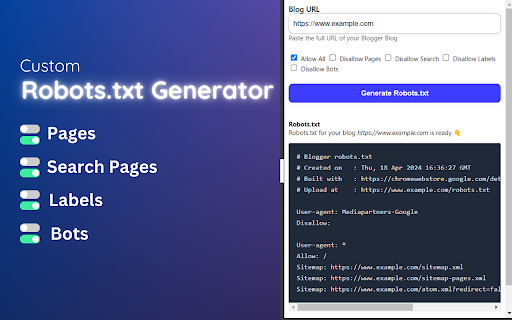
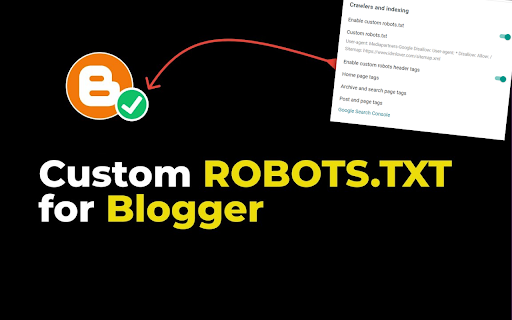
Create a perfect custom robots.txt file for Blogger Free ✔️ Optimize your blog for search engines in 2025 Custom Robots.txt Generator for Blogger [Sitemap Generator for Blogger] is a powerful Chrome extension designed to simplify the process of generating custom robots.txt files for Blogger websites. Robots txt is a crucial file that tells search engine crawlers which pages or sections of a website should be crawled or indexed, helping website owners control their site's visibility and ranking in search engine results. ✅ How to Generate Custom Robots.txt for Blogger using this Extension: 1. Install the Custom Robots.txt Generator for Blogger extension from the Chrome Web Store. 2. Click on the extension icon in the browser toolbar to open the popup. 3. Enter the URL of your Blogger blog in the provided input field. 4. Select the desired options, such as allowing/disallowing homepage, pages, search, labels, and blocking specific bots. 5. Click the "Generate Robots.txt" button to generate the custom robots.txt file. 6. Copy the generated robots.txt content using the "Copy to Clipboard button". ✔️ How to Update Robots.txt of Blogger using Custom Robots.txt Generator for Blogger Extension: 1. After generating the custom robots.txt file using the extension, copy the generated content. 2. Log in to your Blogger account with your Gmail account. 3. From the left menu, click on "Settings." 4. Navigate to the "Crawlers and indexing" section. 5. Enable the "Custom robots.txt" toggle button. 6. Click on "Custom robots.txt" and Paste the copied robots.txt content into the provided text area. 7. After adding the code, click on "Save." Custom Robots.txt Generator for Blogger [Free Sitemap Generator for Blogger] extension offers a user-friendly interface and advanced features to help Blogger users effectively manage their site's crawling and indexing directives. Improve your site's search engine visibility and SEO performance with ease using this handy extension!

Blogger Helper: Pro Version
## All New Update For Tool in last Description ### 🎉 **Blogger Helper Tool**: The Ultimate Companion for Blogger Enthusiasts ✨ The **Blogger Helper** tool is the first of its kind, crafted exclusively for the **Blogger platform** and tailored to bloggers who love sharing their thoughts and ideas on this platform. 📝💻 We offer two versions of the tool: 🔹 **Free Version**: A great starting point with essential features. 🔹 **Paid Version**: Unlock advanced tools and premium capabilities (details below). 🚀 With this tool, we've aimed to equip bloggers with everything they need, eliminating the hassle of visiting external websites or using third-party programs. Everything you require for **top-notch blogging** is right at your fingertips! 🛠️🎯 💡 **Key Features You’ll Love**: - **SEO Optimization**: Ensure your articles follow best practices for better visibility. 🌟 - **Error Tracking**: Identify and fix mistakes or duplications effortlessly. 🚦 - Plus, a wide range of other tools to make your blogging journey smoother and more enjoyable! 🌐📈 Get ready to elevate your blogging experience with **Blogger Helper**! 💪✨ 🚀 **Exciting Updates for Blogger Helper Tool!** 🛠️ 🌟 **Version 1.2.6** 🎨 change the styling of Tool 📌 Other improvements 🗂️ Add article optimization tool 🌟 **Version 1.2.5** 🖥️ Added viewport options: **Desktop**, **Tablet**, and **Mobile**. 🗑️ New feature to **delete unnecessary codes** from article. 🔍 Search in **Google** using a keyword, with results including: **Similar words** **Questions** **First 10 search results** 🌟 **Version 1.2.4** 📌 Shows **paragraph location (p)** directly in the editor. 🌟 **Version 1.2.3** 🗂️ Display articles based on **categories**. ✏️ Control the **number of words** in the description box. 🖼️ Identify images without **Alt attributes**. 🌟 **Version 1.2.2** 📑 Added **Schema for Answer and Questions**. 🌟 **Version 1.2.0** 🛠️ Fixed errors. 📋 include the **Schema Generator Tool**. 🌟 **Version 1.1.8** (Part 2) - 🧮 Added a **post counter**. - 📤 Moved **Contact Us** to the main menu. - 🎨 Updated **styling** for improved appearance. 🌟 **Version 1.1.8** (Part 1) 🌗 include The Dark/Light Mode. 🎨 Fixed **CSS styling issues**. 🌟 **Version 1.1.5** 🔄 Added a feature for **social media sharing**. 🗺️ Restyled the **heading map**. 🌟 **Version 1.1.1** 🛠️ Fixed the issue of detecting **Arabic language** in the Windows. 🌟 **Version 1.1.0** 🛠️ Fixed error in detecting **internal and external links**. ✨ Stay updated for more enhancements! 💡

Compress Image to 500kb » Convert JPG to 500kb
Image Compressor to 500KB is a lightweight browser extension designed to optimize digital content by reducing image file sizes while maintaining acceptable visual quality. The tool specifically targets web users, content creators, and professionals who need to quickly prepare images for uploads, emails, or web content without using complex software. Key Features: Smart Compression Algorithm:- Automatically reduces images to ≤500KB through quality adjustment and intelligent resizing. Preserves dimensions whenever possible, only resizing when absolutely necessary. Converts all formats to optimized JPEG for maximum size reduction. User-Centric Workflow:- One-click file selection and automatic download Side-by-side visual comparison Clear status updates (success/failure messages) Privacy-First Approach:- All processing done locally in the browser No image data transmitted to servers Instant automatic cleanup of temporary files Technical Implementation:- Built using modern web technologies (HTML5 Canvas, Web Workers) Utilizes Chrome's native downloads API for secure file handling Progressive quality reduction (0.9 → 0.2) with geometric scaling fallback Adaptive compression based on MIME-type detection Compatibility: Supports all modern image formats (JPEG, PNG, WEBP, BMP) Works with files up to 25MB (browser memory limits) Responsive UI optimized for desktop Chrome

DeepFocus: Digital Detox + Time Alert + Website Blocker Chrome Extension
A productivity extension with time-based and site-specific interruption alerts. Take back control of your time and attention with DeepFocus, the all-in-one productivity tool designed to help you stop mindless browsing and build intentional work habits. DeepFocus is more than just a website blocker; it's a mindful productivity coach. It combines a powerful, flexible site blocker with a unique, recurring "Focus Mantra" alarm to create a complete system that not only blocks distractions but also reminds you why you wanted to focus in the first place. Whether you're a student, a professional, or anyone looking to reclaim hours lost to digital distractions, DeepFocus provides the tools you need to work, study, and create without interruption. Key Features: Powerful & Flexible Website Blocking Stop distractions in their tracks. You can block sites in two ways: 😎 Categorized Blockers: Instantly block entire categories of distracting sites (like "Social Media," "Streaming," or "Adult Content") with a single toggle. 😊 Custom Block List: Add any domain (e.g., news.com) and create your own custom intervention message to remind you why you're blocking it. 🤩 NEW: "Block Current Site" Button On a distracting website right now? Just click the extension icon and hit the "Block this Domain" button. The site is instantly added to your block list without ever leaving your tab. 💯 The "Pattern Interrupt" Intervention Unlike other blockers that are just a dead end, DeepFocus creates a "pattern interrupt" to make you think. When you visit a blocked site, you'll see a full-screen overlay that: Forces you to pause and wait for a 5-second countdown. Shows you the custom "Why are you here?" message you wrote for yourself. Displays how many times you've tried to visit that site today. ☠️ The "Focus Mantra" Time Alarm This is the core of DeepFocus. It's a separate, time-based alarm that helps you stay on track. Set an interval (e.g., every 30 minutes) and write a personal "Focus Mantra" (like "Is this serving my goals?"). When the timer is up, a full-screen, non-intrusive page will appear, showing you your mantra and forcing a moment of reflection before you continue. ⚠️ Flexible Snooze Control Sometimes you really do need to check a blocked site. From the intervention overlay, you can choose to "snooze" the block for 5, 10, 30, or 60 minutes, giving you a temporary, controlled pass without having to disable the entire extension. 🩷 Your Focus, Your Schedule You're not working 24/7, and your blocker shouldn't either. The built-in Scheduler lets you choose exactly when DeepFocus is active. Set a start time, end time, and select the days of the week (e.g., 9:00 AM - 5:00 PM, Mon-Fri) to perfectly match your work or study schedule. 📈 Accountability Dashboard See how you're doing. The Accountability Dashboard gives you a simple, clean report of how many times you attempted to visit your blocked domains each day. Turn your productivity into a personal challenge and watch the "attempts" number go down. Stop being a victim of your own tabs. Install DeepFocus and start building a more intentional, productive, and focused digital life today.

Sneeit Spot
Sneeit Spot is a support tool for some special Blogger / Blogspot themes / templates from Sneeit.Com or any compatible ones. It will help users to manage theme options, menus, translations, or even importing demos and update their theme code without loosing their theme's configurations. *** NOTE: THIS EXTENSION IS AVAILABLE FOR CERTAIN THEMES ONLY, NOT ALL. *** Sneeit Spot also provides applications for Blogger / Blogpost post editor where you can enable / disable AMP format for your post or even check the post SEO scores that will show you in details about how to improve your post content for better SEO.
