
fbfnglohadgfmkmlamailklimpmidmog
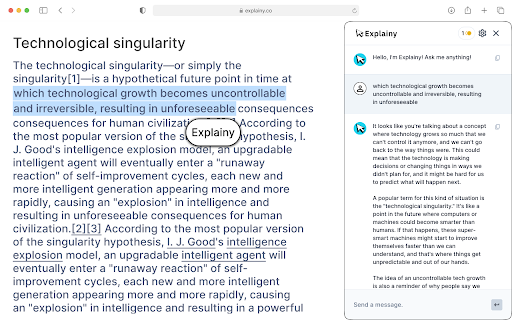


Explainy is a pioneering Chrome extension designed to simplify and enhance the learning experience for users by offering concise and comprehensive explanations of words or phrases. With its intuitive interface, Explainy integrates seamlessly into the user’s browser, providing instant access to a wealth of knowledge. The extension features two distinct modes of explanation: a 'Brief Mode' for quick and succinct summaries, and an 'Extensive Mode' for more detailed and in-depth information. This innovative tool is especially beneficial for students, researchers, and curious minds who frequently encounter unfamiliar terms or complex jargon. By simply highlighting a word or phrase, users can activate Explainy and receive an explanation that suits their immediate needs. Whether it’s a quick definition or a thorough exploration of a concept, Explainy adapts to the user's preference. Prioritizing user privacy and data security, Explainy operates with minimal permissions, ensuring that it remains both helpful and unobtrusive. It's designed to be a discreet yet powerful assistant in the user’s learning journey, contributing to a deeper understanding without interrupting the workflow. With Explainy, users can effortlessly bridge the gap between curiosity and knowledge, making it an indispensable tool for anyone looking to enhance their comprehension and learning experience.

Q-Tools
Q-Tools is a Chrome extension that provides a suite of tools for students to enhance their learning experience in Canvas. Welcome to Q-Tools, Your Study Companion, in Beta! 🎓🌐 Install it and get access to: 🤖 Qewy: A portable study friend for your academic journey 💬 Q-Chat: Integrated AI chat into each of your modules 📝 Q-Notes: AI-Generated Notes and Flash Cards 📁 Q-Layout: A customizable layout to suit your style We want to create new tools based on your suggestions, making Q-Tools the ultimate learning extension for modern students. As a Beta tester, your feedback is instrumental in shaping our product. Please share your thoughts and help us enhance Q-Tools for the better. 😊 Connect with us at contact@studenthub.study 📧 Don't forget to follow our Instagram @studenthubbb for updates and more! For any questions or guidance, check out our FAQ at https://studenthub.study/faq to find answers and information. Start exploring Q-Tools today and join the community redefining the future of learning! 👨💻🚀

Note It - Notes & OCR
A feature-packed note-taking extension with OCR support. With our note-taking app, you can take notes, convert images to text, download notes to PDF. You’ll be able to stay organized with a beautiful minimalist design. - ✍ Take notes in rich formatting. - 👀 Open the extension as a pop-up or re-sizable window. - 👀 Three different themes light, dark and dim - 📸 Take a screenshot of the active tab and: - ✂️ Copy the cropped image - 📜 Convert to text (OCR support) - ✔ Download the cropped image - 💾 Save notes on your local machine - 🗃 Notes folder - ⭐ Make notes as favorite - 📁 Download note in PDF format - 🗄 Convert your images to text (this feature works only when the extension is in window mode) This extension is open-source and does not store any user data on any server. All your data is on your local computer. Please get in touch with us if you find any bugs or have any features or recommendations. The GitHub link is available on the home page. Note It is a non-profit extension. We built and now maintain it during our free time, and we try our best to improve it and keep it up to date.

Lexsee - AI Language and Reading Companion
An AI companion that helps everyone read better and more fluently, with features especially for people with dyslexic brains. Lexsee is free and private for you to use. We don’t collect personal information.

Tell Me - AI Text Understanding
An extension to help users get quick answers about anything. The "Tell Me" extension for Google Chrome provides an easy and convenient way for users to make queries and searches with just a text selection. By selecting any text on a web page, users can activate the extension and instantly get relevant information about the selected text. The main advantage of this extension is its ability to provide quick access to information without the need to open new tabs or search windows. This saves time and effort, making the browsing experience more efficient and productive. Furthermore, the "Tell Me" extension utilizes artificial intelligence provided by some of the biggest names in the field. This means users can rely on the accuracy and quality of the information provided by the extension.
