
fappkmoiinkihdmhcdeepndchhohjcjn

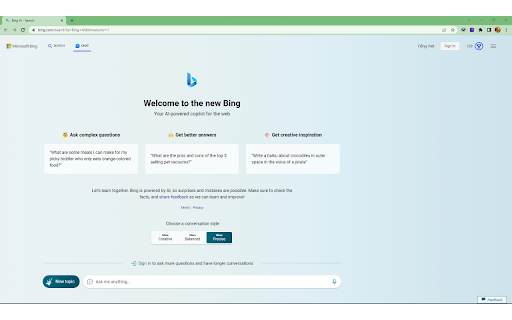
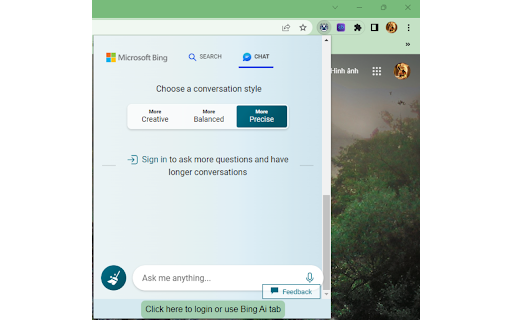
This extension will help you using us Bing Ai on Chrome with popup and website Introducing our new Chrome Extension: Bing AI Anywhere - GPT 4! With this tool, users can easily access Bing AI in both tab and popup formats. If you prefer using the popup format, simply pin the extension and click on it. Within 1-2 seconds, the popup will appear, ready to assist you. However, before diving in, please remember to log in at the following link: https://www.bing.com/chat. Get ready to enhance your browsing experience with Bing AI Anywhere - GPT 4.

Wide GPT
Expand ChatGPT's screen instantly with 'Wide GPT' Chrome extension! No clicks needed, free and easy to install. Get more space now! You'll have more room to see and interact with your content with "Wide GPT," whether you're reading a story, writing code for your next big idea, or talking to AI. This extension is great for people who want to make the most of their workspace and avoid eye strain by not having to constantly scroll horizontally or resize their browser window. Simple to set up: just add "Wide GPT" to your Chrome browser, and you're good to go! You don't have to click any buttons or do anything else. The extension works in the background without being noticed and instantly makes ChatGPT's screen as big as it can be. As soon as you start, you'll be able to browse in a bigger and more immersive way. The best part? You can use "Wide GPT" for free. Why wait then? Get "Wide GPT" right now and start easily making the most of your screen space! Release log: 1.0.8 - Update the component selectors to follow the changes made by ChatGPT web interface. 1.0.7 - Fix the project page that was shrinking in the middle of the screen, now that page is ignored, no wide-screen will be applied to it. 1.0.5 - Fixed an issue with the enable/disable switch. - New version to try clearing the cache for Windows users who reported that the extension stopped working. 1.0.4 - Fixed the selectors to capture messages and make it wide again. 1.0.3 - Fixed the manifest.json to apply the extension on top of new ChatGPT URL. - Fixed the selectors to capture the prompt element textarea. 1.0.2 - Fixed manifest.json file to limit content access to https://chat.openai.com/ and cease requesting permission to access content on all websites. 1.0.1 - Enhanced element selector stability to prevent the extension from breaking when CSS classes are modified 1.0.0 - Added popup with preferences to: - Toggle the primary feature of the extension either inactive or active - Choose the width of the messages and prompt text input. - Buy me a coffee button.

TutorEva - AI Homework Helper beyond GPT-4
Crop and solve any questions on your screen with AI Ask your questions, get instant answers & explanations for all college subjects with accuracy beyond GPT-4. Solve all questions on your homework website with one click. TutorEva will become your ultimate time saver! Available on all websites and homework platforms. (Such as: Blackboard, Canvas, WebAssign, Google Classroom, Schoology...) 💡 Top problem-solving ability TutorEva is the most powerful homework helper you'll ever need! Solve everything on your website page with ONE CLICK and get all your college subjects covered, including math,chemistry, economics, psychology, computer science... you name it! As an AI-empowered homework helper, TutorEva can solve any complex problems, even the hardest college math with accuracy beyond chat-gpt4. 📖 Interactive AI tutor As an advanced AI tutor, TutorEva also provides audio and visual guidance like a 24/7 exclusive mentor by your side just for you. Ask Eva any further questions and you'll get instant step by step break-downs. ⏰ Ultimate Time-Saver With TutorEva, you can now get all the questions on your homework website solved with a single click! No more struggling with copying and pasting, TutorEva will simply solve the entire page and provide step-by-step answers, saving you tons of time. If you are currently struggling with your studies and have multiple deadlines, TutorEva is the perfect helper you do not want to miss!

Syncia - Power of ChatGPT on any website
Syncia is a browser extension that allows you to use Open AI's GPT in any website. Syncia enables users to chat with ChatGPT by opening a sidebar on any website by using the shortcut ctrl+shift+x. In addition, it provides a floating menu underneath any selected text on any website that allows users to generate text summaries, check grammar issues, and customise text length so on ! 🦾 Features 🗨️ Chat with ChatGPT through a sidebar. 🔑 Use your own Open AI API key. 📜 Quick menu underneath any selected text which allows you to summarise, simplify language, translate, and more. 🗂️ Allows to store custom prompts and use them with quick menu. 💯 Fully customisable settings page. 🔐 Secure and fully Free and open source forever. (Please consider giving this project a star 🌟 and contributing 💖 to support the project.) For more info check out https://github.com/Royal-lobster/Syncia Note: If shortcut is not working, Enter "chrome://extensions/shortcuts", under Syncia set new keyboard shortcut for "Open the sidebar"

Mano - Your AI Copilot powered by GPT-4
Mano brings the most powerful AI tools directly into any site. Powered by OpenAI. Mano uses the most innovative AI to make your day easier. Simply by pressing ⌥ + m, you'll have all the help you need. Just add to chrome at https://www.usemano.com 🚀 Expert Agents: Mano comes with expertly curated prompts that turn ChatGPT into a Travel Guide, a Prompt Generator, and a ton of other useful agents. Use Agents to automate and speed up your work. 🖱️One-click actions: Explain complicated topics, summarize long articles, and ask questions about any text directly from Mano's popup. You can answer any doubt you have without slowing doing what you are doing. 💌 Search the web Mano can now search the web for any new information you want it to keep in mind. No more having to search and then copy and paste text. 🔍 Access to your screen Grabbing your entire screen with a single click? Now that's what we're talking about. No more loosing context or annoying explanations 👩🏼💻 Summarize Articles Quickly from our Mano sidebar, you can summarize articles at the click of a button. 💌 Write emails like a native speaker Feel confident about your grammar, spelling and writing style. Simply select the text and press ⌥ + m. 🔍 Get human-like answers to your searches Get the answer you need instantly, without searching through pages of Google results. Simply press ⌥ + m. 👍 Boost your social engagement Generate post drafts for your social media in case you are stuck or have run out of ideas. Simply press ⌥ + m. 👩🏼💻 Fix code bugs 10x faster Quickly get code explanations and answers to hard coding issues not answered on StackOverflow. Simply press ⌥ + m. For more information visit https://www.usemano.com If you have any issues reach out to support@usemano.com or https://www.usemano.com/help
