
faiijbaopcildnhkgiomcegfdaglkdcb
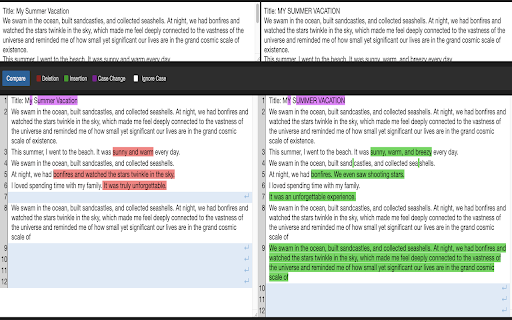
Compare and analyze differences between two text inputs. Text Comparison Tool - Advanced Diff Viewer for Chrome Compare text instantly without the hassle of switching tabs or copy-pasting! Simply select text on any webpage, use keyboard shortcuts (Alt+1, Alt+2) or right-click to mark it, and your comparison is just a keystroke away (Alt+C). ✨ Revolutionary Time-Saving Workflow - No more switching between tabs or copy-pasting - Select and mark text directly on any webpage - Compare text from different sources instantly - Access comparison with a single keystroke (Alt+C) 🔍 Intelligent Comparison - Clear side-by-side diff view - Smart word-level difference detection - Highlight changes in different colors: • Deletions (red) • Insertions (green) • Case changes (purple) - Toggle case sensitivity with one click 🎯 Advanced Pattern Recognition - Automatic highlighting of: • Email addresses • URLs • Code snippets • IP addresses (IPv4 and IPv6) Perfect for: - Developers comparing code snippets - Writers reviewing document versions - Students checking text differences - Business professionals reviewing changes Privacy & Security: - Works entirely in your browser - No external services needed - Your text remains private and secure Pro Features: - Line numbering for easy reference - Clean, distraction-free interface - Multiple text selection methods - Real-time updates - Handles multiple lines and empty spaces - Preserves text formatting Whether you're checking code changes, reviewing documents, or comparing any text, this tool makes it effortless to spot differences. Install now and transform the way you compare text! 💌 We’re Here to Help! If you have any questions or run into issues, feel free to reach out to us. We’d love to hear from you and make your experience even better! 😊

JSON Diff
JSON Diff chrome extension which works offline JSON DIff is an offline chrome extension which provides one click access to jsondiff.com whether you are connected to internet or not.

Text Compare
Online Text Compare: Compare two texts, code or files to find the difference between them. Need to compare two pieces of text quickly and accurately? Meet Text Compare — Diff Checker, your go-to online diff checker and text comparer right from your Chrome browser. Whether you're a developer, writer, editor, student, or teacher, this Chrome extension is built to help you effortlessly compare text and highlight every difference with clarity. 🔍 With this tool, you no longer have to wonder what the difference between two documents is — now you can see it instantly. 📊 Why Use Text Compare — Diff Checker? This text compare online extension is designed for anyone who needs to compare texts for differences, edits, or changes. Whether you're proofreading documents or conducting a code compare, the extension gives you an instant and visual breakdown of all differences. 🥇 Top Features Include: ⭐ Highlighted differences with color coding ⭐ Easy copy-paste functionality ⭐ Secure: all comparisons happen locally in your browser 🛠️ How It Works Using this text comparer is incredibly simple: 1️⃣ Paste or type your original symbols into the left panel 2️⃣ Paste or type the modified symbols into the right panel 3️⃣ Click the button for schek contrast 4️⃣ Instantly view the difference between the symbols 5️⃣ Analyze, edit, or export the results The intuitive interface ensures anyone can use it — no technical knowledge required! 💡Use Cases for All Users Whether you're working with written content or source code, this diff tool is a powerful assistant. Common use cases include: Writers & Editors: Spot revisions and find the difference in draft versions • Programmers: Conduct detailed code compare tasks • Students: Understand how essays and assignments change over time • Lawyers & Professionals: Find the difference between compare two texts content and contracts • Teachers: Help students compare and contrast text structure for better comprehension 📑You can even compare files, code, or documents, making it a versatile tool for any task. 👁️🗨️ Compare and Beyond This isn't just a basic file diff checker. It goes beyond simple comparison. With diff check capabilities the extension delivers deeper insights into the differences between files or content. Some standout advanced features: ➤ Line-by-line comparison ➤ Simple similarity checker algorithms ➤ Lightweight and fast: doesn’t slow down your browser 📍Why Choose This Online Diff Checker? There are many tools out there, but few deliver the same combination of speed, accuracy, and ease of use. With this extension, you’re not just getting a diff checker software — you're getting a reliable companion for your day-to-day content comparison tasks. ✅ Fully browser-based ✅ No installations or logins required ✅ Trusted by developers, writers, and professionals ✅ Works on Chromebooks, Windows, Mac, and Linux It’s one of the most efficient diffcheck options available. ⚡ Compare Two Texts — Instantly Say goodbye to the guesswork of finding what are the differences between two versions. With our Chrome extension, you can: 🔥 Instantly detect changes 🔥 Quickly check diff in real-time 🔥 Pinpoint exact revisions and improvements ⏱️ Save time and reduce manual work — let the difference checker do the heavy lifting! 👨💻 Built for Developers Too If you're writing or reviewing code, our extension doubles as a code compare tool. Developers can: 🌐 Catch subtle logic changes 🌐 Monitor changes in functions and variables 🌐 Collaborate more effectively during code reviews 🌐 Integrate with other tools for enhanced file diff workflows 💻 For coders, it's a must-have diff tool right in your browser. 📚 Online Text Compare for Education and Learning Educators and students benefit greatly from this tool. It's excellent for teaching and understanding how docs evolve or differ. 💡 Teach students to compare and contrast text structure 💡 Help identify paraphrasing or plagiarism 💡 Use as a similarity checker for homework or essays 💡 Understand the differences between writing styles It's more than just a diff check tool — it’s an educational resource. 📁 Compare Files with Ease Not only can you compare text online, but this tool allows you to compare files, Markdown, and plain wording. It's also a powerful solution with visual diff views. 🗂️ Ideal for professionals reviewing contracts, documents, or long-form content. 🪶 Lightweight Yet Powerful No bulky downloads. No login walls. Just pure, fast, easy capability in your browser. The extension is designed to be: 🔐 User-friendly 🔐 Safe and secure 🔐 Extremely fast 🔐 Fully local (no server storage) Your data stays private — always. 🔍 Compare and Compare — Every Version, Every Time From blog drafts to code snippets, documents to contracts, you can compare and beyond with total control. You’ll never have to ask yourself what the difference between two versions is again. Thanks to the built-in diff checker online, you can work smarter, not harder. 🏁 Get Started with the Best Diff Checker Software Today Add the Text Compare — Diff Checker Chrome Extension now and experience seamless, powerful comparison anytime you need it. Whether you need to compare text, check diff, or find the difference, this tool is your trusted digital assistant. ✅ Try it once, and it will become an essential part of your workflow! 🎯 The ultimate diff tool for anyone who needs clarity, speed, and simplicity. 🚀 Download Text Compare — Diff Checker Now and Make Every Comparison Count! Say goodbye to confusion. Say hello to precision. Add the extension today and simplify the way you compare two texts, documents, and code forever.

Highlighty: Search, Find, Multi Highlight
Searching and Multi Highlighting made effortless! It's the most efficient way to find and highlight any text on the web. Highlighty is a free PDF highlighter and multi-keyword finder for Chrome — a smarter Ctrl+F replacement that searches, highlights, and navigates dozens of words at once across webpages and PDFs. Press Cmd/Ctrl+F on any page to launch Highlighty's built-in finder — faster and more powerful than the browser's default search, with multi-query support, custom colors, RegExp, and X-Ray navigation built in. Built for researchers, students, lawyers, analysts, journalists, recruiters, and anyone who scans long documents, contracts, academic papers, or technical reports. Works in Chrome, Edge, Brave, Opera, and Arc. Also available on Firefox 109+. ❗ATTENTION — please refresh all currently opened webpages after installing the extension. ⚙️ How it works 1. Open the website or PDF you want to search 2. Type your query into the Highlighty input 3. Watch for instant found / not-found notifications 4. Scroll through the highlighted matches 5. Or press Cmd/Ctrl+F on any page to launch Highlighty's finder instantly More tutorials and videos: https://highlighty.app/how-to-use https://highlighty.app/blog ✔️ PDF highlighter — dedicated PDF viewer for searching, highlighting, and navigating one or many selectable-text PDFs with the same queries, colors, and X-Ray workflow ✔️ OCR for scanned PDFs — on-device English OCR makes scanned and image-only PDFs searchable, with no upload to any server ✔️ Ctrl+F replacement — multi-query in-page finder that beats the browser's default Find on Page ✔️ Multi-keyword search — find and highlight multiple words at once on any webpage ✔️ Highlight inside text inputs and textareas — your saved-query matches also light up inside form fields as you type, without ever modifying the field's real value (copy, paste, undo, form submission all see the literal text) ✔️ Highlight inside rich-text editors — Lexical (Reddit composer), ProseMirror, Tiptap, Monaco, CodeMirror, Quill, Notion, and any contenteditable surface, painted via the browser's native Custom Highlight API so the editor's own behaviour is never disturbed ✔️ Highlight inside modern web-component inputs — Reddit's navbar search and reply controls, Material Web text fields, and other shadow-DOM-based form controls are now in scope ✔️ X-Ray minimap — draggable context panel showing snippets around your matches, including matches hidden inside collapsed sections, tabs, and layered UI ✔️ Scrollbar markers — jump between highlighted matches at a glance ✔️ Custom colors — color picker, palette, and randomizer for every query ✔️ Adaptive text color — auto-contrast based on WCAG 2.0 for accessibility ✔️ Search analytics and visualization ✔️ Bulk import — load query lists from .xlsx (Excel, Google Sheets) ✔️ RegExp toggle for advanced patterns ✔️ Backup & restore — sync your queries between computers ✔️ Found-query counter badge on the extension icon ✔️ Download / upload query lists ✔️ Manual search mode with hotkey trigger ✔️ Compact list view ✔️ Highlight and search on text select ✔️ Large highlighted font option (up to 25px) ✔️ Unlimited saved query lists ✔️ Temporary deactivation of coloring ✔️ Custom keyboard shortcuts for navigation ✔️ Auto-focus on the search input • Free and ad-free — no subscriptions, no upsells, no telemetry • No tracking, no analytics, no remotely injected code • Smarter Ctrl+F — search multiple keywords at once, apply your custom colors, and respect every filter (case, diacritics, whole word, RegExp) — everything the browser's default Find can't do • PDF support — highlight and search inside selectable-text PDFs with the exact same workflow as on webpages • X-Ray context minimap — surfaces matches hidden inside collapsed sections, tabs, accordions, or dynamic UI • Instant found / not-found notifications on any website • Works on dynamic and endless-scroll pages — Facebook, LinkedIn, Reddit, X, YouTube comments, and more • Unlimited queries and unlimited saved query lists • Powerful filtering — diacritic sensitivity, case sensitivity, whole words, RegExp • Quick disable matches with hotkeys • Search by selecting any element on a website • Website whitelist and blacklist for scoping the extension • Fully optional — every feature can be turned off at any time • Keyboard-driven navigation that scrolls to the next match • Clean, friendly interface • Legal — contract review, case law research, due diligence, e-discovery • Academic — literature review, citation hunting, exam prep, thesis research • Research & analysis — financial reports, technical documentation, white papers, 10-Ks • Journalism — fact-checking, source scanning, document leaks • Recruiting — resume and CV keyword screening • SEO & marketing — keyword scanning on competitor sites and SERPs • QA & engineering — log file scanning, API documentation searches • Sales — prospect research, intent signal hunting ▸ Performance note Scanning very large webpages with many queries is CPU-intensive. Older machines may slow down with many tabs open simultaneously. 📨 Info / Contact hey@highlighty.app — feature requests and bug reports welcome

HTML Diff Check Tool
Tool for checking HTML difference between tabs ,or between production and development environment. HTML Diff Check Tool is chrome addon for checking difference between tabs or between Production and Development. You can check HTML diff with other tab. You can open the URL of production and development server each other with pre-register pairs of those URLs. Also, you can check HTML diff of them. [usecase] - To check the difference between a testing and production environment before/after deployment. - When your co-worker asks you to check a testing environment which he/she updated. [How to use] 1. In the settings register the combination of a testing and production environment domain (including a subdomain). 2. Turn on the "balance scale" icon or select from context menu at the web page where you want to check a testing or production environment. 3. Click the "open" button then a testing or production environment domain will be opened. 4. Click the "diff" button so you can check the difference between the HTML sources. [about privacy] - The registered domains, URLs or HTML sources are not sent to third parties. - According to correspond to manifest v3, analyzed via Google Analytics is stopped. -v.2.0.0 Add function for checking diff with other tab. -v.1.3.0 Nex/Prev Diff and Search Functions are added. -v.0.2.0 You can also use in incognito mode. Fix bug and strings. - v.0.1.11 You can also check HTML diff include JavaScript rendered HTML. Change option for that, if you need.
