
migdhldfbapmodfbmgpofnikfbfpbbon

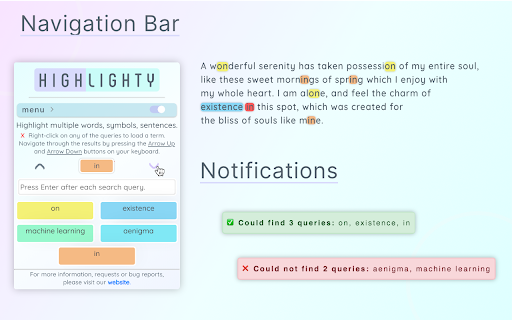
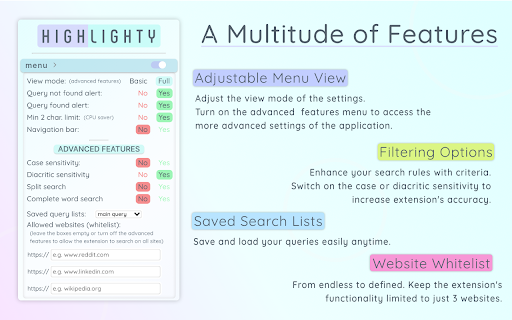
Searching and Multi Highlighting made effortless! It's the most efficient way to find and highlight any text on the web. Highlighty is a free PDF highlighter and multi-keyword finder for Chrome — a smarter Ctrl+F replacement that searches, highlights, and navigates dozens of words at once across webpages and PDFs. Press Cmd/Ctrl+F on any page to launch Highlighty's built-in finder — faster and more powerful than the browser's default search, with multi-query support, custom colors, RegExp, and X-Ray navigation built in. Built for researchers, students, lawyers, analysts, journalists, recruiters, and anyone who scans long documents, contracts, academic papers, or technical reports. Works in Chrome, Edge, Brave, Opera, and Arc. Also available on Firefox 109+. ❗ATTENTION — please refresh all currently opened webpages after installing the extension. ⚙️ How it works 1. Open the website or PDF you want to search 2. Type your query into the Highlighty input 3. Watch for instant found / not-found notifications 4. Scroll through the highlighted matches 5. Or press Cmd/Ctrl+F on any page to launch Highlighty's finder instantly More tutorials and videos: https://highlighty.app/how-to-use https://highlighty.app/blog ✔️ PDF highlighter — dedicated PDF viewer for searching, highlighting, and navigating one or many selectable-text PDFs with the same queries, colors, and X-Ray workflow ✔️ OCR for scanned PDFs — on-device English OCR makes scanned and image-only PDFs searchable, with no upload to any server ✔️ Ctrl+F replacement — multi-query in-page finder that beats the browser's default Find on Page ✔️ Multi-keyword search — find and highlight multiple words at once on any webpage ✔️ Highlight inside text inputs and textareas — your saved-query matches also light up inside form fields as you type, without ever modifying the field's real value (copy, paste, undo, form submission all see the literal text) ✔️ Highlight inside rich-text editors — Lexical (Reddit composer), ProseMirror, Tiptap, Monaco, CodeMirror, Quill, Notion, and any contenteditable surface, painted via the browser's native Custom Highlight API so the editor's own behaviour is never disturbed ✔️ Highlight inside modern web-component inputs — Reddit's navbar search and reply controls, Material Web text fields, and other shadow-DOM-based form controls are now in scope ✔️ X-Ray minimap — draggable context panel showing snippets around your matches, including matches hidden inside collapsed sections, tabs, and layered UI ✔️ Scrollbar markers — jump between highlighted matches at a glance ✔️ Custom colors — color picker, palette, and randomizer for every query ✔️ Adaptive text color — auto-contrast based on WCAG 2.0 for accessibility ✔️ Search analytics and visualization ✔️ Bulk import — load query lists from .xlsx (Excel, Google Sheets) ✔️ RegExp toggle for advanced patterns ✔️ Backup & restore — sync your queries between computers ✔️ Found-query counter badge on the extension icon ✔️ Download / upload query lists ✔️ Manual search mode with hotkey trigger ✔️ Compact list view ✔️ Highlight and search on text select ✔️ Large highlighted font option (up to 25px) ✔️ Unlimited saved query lists ✔️ Temporary deactivation of coloring ✔️ Custom keyboard shortcuts for navigation ✔️ Auto-focus on the search input • Free and ad-free — no subscriptions, no upsells, no telemetry • No tracking, no analytics, no remotely injected code • Smarter Ctrl+F — search multiple keywords at once, apply your custom colors, and respect every filter (case, diacritics, whole word, RegExp) — everything the browser's default Find can't do • PDF support — highlight and search inside selectable-text PDFs with the exact same workflow as on webpages • X-Ray context minimap — surfaces matches hidden inside collapsed sections, tabs, accordions, or dynamic UI • Instant found / not-found notifications on any website • Works on dynamic and endless-scroll pages — Facebook, LinkedIn, Reddit, X, YouTube comments, and more • Unlimited queries and unlimited saved query lists • Powerful filtering — diacritic sensitivity, case sensitivity, whole words, RegExp • Quick disable matches with hotkeys • Search by selecting any element on a website • Website whitelist and blacklist for scoping the extension • Fully optional — every feature can be turned off at any time • Keyboard-driven navigation that scrolls to the next match • Clean, friendly interface • Legal — contract review, case law research, due diligence, e-discovery • Academic — literature review, citation hunting, exam prep, thesis research • Research & analysis — financial reports, technical documentation, white papers, 10-Ks • Journalism — fact-checking, source scanning, document leaks • Recruiting — resume and CV keyword screening • SEO & marketing — keyword scanning on competitor sites and SERPs • QA & engineering — log file scanning, API documentation searches • Sales — prospect research, intent signal hunting ▸ Performance note Scanning very large webpages with many queries is CPU-intensive. Older machines may slow down with many tabs open simultaneously. 📨 Info / Contact hey@highlighty.app — feature requests and bug reports welcome

123 Multi-Highlight PRO
Highlight multiple words and search for expressions and patterns on web pages with professional-grade precision. Highlight multiple words with different colors, get real-time stats, and make complex search queries. Think of this extension as your personal search wizard for web pages! Using * in your search is like a magic key that can stand for any word. For example, if you search "I * unicorns," you'll find sentences like "I love unicorns" and "I hate unicorns." It's like having a super-smart search that gets the magic behind your words! Privacy is our priority! 123 Highlighter PRO keeps all your data on your local machine. We don't access or save your queries.

Multi Highlight
Search and highlight multiple words on web pages. "Multi Highlight" is a powerful browser extension designed to enhance your web browsing experience. With its advanced features, you can highlight multiple words or phrases on any webpage with ease, making it easier for you to find the information you need. This extension allows you to customize your highlighting experience by selecting different colors for each keyword or phrase, making it easier to distinguish between different terms. You can also quickly toggle between different highlight colors, making it easy to organize and categorize your highlights. Additionally, "Multi Highlight" features a search function that enables you to quickly find all instances of a highlighted term or phrase on the current webpage. This feature saves you time and makes it easier to navigate lengthy documents or web pages with multiple instances of the same term. Overall, "Multi Highlight" is an indispensable tool for researchers, students, and anyone who wants to streamline their web browsing experience and stay organized while working online. Features: • No tracking/analytics of any kind. • Ads-free. • Instant notification about found or not found queries on any website. • Search query by selecting element on website. • Customly assigned colors for the queries. • Works on dynamic (endless) pages like Facebook, LinkedIn, Reddit, etc. It's automatically searching for new queries. • Unlimited queries. • Lots of filtering features. (Diacritic sensitivity, Case sensitivity, find only Complete words, etc.) • Full compliance with privacy and data security. • A highly flexible tool. All the settings are optional, you can turn every function off anytime you wish to. • An easy-to-use, friendly interface makes searching a pleasure.

Multi Highlight Hub
An easy to use multi-keyword highlighter with live stats report Multi Highlight Hub: Elevate Your Web Highlights Multi Highlight Hub is an easy-to-use multi-keyword highlighter with live statistical reporting. -- Custom Styles: Tailor your highlight styles and apply them to lists of search terms. -- Live Summary: Instantly view a summary of keywords found on the page, making it a must-have for research and analysis. -- Dynamic Page Compatibility: Works seamlessly on highly dynamic pages like Facebook or Amazon without page refreshing. -- Secure Storage: All keywords are stored in the browser's local storage. -- Create Lists: Organize your keywords into lists or groups. -- Import/Export Lists: Conveniently transfer your keyword lists. -- URL Control: Whitelist or blacklist specific URLs for precise control (see options). If something seems off, try toggling an item on and off or refreshing the page. Found a bug? Report it, and we'll promptly address it to enhance your experience.

Highlight
Supercharge Google Docs with text-synced audio recording. Stop worrying about taking notes and be more present actually listening. Recall every word. Find the most important moments effortlessly. Never lose a recording. Highlight works inside Google Docs to record your meetings. Be fully present now, review the highlights later. Sign up for your free account, then use Highlight to: - Record audio directly within Google Docs - Sync your notes to the recorded audio - Quickly search your recording by clicking anywhere in your notes - Hear what was said and see what you wrote simultaneously - Automatically organize and manage your recordings - Easily collaborate and share the audio with others PRIVACY AND SECURITY - Your recordings are important, so Highlight takes privacy and security seriously. - Highlight uses the minimum possible personal information. - Highlight doesn’t see or store your Google Doc content. We treat everything as sensitive. - No one hears your audio unless you want them to. Audio files are private by default and are only ever available to collaborators who you share a Highlighted Google Doc with. - Recorded audio and document indexes are restricted and secured via AWS Cloud Security. Capture every word. Highlights audio recording allows you to have confidence that you won’t miss a thing. Sync audio to text. Get the full picture of what you thought and what you heard. Highlight syncs it up for you. Don’t worry about forgetting those aha moments. Instead, jot down your Highlights. Find exactly what you’re looking for. Highlight helps you easily recall what was important, so that insights come together naturally. You already sat through an hour-long meeting. Don’t spend another hour searching your notes for those lightbulb moments. Document playback. Never worry about getting that quote or sound bite wrong. Highlight gives you confidence that you have every word available to you for whenever you need it. Quick search. Quickly search for your keywords and highlights. Don’t spend time scrubbing for important moments in a conversation, find them in seconds, and spend more time expanding on your ideas. Live Collaboration. Take notes and discover insights with teammates in real-time. Collaborate on interview synthesis by keeping a living record of what was said and what was thought. Native to G Suite. Use the system you know and love. Skip the extra training and stress of switching to a new app. With Highlight, you can search Google Drive for old notes with ease. Stay clutter free. Highlight recordings are stored in the cloud along with your Google Docs, making sure you don’t clutter up other devices or lose a recording.
