
epocinhmkcnjfjobnglchpbncndobblj

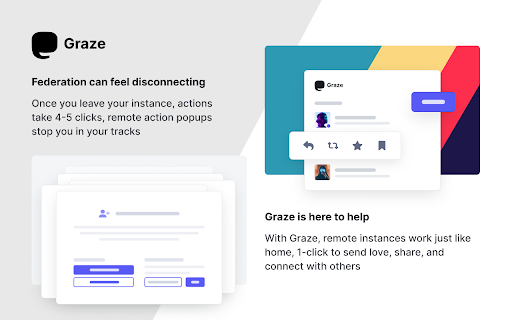


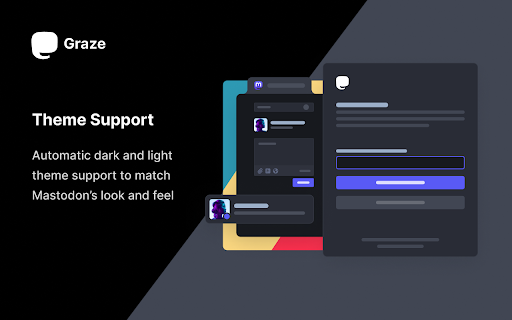
Graze is 1-click follow, favorite, boost, bookmark, and reply for Mastodon, no matter what instance you call home. Graze makes it easy to follow, favorite, boost, bookmark, and reply on Mastodon. You don't need to copy & paste links or search for content from other instances. With Graze, you can discover new people and interact with posts instantly! Say goodbye to the federation frustrations and start using Graze today! • Use multiple accounts across instances • Switch which account you take actions from • See notifications and Direct Messaged across accounts • Get to your to Home feeds quickly • Automatic themes match Mastodon's look & feel This release is all about Discovery! See how popular posts in your feed are with boost and reply counts visible without clicking. Discover Mastodon account as you browse the web, get alerted to instances you're not federated with, and quickly access profile highlights and actions with Hovercards, start conversations quicker with linkified profiles names. Link Previews now render off screen for less timeline jittering. 📈 Show boosts, and replies on main timeline 💡Federation suggestions on remote instance 🔗 Linkify Mastodon usernames with Hovercards across the web #️⃣ Hashtag Hovercards for quick stats, follow, and mute 🔎 Discover accounts of people & publishers across the web 🧈 Smoother link preview loading, and deduped link images ⚡ Quick add of logged-in Mastodon Accounts 🏠 Remap feed links to users' home instance ⚫ Round avatars 🦟 More bugs squished You can now enable Graze only on specific sites via your browser's extension settings, this somewhat defeats the purpose of Graze, but hey, do what you like...

lemmy Link
Extension to make it easy to interact with different Lemmy communities Extension to make it easy to interact with different Lemmy communities. https://github.com/FackJox/lemmy-link

FediAct
Simplifies interactions on other Mastodon instances than your own. Visit https://github.com/lartsch/FediAct for more. A Chrome/Firefox extension that simplifies following and post interactions on other Mastodon instances than your own. All data is processed on your machine locally! Visit the Github page to read up-to-date information on: - Supported features - Setup steps - Screenshots/GIFs - Additional usage notes If you like this addon, consider donating: https://paypal.me/lartsch

Instance Assistant for Lemmy & Kbin
Simplify your Lemmy & Kbin experience with tools for your instance and communities - Support for Lemmy and Kbin instances, as well as Alexandrite & Photon frontends. - Post to Lemmy/Kbin: - Instance Assistant can generate a draft post with autofilled title/link/body - Use the popup menu for most news sites, videos, and other webpages - For images, you can rightclick on the image itself - Search for posts: - Find and open all posts that have a link to the site you are on. Use it to find posts about news articles, videos, and more - Search for communities and content without leaving the page: - You can use the popup menu or sidebar to search for communities (with lemmyverse.net), and for content (with search-lemmy.com) - Redirect to your home instance: - When you are on a foreign instance, buttons will be available in the sidebar to open the COMMUNITY, POST, or USER in your home instance, allowing you to participate immediately - Open links in home instance: - If you come across a Lemmy/Kbin link anywhere on the web, you can right click to open it in your home instance - Improved Error Pages: - 'Community not found' pages now have better information and buttons to trigger a fetch, open the community in the source instance, and more. This also supports alternative front-ends - Customizable: - Customize list of instances in the popup/sidebar to let you quickly switch home instances. This is great for if you have multiple accounts on different instances - You can change the default behaviour of the extension, customize the popup & sidebar menus, and turn off features you don't want to use. Lemmy and Kbin are a part of the Fediverse, a network of interconnected social media platforms that work similar to Reddit. This extension is designed to make it easier to use these platforms and make the most of decentralized social media while mimizing the difficulties that may come with it. For example, you may make an account on "https://lemmy.ca". You may google a community or topic and come across a page on a different instance (ex. "https://lemmy.ml/c/technology"). If you want to subscribe to the community, you will need to copy the code (!technology@lemmy.ml), open your home instance, and then paste it into the search page. If you want to comment on the post, you will then need to track it down somehow by scrolling through the community. This extension will let you jump to the version on your home instance (ex. "https://lemmy.ca/c/technology@lemmy.ml"), allowing you to subscribe and participate immediately. There are many other features as well, and hopefully many more to come! :)

Mastodon Chirper
Add Mastodon posts to your twitter.com home timeline feed Mastodon Chirper is a browser extension which integrates the Mastodon social network with the twitter.com UI. All you need to do is login to your Mastodon account and the extension will automatically inject posts from your Mastodon timeline into twitter.com. This means that whenever you navigate to https://twitter.com/, you will see tweets as well as Mastodon toots. The extension can be easily disabled at any time by clicking the Chirper icon in the top bar. This will stop the extension from injecting toots into twitter.com. You will always be able to re-enable the extension by clicking the Chirper icon again. This extension supports all Mastodon instances. If you run into any issues, please feel free to get in touch via the "About" link in the Chirper popup. This project is not affiliated with the Mastodon project, Mastodon gGmbH nor is it affiliated with Twitter.
