
epngggilgnflanfabeldfpbgponcgpgl

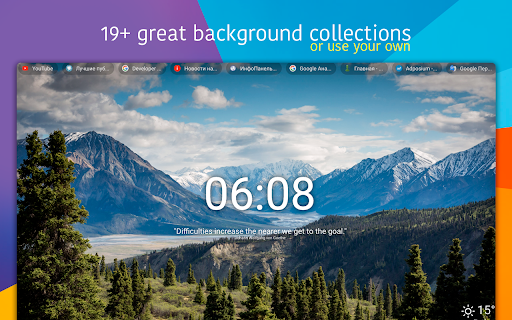
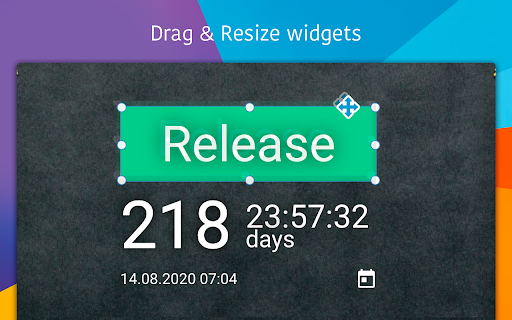

New Tab Studio is a very powerful application to create a mood board in your new tab. You can make its design ABSOLUTELY ANY with our widgets to boost your productivity! Replace and customize your New Tab page with this dashboard extension (countdown, clocks, quotes, images, texts, etc.). It will help you to focus and be productive with your main goal or event / deadline. Eliminate distractions and beat procrastination with a reminder of your goal or event on every new tab. 0) Habit tracker 1) 2 Clocks, Date widget, Analog clock 2) Countdown 3) CountUp 4) Text 5) Quotes 6) Image (for vision board, gsd board, goal board, mood board) 7) Workspace switcher 8) Bookmarks 9) Search bar 10) Top sites 11) Todo list 12) Notes 13) Weather 14) Powerful background selector (use one of our background collection from unsplash and giphy, our upload your photos, or use a solid color) 15) Link 16) Google sites 17) Figure (Rectangle / Line) 18) IFrame 19) Calendar 20) Day planner 21) Week planning 22) Calculator Ways you can use it: 0) Beautiful customizable theme with autochanging backgrounds 1) Set your everyday habit and track your progress 2) Add clock, text, quotes, image widget 3) Add any count of todo lists 4) Add bookmarks 5) Change the position, style, and size of the widgets - make your own, unique design, that will inspire you in every replaced new tab 6) Holiday countdown (birthday, Christmas, new year, Halloween, Thanksgiving day) 7) Event countdown (wedding, meeting, release, movie release) 8) Deadline countdown 9) Goal countdown 10) Important day countdown 11) Setting any wallpaper (HD, small, GIF), as you want in different modes 12) Show/hide countdown timer, writing some inspiration quotes 13) Dark theme 14) Kanban Board 15) Goal Board, Vision Board, Mood board 16) Blank new tab / Empty new tab / Clean new tab 17) Project planning in our calendar (close to gannt diagram) 18) Exam countdown Just upload an image (or pick from unsplash, giphy), that you like, set header and date, drag and drop your widgets :) v. 3.2.4: - Many performance improvements (render time, use webp, countdown refactoring, etc) - Rectangle / Line widget - Search gifs images - Bookmarks widget - Google links widget - Redesign of the background collections (also added the space collections) - Added second to the clock widget - Ability to hide the text in Top Sites widget - More soft text shadow - Rectangle image resize v. 3.2.3: - Added Habit tracker widget - Disabled spell checker for todo and notes v. 3.2.2: - Fix the weather input of city name - Fix the search bar input of placeholder - Social sharing for quotes, wallpapers - Quotes improvement: pin quotes, manually switch to the next quote - Install wallpapers from the theme market v. 3.1.0: - Notes widget - Tutorial - The new title of the application (New Tab Studio) v. 3.0.0: - Text widget - Clock widget - Ability to change the style and position of the widget - Image widget - New material design - Custom intervals for random backgrounds from unsplash v. 1.3.4: - autodetect fullscreen or default mode by the image size - save small images to localStorage v. 1.3.2: - pagination for image search v. 1.2.0: - Uninstall page v. 1.1.9: - Possibility to hide an image - Possibility to hide header - Possibility to hide the timer - Settings button moved to right top

Re-newtab
A redesigned, productive and pragmatic new tab alternative. Overview: This extension provides 19 desktop widgets, plus bookmarks manager, history manager, extensions manager, downloaded files manager and quick search function in your new tab page (so chrome will show you these permissions when you install it). The core idea of this extension is to help user quickly find web pages that you want to open. The home panel shows links, information and functions by different widgets. Of course, you can customize these widgets. Sometimes if you just want to see a wallpaper on new tab, there is a wallpaper mode that hide all elements on the page and only show the wallpaper and a toggle button. 0. Quick Search You can use keyboard shortcuts to search for bookmarks, history, opened tabs and downloaded files, similar to Alfred. 1. Home Panel Home panel contains many versatile widgets(cards), like clock, calendar, recently closed tabs. You can add/remove widgets, drag and drop widget to a new position, change widget's title and color. Main widgets: • Most Visited: show default newtab most visited pages. • Bookmarks Bar: show Bookmarks. • Todo List: a simple but powerful todo(task) list. • Opened Tabs: a simple tabs manager, which shows all current opened tabs. You can jump to or close a tab by click, and more functions in context menu. • Recently Closed: recently closed tabs. • Analog clock and digital clock: highly customizable clocks. • Calendar: A month view calendar. • Calculator: A super calculator powered by math.js. • Google Drive widget: quick access recent, starred, shared drive files or search files. • Google Calendar widget: list your Google Calendar events. • Translate: a Google Translate widget. • Notepad: a simple notepad. • Search Engine: search via your browser's default search provider. • YouTube Subscriptions: list video updates for all your subscriptions. • Google Sites: top google services. • Office: ms office web apps. • Chrome Misc: chrome internal pages. 2. Bookmarks Manager Bookmarks are an important concept, because they are your own collections and what you need. This extension provides a more productive bookmarks manager. Similar to Mac Finder in columns view, you can manage and navigate bookmarks by mouse or keyboard shortcuts, for example: • Navigate all bookmarks using mouse or arrow keys. • Open a bookmark by double click or enter key. • Open all bookmarks in a folder by context menu. • Drag and Drop a bookmark to a new location. • Create, edit or delete bookmark or folder by context menu. • Select multi bookmarks to move, delete or open. • Copy/cut/paste bookmarks(except folders) by shortcuts. • Sort bookmarks by name • Support many keyboard shortcuts. 4. Downloads Manager Show your downloaded files. You can open downloaded files or open their folders, and clear download history. 6. Extensions Manager Manage all extensions and apps. You can enable/disable/remove the extensions and open their options.

Tabrr Dashboard - New Tab with AI
New tab with AI. The personal dashboard organizes bookmarks, favorite websites, and provides access to ChatAI from the start page. We get used, that normally a new tab of our browser as just a starting point for our internet journey, where we spend just a few seconds typing a website address, search query, or clicking a website shortcut. But today we redefine the new tab as a pursuit of usability and more features. A new generation of tabs means a more accessible and powerful dashboard. The browser home page has become the main desktop for many users. Tabrr Dashboard will allow you to customize it just for you. Make your start page truly user-friendly and inspiring with the Tabrr New Tab extension! Install wallpapers, add widgets and finally put things in order in your bookmarks. Tabrr is a way to infinity options for customizing the New Tab. Among the most interesting functions you can find the next: ⚡ ChatAI Engage in conversations with humans and answer a wide range of questions on various topics. ☁ Cloud Sync Create an account and log in to sync your data across devices. 🖼 Wallpaper Set wallpaper for the browser home page. You can choose images from a ready-made collection or upload your own images. 📚 Bookmarks Add bookmarks in the form of visual icons and group them into folders by subject (for example, “work”, “fun”, “shopping”, “tv shows” or any others). Tabrr is a unique start page where you can add an unlimited amount of folders with bookmarks. Any bookmark or a group of them can be organized in separate folders. Create different folders with lots of bookmarks that you set according to topics, tasks, users, etc. Rename them and organize bookmarks inside each folder. Working with a start page has never been so simple. Put the most used apps in the middle of the page and leave others at the bottom. As well with u New Tab it's possible to place apps according to functionality. In other words, you are limited only by your imagination. Since its launch, hundreds of users have found our start page easy to use, clean, and aesthetically pleasing. With such feedback, Tabrr Dashboard is well on its way to becoming your go-to Chrome extension. All you have to do is just switch on your computer and Tabrr New Tab will ensure your productivity. Note: To continue to support Tabrr New Tab, we've started partnering with an affiliate network. Any compensation we receive comes solely from sales made through affiliate link clicks.

HiTab - New Tab Dashboard and Widgets
Customize your homepage with widgets, and dark mode support HiTab - New Tab Dashboard and Widgets. New Tab Dashboard and Widgets. Personal dashboard organizes bookmarks, favorite websites from start page. HiTab supports customizing your homepage with widgets, including dark mode. Hitab - New Tab Dashboard and Widgets,Hitab is a new tab extension for iOS that allows you to create your own visually appealing homepage with customizable widgets. It features card-style design, built-in features such as countdowns, anniversaries, weather, hot searches, and a calculator. Hitab makes all the information easily accessible, keeping your new tab page clean and beautiful. 1. Customize widgets and icons on your new tab page, freely arrange and mix and match them. 2. Personalize birthday countdown widgets, payday countdown widgets, holiday widgets, etc. 3. Quickly add frequently visited websites or widgets to your homepage. 4. Customize search engines and toggle between Google, Bing, Yahoo, and other search engines. You can also add your own custom search engines. 5. Customize wallpapers with a wide selection of high-definition wallpapers in categories such as nature, ocean, architecture, animals, etc. 6. Note-taking and to-do list widgets to keep your inspirations and tasks organized. 7. Customize dark or light mode, or automatically follow your system settings. 8. Customize the left sidebar with categorized icons for easy access to office and entertainment apps. You can hide or show the sidebar as needed. 9. Customize the bottom bar to store frequently used websites for convenient one-click access. You can hide or show the bottom bar. 10. Login/register a Hitab new tab account to backup and sync your data across different devices. 11. Receive message notifications from us. 12. Ability to adjust the icon size. 13. Hot search widgets. 14. Ability to adjust the icon width. 15. Ability to adjust the icon size to small, medium, or large. 16. Unit converter widget supporting calculators, length, weight, area, volume, temperature, speed, unit conversion, heat, pressure, power, force, etc. 17. Calendar widget. 18. Daily quotes widget. 19. News widget. 20. Habit tracker widget. 21. System status widget displaying real-time CPU, battery, and memory usage. 22. Currency exchange rate converter widget. 23. Mini game widget. 24. Dynamic wallpapers and gradient backgrounds. 25. Bookmark manager widget for easy bookmark management. 26. Full-screen clock widget and world time widget in the new tab. 27. Minimalist mode support for new tab.

Timer Countdown
An easy-to-use interface for the Countdown clock Timer—to manage time! After all, you'll be redirected to the last active tab. Online Timer Countdown Clock—This is a Chrome extension timer that simplifies time management and boosts productivity. Our online timer is designed to be easy to use, eliminating the need for a keyboard and providing an intuitive interface that anyone can navigate. Its versatile features make this timer good for personal use, whether managing work projects, timing meetings, or tracking other essential tasks. Why Choose Our Extension? ✅ Efficiency growth ✅ Popular sounds collection. If you need more - write in the comments ✅ Nice to view ✅ Simplicity ✓ Ease of Use: Set up your countdown in just a few clicks. ✓ No Keyboard Needed: Navigate with your mouse, making it perfect for quick setups. ✓ Anchors: 10s, 30s, 5m, 10m, 15m, 30m, 45m, and 1h to set an alarm clock in a single click. ✓ Visual Clarity: The countdown is prominently displayed, ensuring you always know how much time is left. ✓ Productivity Boost: Helps maintain focus and manage time effectively during work or study sessions. Because the clock is ticking! The countdown clock is prominently displayed on your screen, clearly indicating the time left. This is particularly useful during meetings or timed work sessions, where keeping an eye on the clock is crucial. The alarm timer feature allows you to select predefined alarm sounds, ensuring you never miss a deadline or forget an important task. The countdown app is designed with versatility in mind. You can use it for various activities, from tracking the time spent on work projects to setting timers for breaks and personal tasks. The online countdown function means you can access your timer from any device with a Chrome browser, giving you flexibility and convenience no matter where you are. Use Cases and Benefits: ☑️ For Professionals: Manage project deadlines, time meetings, and improve productivity by completing tasks within the set time. ☑️ For Students: Perfect for timing study sessions, exams, and breaks, helping to create an effective study routine. ☑️ For Fitness Enthusiasts: Track workout sessions and rest intervals, and ensure you follow your fitness regimen accurately. ☑️ For Home Use: Set timers for cooking, household chores, and other daily activities to stay organized. 🔸 Increased Productivity: Users report a 30% increase in productivity when using our timer for managing work tasks. 🔸 Enhanced Focus: 75% of users feel more focused and less distracted when they use the timer to segment their work into manageable intervals. 🔸 Better Time Management: Over 80% of users find it easier to manage their time effectively and meet deadlines consistently. - Style: Set and manage multiple timers simultaneously for different tasks. - Predefined Alarms: Choose from various alarm sounds and customize them to your liking. - Timer Presets: Save frequently used countdowns for quick and easy setup. - Tab safe: The alarm sound opens in a new tab. When it closes, you will automatically go to the tab where you worked. 👉🏻 "The online timer has completely changed how I manage my workday. It's incredibly easy to use, and the countdown clock keeps me on track during meetings and projects." – Sarah T., Marketing Manager. 👉🏻 "I use the countdown app for all my study sessions. It helps me stay focused and ensures I take regular breaks. Highly recommend it!" – John D., University Student. 👉🏻 "As a coach, the digital timer is perfect for timing brainstorms and rest periods. The customizable alarms are a great feature." – Emily R., The Personal Productivity Coach. Our Chrome extension timer is more than just a simple countdown tool: it's a comprehensive time management solution designed to enhance productivity and organization. With features like the timer countdown, digits display, and sound countdown clock alarm, it offers everything you need to stay on top of your tasks. Whether working on a critical project, studying for exams, or managing daily activities, this timer is the perfect tool to help you achieve your goals. Don't wait to take control of your time. Set up our Chrome extension timer today and experience the benefits of efficient time management. Join thousands of users who have transformed their productivity with our easy-to-use and versatile timer. With our feature-rich Chrome extension timer, enhance your workflow, stay organized, and never miss a deadline again.
