
eopgmefbafmikfhhbdinpdpbiicbchce
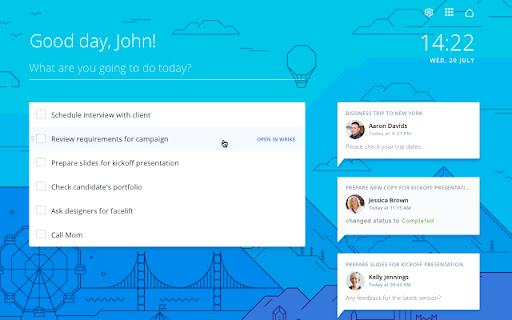


Wrike ToDo is all about you. Create a task list just for yourself and see your Inbox notifications, without needing to open Wrike. What's wrong with sticky notes? They get lost easily, for one thing. Oh, and you can’t copy-and-paste or edit them. We know they were once an office staple, but that was so yesterday. As a modern alternative, we’ve combined the simple beauty of sticky notes with the power of the digital workspace. In Chrome's new tab, you can create notes and to-do lists, and complete, prioritize, and edit them with the Wrike ToDo Chrome extension. Each note is a Wrike task, so if one line isn’t enough, just open it in Wrike. You can benefit from this extension if you: - Have a to-do, action, follow-up or just an interesting item to jot down - Want to check your personal to-do list - Feel like you’re always forgetting something All you have to do is open a new tab, and your item is there. Write, read, cross out. No pencil required. Additional benefits: - The Wrike ToDo Extension is clean, simple, and really fast - You can choose a background that matches your mood - Notifications are viewable from Wrike - You can build your personal productivity report or dashboard in Wrike - You can tag tasks in Wrike and they’ll appear in the new tab

DragApp: Gmail shared inbox
Turn Gmail into a collaboration tool for teams to manage shared inbox, Help Desk, CRM, Task Management and more from Gmail. Bring email collaboration, workflow automation and individual productivity into your Gmail inbox. Built for Google Workspace users. ✓ Manage shared inboxes or Google Groups like support@, sales@ or info@. ✓ Use shared boards in Kanban, list or preview views to create all types of workflows in Gmail. ✓ Know who is working on what with email assignment. ✓ Collaborate with team members within the context of a specific task with internal live chat and email comments. ✓ Create automation rules for your workflows. ✓ Create custom fields to add information specific to your company’s workflows. ✓ Personalize email templates and follow-up email sequences. ✓ Report on individual and team performance with email analytics. ✓ Integrate Drag to 5,000+ apps via Zapier. ✓ Manage workflows on the go with a mobile app. Watch our demo: https://www.dragapp.com/watch-demo/ Speak to a Customer Champion: https://www.dragapp.com/demo/ Read real customer stories: https://www.dragapp.com/customer-success-stories/ Refer Drag and get paid: https://www.dragapp.com/referral-program/ 🧮 Boards Use shared boards for different workflows, from a simple Help Desk and CRM to a Marketing board. 🙋♂️ Email Assignment Assign emails and tasks to the best-placed team members. You can see, at a glance, who’s working on what. 🎤 @mentions @mention your team to start a real-time chat with a team mate within the context of a specific email or task. 💬 Team chat A private space for you and your team to add email comments and context to any conversation. 📨 Shared drafts Work together on email replies. Write a draft reply and have a colleague check it before sending. 🏷️ Shared labels Share labels and organize your boards across your team with shared labels. ✅ Tasks Not everything comes as an email, sometimes there’s a separate task. You can add tasks directly to your inbox. 📤 Email templates Quickly select templates to send, instead of having to write them from scratch over and over again. 🕹️ Automations Easily automate repeatable workflows. Automatically send emails to boards, assign emails and create tasks for your team. 📊 Email analytics Understand what’s happening on boards. Get insights into how productive you and your team are. 📱Custom fields Custom fields have all of the different field types that you may need to organize your cards. For example ‘deal value’ for Sales CRM or ‘ticket criticality’ for Help Desk. 📁 File upload Share files with your team – upload all sorts of files to cards to close things faster. 🗂️ Merge cards Merge cards into collections to save time and energy. Group different emails and tasks into one single card to better manage your work. 🕵️ Email tracking Know who’s viewing your emails and when. Think WhatsApp’s ‘double-tick’ technology. 🧘 ”Reply as” Reply or compose new emails as yourself, your team, or as the shared inbox address such as sales@ or support@. 🚧 Collision detection Sometimes your team tries to do the same thing at once. Drag detects this and notifies users when they’re both working on the same thing. 📕 Email notes Can’t remember some details? Add notes to any email so you always have information to hand. ☑️ Checklists Most emails come with things to get done. Separate these out and add them as actionable tasks. 📆 Due dates Is there a deadline – something you need to get done by a date? Keep things on track by adding a due date. 🍭 Color coding Get a better overview of your boards by color-coding them based on time zones, urgency levels, or anything that works best for you. 🗄️ Activity log Get a full history of all actions on a board (and on a specific card). Learn what and when you need to deal with an email or task. 📇 Sort & filter Sort and filter boards so that you can focus on the things that matter most. By person, statuses, colors, labels, you pick how to filter boards. 🔗 Card and board permalinks Generate card and board links and use the URLs anywhere. Used for: ✓ Shared Inbox ✓ Help Desk & Customer Support ✓ Sales CRM ✓ Task Management ✓ Finance ✓ Operations ✓ Human Resources and Recruiting ✓ Project Management ✓ Customer Onboarding ✓ Marketing ✓ Remote Work ❤️ Trusted by over 30,000 professionals around the World. PRIVACY & GDPR We are committed to respecting everyone’s privacy and design our services in order to best achieve this.If you have questions, please email us at access@dragapp.com. For more details, please see https://dragapp.com/privacy and https://dragapp.com/gdpr. By installing this extension, you agree to DragApp's Terms and Conditions (www.dragapp.com/terms) and Privacy Policy (www.dragapp.com/privacy). Copyright © DragApp DragApp is not affiliated with Google or any Google-related services.

checklist for Google Tasks™
Access and manage all your Google Tasks™ directly in Chrome Provide an interface to Google Tasks™ via an easy-to-use Chrome extension. List of tasks and the ability to quickly add a task are a keyboard shortcut away. * fast access to tasks from Chrome * ability to add a page, or text from a page, as a task directly via right-click menu and keyboard shortcuts * great for use with gmail to make a task out of an email; adding a page as a task stores the URL of that page for quick access later * support for multiple lists and consolidated view of all lists

Zoho Projects
Project Management software that lets you manage projects and tasks online. Collaboration with your team is now easier than ever. Zoho Projects, our cloud-based project management software used for project planning, tracking, and collaboration, is now available as a browser extension for Google Chrome. Zoho Projects is preferred by more than three million users worldwide for project planning, tracking, and collaboration. This new Chrome extension keeps you updated even when you are working on other tabs. Access all the important Projects modules, such as task management, time sheets, news and updates feed, bug tracker— all available right from your browser. This helps you quickly take action without having to open the web app in a new tab. Use our built-in screen grabber to easily file bugs and upload edited screenshots directly from the extension. Here’s a glimpse of what you can do with Zoho Projects: * Easily manage complex projects using milestones, task lists, tasks, and sub tasks. * Quickly view ongoing discussions, tasks, comment threads, and much more by skimming through your Feed. * Use the timesheet module to log hours for your tasks and issues. You can also see a daily, weekly, or monthly view of your logged hours, making it easy to track all the hard work you've done. * Communicate effectively with your team using our rich collaboration options such as wiki, chat rooms, and forums. * Integrate with Google Drive, Google Calendar, and Gmail. * Get in-depth insights on your projects using Gantt Charts, advanced analytics, and reports. * Take advantage of other Zoho apps such as CRM, Docs, and Desk using integrations. * Stay on top of all your projects and work on the go with our iPhone and Android mobile apps.

New Tab Todo List: Checklist, Notes, Outliner
Beautiful and sharable checklists, notes, and to-do lists. Collaborate and outline in real-time. Turn your New Tab into a Todo List! ✏️ A lightning fast new tab productivity page and dashboard with stunning backgrounds, todo, tasks, lists, and more. Make your new tab / start page the way it should be: Fast, customizable, beautiful and productive! Make lists, outlines, todos, and more. With the New Tab Todo List extension for Chrome, just open a New Tab to capture your ideas, goals, and daily tasks. New Tab Todo List is a friendly space for your lists, outlines, and teams. Use it as your simple to-do list and task manager. You can instantly make a list and share it with your friends, family, and team. Simple, clean, and beautifully designed with relaxing themes and backgrounds. New Tab Todo List declutters your thoughts so you can focus on your tasks, ideas, and getting things done. Use New Tab Todo List to capture your ideas, goals, daily tasks and stay organized. A homepage you will fall in love with! Checklists, tasks, todos, quick notes, calendar and more. Replace your new tab with a personal productivity tool featuring to-do, task lists, team outliner, and inspirations. • New Tab into a beautiful task list • Collaborate with others, with real-time syncing • Share your task lists instantly using a share link • Easily invite friends and teammates to New Tab Todo List • Work together in a shared team space • Task lists with a natural editing interface • Edit to-do lists like a word doc and document • Mark any items as complete, whether bullet, number, or checkbox. • Infinitely nested lists with indent / outdent • Tag and filter tasks using #hashtag and @mentions • Works on phones and tablets, with live real-time syncing between devices • Automatic syncing between your phone, tablet and computer • Simply click to edit, like a text document • Easily expand and collapse outlines and lists • Inspirational wallpapers and photos • Beautiful and minimal interface • Simple, instant and FREE • Feel good, get motivated, seize the momentum and get things done! Yes, New Tab Todo List is completely free. Soon you will have the option to upgrade to New Tab Todo List Pro, which will have additional features like themes, sticker packs, and customizations. ➜ CAN I USE New Tab Todo List WITH MY TEAM? Yes. Create a space and invite your team instantly. It helps keep your lists and team organized. Members will have full access to lists in space. Use New Tab Todo List as your collaboration tool to help each other get stuff done. Meeting notes, task lists, collaborative documents and processes are now in one place in your shared New Tab Todo List space. Unleash your team’s potential ➜ CAN I COLLABORATE WITH OTHERS? Yes. New Tab Todo List allows you to edit lists dynamically with anyone through a share link in real-time. Your task lists are in sync across all devices live and in real-time. Collaboratively edit together in real-time with teams and groups. Simply select and share the edit link. Stay organized and make progress with your team projects using New Tab Todo List. Your team is on the same page!
