
eopblkihdgjjlipjpdjpekabokhlenoo


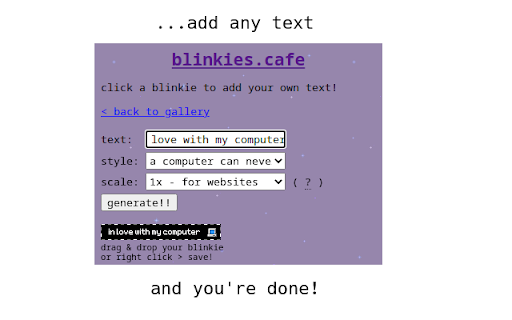
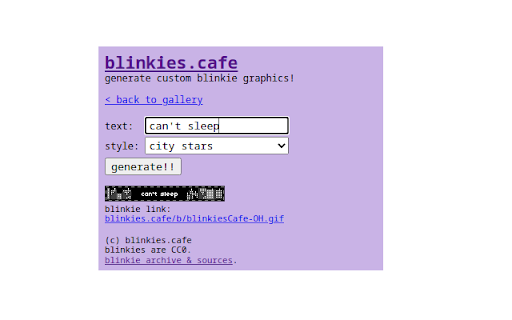
customize and generate retro animated blinkie gifs! blinkies.cafe is a blinkie generator that lets you generate animated pixel gifs featuring whatever text you want. choose from dozens of styles - new styles are added weekly! blinkie gifs are great for: - badges for your website or blog, to show off your interests! - eye-catching links on your streaming page! - fun, sparkly messages in chat apps! - flashy email & forum signatures! blinkies are tiny, 150x20-pixel animated gifs used as badges to share interests and tell jokes! they were popular decorations in early-2000s geocities-era personal websites. What's new: 0.0.1.10: added lots of new blinkies, 2x scale option, sort oldest first! 0.0.1.9: added option to toggle text splitting! added 7 new blinkies. 0.0.1.8: minor UI tweaks, added new blinkies 0.0.1.7: - expanded character set support for 日本語, 中文, 한국어 - longer text split over multiple lines - cool space background 0.0.1.6: performance improvement, preview badge

Sprout
Track your mood each day Keep track of your daily mood and visualize your progress throughout the year. Choose one of five plant moods everyday and watch your year slowly unfold before you. How to use: 1. Click on one of the five buttons which each represent a different mood. 2. Hover over any day on the calendar to see what mood was selected for that particular day. 3. Click the home or calendar button to navigate between pages. If you run into any bugs/problems, please contact us at: sprouthelpteam@gmail.com

Sweezy Custom Doodle for Google™
Change Google logo with amazing Doodle arts. Set your own text and replace Google Doodle with something fun on the Homepage. Make your web browsing experience more fun, colorful and unique! 🙌 This extension will allow you to set your own doodle on the Google page. 💻⭐️ Every time you open a New Tab, you will be greeted by a Google page with your personal settings: - Set a funny image or animation instead of Google Doodle; 🌻✨🌊🌿 - Add your own Google logo style text. Ꭹꪮᥙɾ tꫀ᥊t - Adjust the size of the Doodle and Text to suit you the best. 📏 - Change the page background color. 🎨 - Customize the color of the doodle text. 🖌 There is no limit to inspiration and cheerful madness. 🤪 Therefore, we have created a special site where you can find and add tons of images and animations to your collection of Doodles. 🪄🖥✨😍 With Custom Doodles you will find a lot of interesting things. Here are some of the collections we have for you: - Cartoons; 🐰🎞 - Games; 🕹👾 - Memes; 👁👄👁 - Movies and Series; 📺🍿 - Text; ✍️🆗 - Aesthetics; ♡🦋 and many, many more. ❤️🔥 The site is regularly updated with new materials. 🎆 Based on current and popular topics. If you are still reading this, we suggest that you do not waste time and try Custom Doodle from Sweezy crew right meow. 🐈 We put a lot of code, graphics and love into it. Show your personality! Feel unique! 🪐🌈🍓🧃🐥

Cat-In-Tab
A cat that can walk around on your page Want a cat to accompany you while surfing the web? This extension can make your dreams come true! How to use: 1. Install extension 2. Open a new webpage 3. Find your cute cat somewhere on the page 4. That's it! Enjoy & Have fun! * If you want to get your cat to sleep, just click the extension button. (It's harmless I promise)

Deadname Remover
A browser extension that replaces deadnames with chosen names (primarily for transgender and non-binary people). By installing it, you can avoid the discomfort of seeing your or a friend/family member's deadname while browsing the web. • Replaces deadnames: Add infinite deadname and chosen name pairs to process and replace on most websites • Privacy-first: All data processing locally on device. No data collection or browsing history stored. Settings remain local by default, with optional browser sync. See Privacy Policy for more details • Performant: Extremely lightweight, no noticeable difference in page load times. Can run on low-end devices including Chromebooks • Pride themes: Add trans pride and non-binary pride gradient highlights on replaced names • Syncing settings across devices: Keep your settings in sync across all your devices (disabled by default for privacy reasons) • Content blocking: Prevent flashing of deadnames by blocking page content before the extension has finished processing (optional) • Stealth mode: Hide the extension icon to protect privacy and avoid being outed. Recommended to disable text highlighting as well. • Site filtering: Control where the extension operates on a per-site basis (including using wildcards). Can allow or block all sites by default, or specify specific sites to allow or block. Proudly open-source and MIT-licensed. See more information on https://github.com/arimgibson/Deadname-Remover
