
jeiahlnhacbbdkaniaednfjpaemaghol

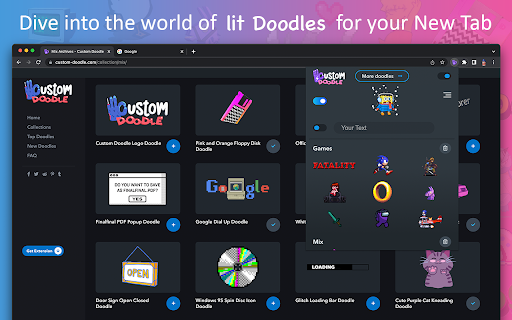
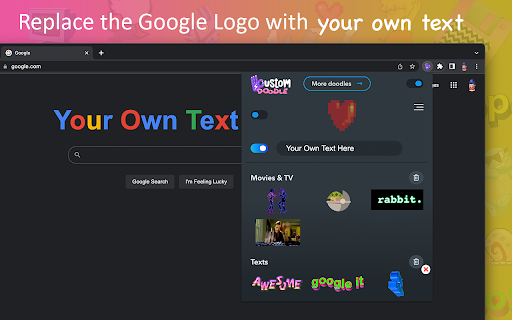

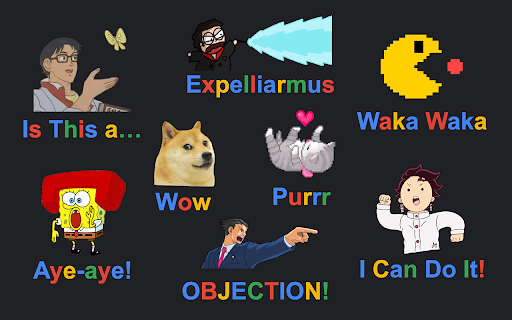
Change Google logo with amazing Doodle arts. Set your own text and replace Google Doodle with something fun on the Homepage. Make your web browsing experience more fun, colorful and unique! 🙌 This extension will allow you to set your own doodle on the Google page. 💻⭐️ Every time you open a New Tab, you will be greeted by a Google page with your personal settings: - Set a funny image or animation instead of Google Doodle; 🌻✨🌊🌿 - Add your own Google logo style text. Ꭹꪮᥙɾ tꫀ᥊t - Adjust the size of the Doodle and Text to suit you the best. 📏 - Change the page background color. 🎨 - Customize the color of the doodle text. 🖌 There is no limit to inspiration and cheerful madness. 🤪 Therefore, we have created a special site where you can find and add tons of images and animations to your collection of Doodles. 🪄🖥✨😍 With Custom Doodles you will find a lot of interesting things. Here are some of the collections we have for you: - Cartoons; 🐰🎞 - Games; 🕹👾 - Memes; 👁👄👁 - Movies and Series; 📺🍿 - Text; ✍️🆗 - Aesthetics; ♡🦋 and many, many more. ❤️🔥 The site is regularly updated with new materials. 🎆 Based on current and popular topics. If you are still reading this, we suggest that you do not waste time and try Custom Doodle from Sweezy crew right meow. 🐈 We put a lot of code, graphics and love into it. Show your personality! Feel unique! 🪐🌈🍓🧃🐥

Rotten Tomato Destroyer
Throw rotten tomatoes in websites that you do not like! Throw one by one rotten tomatoes in any area of almost any site on the Internet. We have all heard of or even seen people throwing rotten tomatoes when disappointed in a live performance. Now you have the opportunity to throw tomatoes in websites that deserve it. Tomato website destroyer for Chrome is always at hand when necessary to blow off steam on sites that really infuriates. Just click on the website destroyer extension icon in the toolbar menu of the browser and throw tomatoes by mouse clicking in the nasty sites. Tomatoes will fall on the webpage and flatten out on its surface, spraying the pulp and juice on the sides. Let the websites know your anger and resentment. Use Tomato destroyer game! And also it can be used for streaming and video to express how your feel about bad web sites, pages and services. In the new release, we have added a collection of objects for throwing in websites: - Rotten tomato; - Slime; - A rotten egg; - Banana.

Pixel.me - color by number game
Color by number to melt your stress away with coloring games. Relaxing game for Chrome. Paint online dozens images. Pixel.Me– Color by number images designed to melt your stress away! Dive into relaxing coloring games created by top developers. Explore dozens of beautiful pixel art artworks or create your very own masterpieces. Relax, paint by number, and enjoy the soothing experience of Pixel.Me. Designed by gaming experts and beloved by coloring book fans worldwide, Pixel.Me invites you into a calming world of coloring meditation. Choose from a diverse range of captivating pixel art pieces and have fun coloring by number! Wave goodbye to stress and unwind with Pixel.Me, your new favorite coloring book app. Simply fill in each pixel by number and watch stunning pixel art come to life. Dozens of beautiful images await—from adorable pixel art cartoons to intricate, detailed scenes—Pixel.Me offers something special for everyone! Even better, grow your coloring book collection by adding new pixel art whenever you want. 👏 Discover a pixel art coloring book loaded with addictive color by number images! Melt away stress and anxiety with our engaging coloring by number games. And the best part? All coloring book images are completely free! 🆓 👇 **We Offer:** 👆 A huge variety of coloring book pages to suit every taste, including 🦄 unicorns, 🐼 animals, 🍰 delicious food, 🐦 birds, 🌻 flowers, 🏰 scenic places, and so much more! 🎨 Pixel.Me is the brand-new coloring book game designed for both adults and kids! 😊 Coloring by number has never been this easy, fun, and addictive. Art lovers, assemble! Create beautiful digital pixel art—pixel by pixel, all for free! Yes, FREE! 📣 💡 **How to color by number?** It’s easy! Zoom in using your mouse scroll or touchpad until numbered tiles appear clearly. Select a color from the palette, and start coloring by number, pixel by pixel. It’s simple, relaxing, and satisfying—start your color by number adventure today! Enjoy stress-free coloring by number in our addictive coloring book game. Choose your favorite pixel art, follow the numbers, and see the pictures come alive. Coloring by number has never been simpler! **Key Features:** • Easily color any image and uncover a delightful surprise at the end! • Perfect relaxing coloring book activity—happy coloring! Watch your stress melt away as time flies by! Escape life's pressures with unique pixel art pieces from our coloring book. Coloring by number is so easy and fun that no artistic skills are needed—just follow the numbers! A convenient color palette at the bottom guides you every step of the way. **Additional Benefits of Pixel.Me:** • Great for developing fine motor skills.

Best Cursors - Bloom of Custom Cursor
Funny, cute and original custom cursor collections with popular topics. Use Best Cursors to change the default pointer with custom Do you like to customize your Chrome browser experience? If you do, then you will love the new Best Cursors extension for Chrome. This neat extension allows you to customize the look and feel of your mouse pointer within the Chrome browser. You can choose from a variety of options to make your mouse arrow look just the way you want. The Best Custom Cursor extension can be found within the Chrome web store. It is a free extension and can be quickly added to your browser. Once added, you can find the extension’s settings menu when you open it and navigate to extensions. In the settings menu, you can browse through a selection of different cursor styles. You can choose from illustrated mouses and pointers such as a hand, a laser pointer, a star, and more. In addition to changing the look of your cursor, you can also set different sizes. This feature allows you to have your mouse pointer bigger or smaller depending on the screen. The Best Cursor extension for Chrome is a great way to bring a personal touch to your browsing experience. Whether you are a fan of the characters arrows or you just want to add colors, this extension has something for everyone. Plus, it is free and easy to install and set up. Give it a try and let your personality shine through your cursor today!

AD Skipper for Youtube
Enhance your YouTube experience by auto-skipping video ads. You won’t feel any difference between blocking and skipping ads. ⏩ Enhance Your YouTube Experience with Auto-Skipping Video Ads for YouTube Are you tired of sitting through video ads on YouTube? Imagine a seamless viewing experience where ads are automatically skipped, allowing you to enjoy your favorite content uninterrupted. With our innovative solution, you won’t even notice the difference between blocking and skipping ads. 🆕🔥 With addition to auto-skip, our extension automatically fast forwards through video ads, allowing you to enjoy uninterrupted content. You can destroy all the AD with a double strike! What is gonna be first, auto-skip or fast forward or maybe both? ✅ Smart Detection: Our system intelligently identifies video ads as they appear. Whether it’s a pre-roll ad or an annoying mid-roll interruption, we’ve got you covered. Instant Skip: As soon as an ad begins, our technology kicks in, ensuring that you don’t waste precious seconds watching promotional content. Seamless Transition: The transition from ad to video content is so smooth that you’ll forget ads ever existed. Say goodbye to those frustrating countdowns! ✅ Time-Saving: No more waiting for ads to finish. Get straight to the content you love. Ad-Free Feel: Experience YouTube without interruptions, just like premium subscribers. Privacy: We respect your privacy by not tracking your ad preferences or personal data. ✅ Install the Extension: Download our browser extension. Enable Auto-Skip: Once installed, activate the auto-skip feature in your settings. Enjoy Ad-Free YouTube: Sit back, relax, and let our technology do the work. Remember, with auto-skipping, you’ll never miss a beat. Say hello to an ad-free YouTube experience! 🎉📺🚫
