
cceilgmnkeijahkehfcgfalepihfbcag
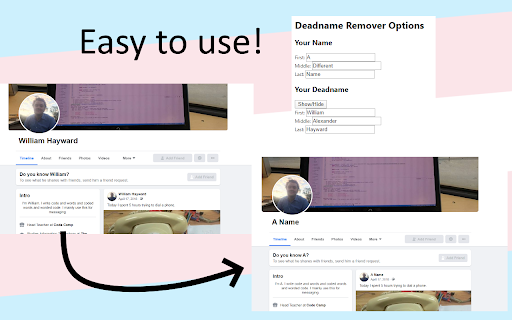
An easy to use browser plugin to automatically remove and replace deadnames Once installed, a page should open where you can edit your name and deadname settings. To edit this later or to temporarily disable the plugin, click on the trans flag in the top right corner of your browser.

Web Scraper - Free Web Scraping
Web data extraction tool with an easy point-and-click interface for modern web Free and easy to use web data extraction tool for everyone. With a simple point-and-click interface, the ability to extract thousands of records from a website takes only a few minutes of scraper setup. Web Scraper utilizes a modular structure that is made of selectors, which instruct the scraper on how to traverse the target site and what data to extract. Thanks to this structure, data mining from modern and dynamic websites such as Amazon, Tripadvisor, eBay, as well as from lesser-known sites is effortless. Data extraction is run on your browser and doesn’t require anything to be installed on your computer. You don't need Python, PHP, or JavaScript coding experience to start scraping. Additionally, it is possible to completely automate data extraction in Web Scraper Cloud. Once the data is scraped, download it as a CSV or XLSX file that can be further imported into Excel, Google Sheets, etc. Features Web Scraper is a simple web scraping tool that allows you to use many advanced features to get the exact information you are looking for. It offers features like: * Data scraping from multiple pages; * Multiple data extraction types (text, images, URL’s, and more); * Scraping data from dynamic pages (JavaScript + AJAX, infinite scroll); * Browsing scraped data; * Exporting scraped data from a website to Excel; It is dependent only on the web browser; therefore, no extra software needed for you to start scraping. How to begin scraping? There are only a couple of steps you will need to learn in order to master web scraping: 1. Install the extension and open the Web Scraper tab in developer tools (which has to be placed at the bottom of the screen); 2. Create a new sitemap; 3. Add data extraction selectors to the sitemap; 4. Lastly, launch the scraper and export scraped data. It’s as easy as that! What can Web Scraper be used for? * Lead generation - email, phone number, other contact detail related data mining from various websites; * E-commerce - product data extraction, product price scraping, description, URL extraction, image retrieving, etc; * Website content crawling - extract information from news portals, blogs, forums and so on; * Retail monitoring - monitor product performance, competitor or supplier stock and pricing, etc; * Brand monitoring - product review, social content crawling for sentiment analysis; * Business intelligence - gather data for key business decisions, learn from your competitors; * Big data extraction for machine learning, marketing, business strategy developments, researches; * And much more. Web scraping can be a little bit difficult at first, that's why we have created informational guides that can help you. For video tutorials, documentation, how-to’s, playground web pages and blog, visit our website: https://www.webscraper.io/ If you want to discuss web scraping, request features, ask questions or submit bugs, visit our friendly forum here: https://forum.webscraper.io/ Regarding the privacy policy of our product, see “Browser Extension Privacy Policy” at https://webscraper.io/extension-privacy-policy Thank you for choosing us!

Cache Killer
Clears the browser cache automatically. On or Off extension by single click Cache Killer automatically clears your browser cache whenever you open a new tab or refresh a page. You can easily enable or disable the extension with a single click

Random User Agent
Generate random user agent with chrome extension. Switch browser agents to any device or browser. Perfect for testing and privacy This powerful tool allows you to get random useragent strings with just a single click. It helps to protect websites tracking your browsing habits. Additionally, tool allows you to test any website across different browsers without actually installing them. 🤔 What is a UserAgent? A useragent is a string of text that your browser sends to websites you visit, revealing information about: 1. Your browser type and version - Chrome, Firefox, Safari, Edge etc. 2. Operating system - Windows, MacOS, Linux, iOS, Android etc. 3. Device specifications, rendering engine 💯 Why you need to use random user agent switcher Websites collect your device information to track your online activities. Our tool helps you maintain anonymity by regularly changing your device's identity. Privacy concerns have never been more relevant than today. – Enhanced privacy protection – Bypass geo-restrictions – Test websites across multiple platforms – Avoid browser fingerprinting – Access to region-specific content ⚙️ How Random User Agent works Extension works like a useragent converter that edits native identity to random user agent string seamlessly in the background. Once installed, you can set it to automatically switch user string at intervals or manually select from a comprehensive list of strings. Our privacy tool maintains a database of thousands of different browser agent strings, ensuring you always have fresh options to choose from. Whether you need to switch useragent in Chrome for development or privacy purposes, this extension handles it efficiently. 🔥 Features that set random user-agent extension apart Generate random useragent strings with unparalleled flexibility! Our tool comes packed with features designed to satisfy both casual users and professionals. 🔺 One-click random agent generator (generate browser strings for your purpose) 🔺 Scheduled rotation (for example, change it every 10 minutes) 🔺 Custom profiles (spoof desktop or mobile) 🔺 Useragent switcher with predefined categories (specific OS, devices, browsers) 🔺 Detailed UA information display (answers the question "what is my user agent?") 📊 Use cases for extension The user agetn randomizer for chrome serves numerous practical purposes. Developers particularly appreciate this agent switcher and manager when testing cross-browser compatibility. Privacy-conscious persons rely on this browser spoofer chrome extension to minimize tracking. 1️⃣ Web developers testing responsive designs 2️⃣ Privacy-focused individuals avoiding tracking 3️⃣ Marketers checking geo-targeted content 4️⃣ Bypassing simple site restrictions 5️⃣ Accessing region-specific offers or content 📱 Compatible with all your devices Whether you're using Chrome on Windows, macOS, Linux, the random user agents extension works flawlessly across platforms. The user identity string can be changed with a single click, making it the perfect browser switcher for all your devices. 🔒 Privacy first approach This extension prioritizes your privacy. It doesn't collect your data or track your browsing habits. This tool generates fake user agents follows strict privacy guidelines, ensuring your browsing remains truly private. ⚡ Advanced options of extension For those who need more control, the random useragent generator offers advanced configuration options. Set chrome useragent strings based on specific websites, create rotation patterns, or define custom browser identities with the useer-agent random generator functionality. 🔹 Rotation patterns and schedules 🔹 Custom user agent creation (with random option) 💻 Perfect for developers and testers Web developes love the switcher user agent chrome capabilities for testing responsive designs across multiple virtual devices. Instead of maintaining several physical devices, use this extension to simulate different environment or spoof browser. The user agent check feature allows you to verify your current identity string, while the agent randomizer ensures you're always testing with fresh configurations. This makes random user-agent extension an indispensable tool in any developer's toolkit. 🚀 How to get started 1. Install our extension from the Chrome Web Store 2. Click the extension icon to access the switcher 3. Turn on random generation mode 4. Customize settings based on your preferences 5. Enjoy enhanced privacy and testing capabilities

Name Generator
Easy way to generate random names and save them for a later use! This extension will generate random profiles using different external sources. You can also save generated data for a later use. Now extension supports the following sources: - Faker.js (https://github.com/marak/Faker.js/) - Random User Generator (https://randomuser.me/) - Random Profile (http://randomprofile.com/) - uinames.com (https://uinames.com/) Feel free to report any issues or suggest new features at GitHub: https://github.com/kondratyev-nv/name-genarator-extension/issues
