
eobkhgkgoejnjaiofdmphhkemmomfabg

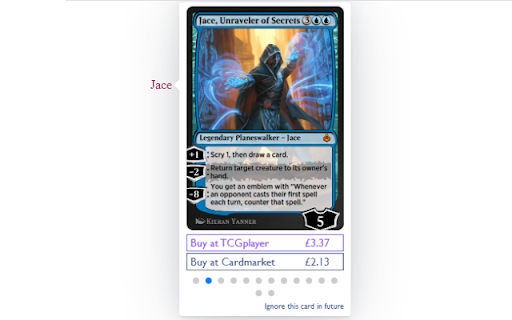
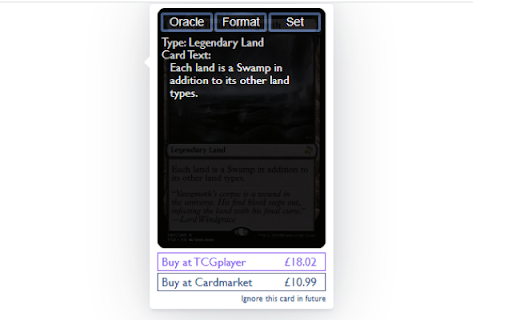
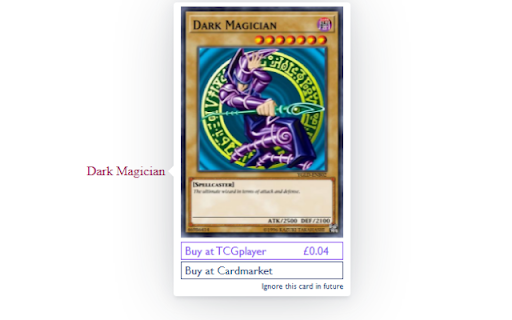
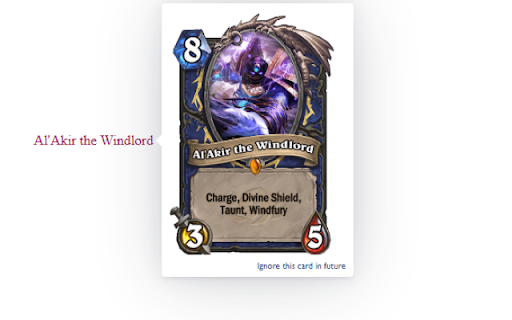
Displays card image popups for collectable card games on all webpages you visit. Do you play a collectable card game, such as Magic: The Gathering, YuGiOh!, Pokémon, Hearthstone or Netrunner? Ever find yourself trying to follow a conversation about card games on a website without card image popups? Then AutocardAnywhere is for you! Just install it in your browser and it automatically recognises card names on any page you visit and adds a popup with information about that card. No more manually searching to find-out what cards do, just hover your mouse over the name. * Supports Magic: The Gathering and 30 other card games too. * Runs instantly on page load - just hover over and the card image appears. * Updates when new content is added to the page. * Fully configurable with a vast array of options. * Easily follow conversations about new cards. * Discover cards you never even knew existed!

Visualping
Visualping Chrome Extension Website change detection and monitoring that does the watching for you. Right now you're checking that page by hand. Refreshing to see if the price dropped, the job posted, or the policy changed. Visualping does the checking instead. It watches any web page and emails you the moment something changes, with a plain language summary of exactly what's different. Visualping reads the change and tells you what happened in one sentence. ➤ How it works: • Click Visualping on any page you want to watch. • Pick how often to check: every few minutes, hours, days, or weeks. • Tell Visualping what you're monitoring for on the page • Get an alert the moment something important changes. ➤ Visualping AI reads the change for you: • Every change comes with a plain-English summary, so you read one short description of what happened • Visualping AI flags the changes that actually matter, so a small footer update doesn't ping you at 2am. ➤ What people watch with Visualping: • Price drops and back-in-stock alerts on shopping sites • Concert, event, and travel-deal availability • New job postings at the companies you want to work for • New property and rental listings that match your criteria • Grades, course registration dates, and scholarship deadlines • Competitor pricing pages, product launches, and policy updates ➤ Get notified your way: • Email, WebHooks, Zapier, and the API on every plan. Paid plans add SMS, Slack, Microsoft Teams, and Google Sheets. • Run as many local monitors as you want, free. They check pages right in your browser. • For pages you want checked even when your browser is closed, a free account includes 5 cloud monitors, and paid plans add more. Never check that page by hand again. Stay in the know with Visualping.

Terms of Service; Didn’t Read
Get information about websites' terms of service and privacy policies, with ratings and summaries from ToSDR. “I have read and agree to the Terms” is the biggest lie on the web. We aim to fix that. "Terms of Service; Didn't Read" is a user rights initiative to rate and label website terms & privacy policies, from very good (Class A) to very bad (Class E). This extension shows this rating for rated websites by an unintrusive icon in the address bar. You can click on this icon to get a list with the most important rated points of the website's term of services. Additional the extension will warn you when you visit for the first time a website with a bad rating. Optionally you can notify companies for their grades by sharing on Twitter, if you do not like this feature, simply head over the settings and hide the share button. This extension is open source. You can report bugs or propose new features at https://github.com/tosdr/browser-extensions.

imgur Uploader
Right-click uploading of images and screenshots anonymously or to your imgur account. Right-click uploading of images and screenshots to imgur, anonymously or to your imgur account. This is intended as a less feature-rich replacement for William Parry's original imgur Chrome extension which he has removed from the web store (I believe it is back and maintained as the Metronomik extension), and makes use of his icons. Version 2.4.1: Fix bug in oauth flow that made some people unable to authenticate with imgur. Version 2.4: Update to Manifest V3. Fix capture area bug when the browser's default zoom level was not 1.0, caused by incorrectly applying a zoom correction factor when the browser had already applied that correction for us. Version 2.3: Relaxed permission requirements as made possible by updates to Chrome's extension API (or, possibly, just their documentation). Version 2.2: Inverted the selection rectangle. This won't ever cause the selection rectangle to be in the captured image, which affected some users. Also, uploading images should work with more kinds of images now, including data urls and SVGs. Version 2.1: I was lying in bed last night and it occurred to me I'd added support for higher dpis but not different zoom levels. This was fortunate as when I went to muck around with it I discovered I'd introduced a bug that affected many if not most users. You can take captures while zoomed in or out now. Version 2.0: This update removes all 3rd party code and so the code for imgur Uploader is now in the public domain. Additionally: - Rewrite of capture area to fix various bugs, work in more websites, and respect high dpi displays. - Added requested features: not focusing tabs of uploaded images; copying to clipboard without opening images - Uses https all of the time - Opens album page when uploading into albums

Moderator toolbox for reddit
Toolbox is an extension that adds a myriad of much needed features and functionality to reddit for moderators. Containing: - Queuetools - Mod Button - Mod Mail Pro - Mod Domain Tagger - Toolbox Notifier - User history analyzer - Comment Nuke tool - User notes - Personal notes - Syntax highlighter for subreddit css - Much more
