
emblnilgmphckfkocfghpmdghiplmpnp

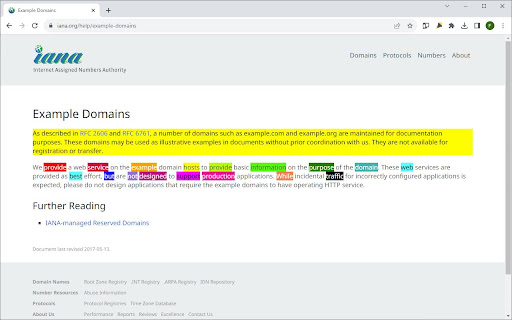
Marks text with a click or selection. Simply press Alt or Option to activate. Easy to use. Highlight what matters with 1 Click Text Marker 2.0. Dive into long texts without losing focus, because with 1-Click Text Marker 2.0, highlighting essential points has never been this seamless. • One-Tap Magic: Click on a word or drag over a passage - highlighting is a breeze. • Precision, Guaranteed: No more partial word highlights. Get clean, full-word marking every time. • Customize Your Palette: From subtle shades to bold hues, choose the perfect color for your context. • Undo in a Snap: Made an error? Revert highlights with the same ease. Please note: 1) There is a short loading time when a website first loads as the extension only starts when it is sure the website has fully loaded. after upt to 2 or 3 seconds you can highlight. 2) The extension was only tested in google chrome, not other chromium based browsers. 3) The highlighting does not work in pdfs or locally stored html pages. There is also a small number of websites where the highlighting feature may not work as expected. • Enhanced Highlighting Algorithm: Effortlessly select with improved precision. Whether it's a single word or an entire passage, get perfect highlights every time. • Expanded Color Palette: More shades, more customization! Choose from an even wider range of colors to match your mood or the content's context. • Smart Undo Feature: Made a mistake? No worries! Reverting highlights instantly with a single click now works even better and more intuitively. • Optimized Performance: Faster, smoother, and more reliable. Experience lag-free highlighting even on the longest of web pages. Ready shortly after the page loads. • Intuitive User Interface: A sleeker design ensures you get the most out of every feature, without any hassle. The new onboarding page gives you an easy introduction of how highlighting works. I'm thrilled to present this revamped and fully optimized version of 1 Click Text Marker that allows you to highlight text with absolute ease. Whether you click on a word or drag to select, 1 Click Text Marker 2.0 just works, and all highlights are reversible just as easily. No need to be accurate when selecting text to highlight, the extension ensures that entire words are highlighted for a cleaner look. With a diverse color palette you can pick the perfect shade for every context. Experience effortless highlighting and enhance your reading, research, or browsing with 1 Click Text Marker 2.0.

Highlighter
Highlight selected text in webpages, add notes and visit the webpage again to see highlighted text and saved notes. 🖍️ Online Highlighter Extension for Chrome™ – Save & Organize Your Research Effortlessly Looking for a reliable web 𝗛𝗶𝗴𝗵𝗹𝗶𝗴𝗵𝘁𝗲𝗿 Chrome™ extension to keep track of important information? This text highlighter Chrome™ extension makes it simple to highlight, save, and revisit key content on any webpage. Highlight selected text on a webpage using the highlighter for Chrome™ and save it to view later. Add personal notes to highlighted sections and access them whenever you revisit the page. All your saved highlights and notes stay linked to the same webpage for quick reference. Mac: Press Cmd + Shift + 2 for fast highlighting. Mac: Press Cmd + Shift + 4 for quick note-taking. With this highlighter for web pages, you’ll never lose track of critical insights, research notes, or references again. 🚀 Perfect for students, professionals, and researchers who need an efficient highlighter Chrome™ extension to stay organized.

Chrome Highlighter — Free Text & Word Highlighter for Webpages
Highlight words on any webpage with custom colors. Manage your list easily and boost focus while studying or researching. Highlight text on any website with Chrome Highlighter, the ultimate Chrome extension for customizable text and word highlighting for free! Whether you're studying, researching, taking notes, or organizing key information, Chrome Highlighter helps you visually mark important text and keywords, making your browsing experience more efficient and productive. - Customizable Colors: Choose from unlimited colors to differentiate highlights clearly and personalize your experience. - Simple to Use: Designed for ease and speed—highlight words in just a few clicks. - Easy Highlight Management: Add, edit, search, and manage your highlighted words effortlessly within the extension’s simple and intuitive interface. - One-Click Enable/Disable: Quickly toggle highlighting on or off without removing your custom settings. - Secure and Private: Chrome Highlighter prioritizes your privacy, ensuring zero data collection or external data sharing. - Real-Time Sync: Highlights and custom settings synchronize automatically across all your devices where Chrome is installed. 1. Students & Educators: Highlight crucial points while studying online textbooks, articles, and research papers. 2. Researchers: Organize your findings effectively by highlighting key sections, statistics, and quotes from academic articles or websites. 3. Writers & Editors: Efficiently edit or proofread online documents, blogs, and web pages by marking essential areas. 4. Business Professionals: Highlight and quickly reference critical data and insights directly from online reports, news, or market research. 5. Everyone: From casual readers to power users, Chrome Highlighter makes it easy to mark what matters — whether you're reading news, comparing products, or saving important reminders while browsing. - Chrome Highlighter transforms your web browsing by turning standard web pages into interactive, easily navigable study and reference tools. Improve your productivity, save valuable time, and keep your digital workspace organized. 📌 Ideal for: Online study tools, text highlighters, productivity extensions, webpage annotation, research assistants, academic tools, content organizers, study aids, custom webpage highlights. Install Chrome Highlighter today—start highlighting smarter, searching faster, and staying more organized. - Improved Onboarding Experience: New user-friendly consent screen so you always know how your data is handled. - Refined Interface & Branding: Fresh new look and name — still the same powerful highlighting tool, now even easier to use. - Performance Enhancements: Faster load times and smoother interactions across all sites. - UI Tweaks: Better spacing, visual balance, and icon polish for a cleaner feel. - Bug Fixes: Resolved sync issues and minor glitches to improve reliability.

Text Highlighter
Enter a keyword and get the text you're looking for highlighted - all the time while surfing the web! Privacy First: We do not track or collect any data. Your browsing activity remains completely private, and all keywords stay securely within your device. When you click the extension, a popup window with an input field appears. Simply enter the keyword you're interested in, and Text Highlighter will search for it on the web pages you visit, highlighting all occurrences of your keyword. Example: Enter a keyword like "bitcoin" to highlight related content on news articles, journals, and blogs. Or use a term like "junior" while browsing job listings online. The extension will instantly highlight your keyword, allowing you to quickly scan and find relevant information across web pages. Lightweight and Efficient: Designed to be fast and unobtrusive, Text Highlighter won’t slow down your browsing experience. Persistent Highlighting: The extension remembers your keywords even as you navigate across different pages, ensuring you stay focused on what matters.

ZetaMarker Lite - Web Highlighter
Free Highlighter & Annotator for touch screen & Android devices. Effortless syncing of highlights and annotations across devices. Introducing ZetaMarker Lite - Your Lightweight Annotation Companion for Touch Screen Devices! ZetaMarker Lite, the sleeker sibling of ZetaMarker, is tailored for touch screen devices and Android, providing a nimble and efficient solution for highlighting and annotating online articles. Streamlined and lightweight, ZetaMarker Lite ensures a focused experience with a primary emphasis on touch-based interaction. 🚀 Touchscreen Optimized: Tailored for touch screen devices, ZetaMarker Lite offers an intuitive and seamless experience for effortless highlighting and annotation on your touchscreen device. 📄 Mobile Productivity: Boost your productivity on the go with ZetaMarker Lite, designed to cater specifically to Android devices, providing a user-friendly interface for annotation tasks. 📱 Android Compatibility: ZetaMarker Lite is fully compatible with Kiwi browser, a web browser for mobile devices specifically designed for the Android operating system. Known for its speed, privacy features, and support for various web extensions. 1️⃣ Install Kiwi Browser: Head to the Google Play Store on your smartphone. Search for "Kiwi Browser" and install it on your device. 2️⃣ Open Kiwi Browser: Launch the Kiwi browser on your Android device. 3️⃣ Add ZetaMarker Lite: Visit the current page using the Kiwi browser. Follow the on-screen instructions to add ZetaMarker Lite to your browser. 🖍️ Streamlined Highlighting: Enjoy easy and precise highlighting on web pages, enhancing your reading and research experience. 💬 Simplified Comments: Add comments effortlessly, facilitating research insights and collaboration, directly from your Android device. 📂 Lightweight Design: ZetaMarker Lite is designed to be light on resources, ensuring optimal performance on touch screen devices without compromising functionality. 🚫 PDF-Free Zone: ZetaMarker Lite focuses on the essentials, omitting PDF support to align with the limitations of mobile browsers on Android devices. If you want to highlight on PDF files, install ZetaMarker on your PC or laptop: https://chromewebstore.google.com/detail/zetamarker-pdf-web-highli/ajaboiophmaflodkmglfpngnmiijkkle 🔄 Sync on the Go: Seamlessly sync your annotations and highlights between your device to ensure a cohesive research workflow. Install the PC version of ZetaMarker on your laptops and PC at https://chromewebstore.google.com/detail/zetamarker-pdf-web-highli/ajaboiophmaflodkmglfpngnmiijkkle, and enjoy the ability to access your annotations and highlights on all your devices. 🌐 Multi-Language Support: Like its predecessor, ZetaMarker Lite is available in multiple languages for a global user base. 🚀 Always Evolving: Expect regular updates and new features as we continue to enhance your annotation experience. 📱 No Account Needed: ZetaMarker Lite retains the account-free and permission-free philosophy, ensuring quick and hassle-free access. 🔒 Privacy Assurance: Your data remains under your control, aligning with our commitment to privacy. Learn more: https://zetamarker.com/legal/privacy. 🔍 Web Highlighter, Android Annotation, Touchscreen Optimized, Lightweight Design, Collaboration on the Go, Mobile Productivity, Effortless Highlighting, Privacy-Focused, Sync Across Devices, Free Annotation Tool, Intuitive Interface, Annotation Companion for Android, Account-Free, PDF-Free Annotation. Mobile Annotator, Marker.
