
bhdenafgfahdobemdgijbehofkbbaoim
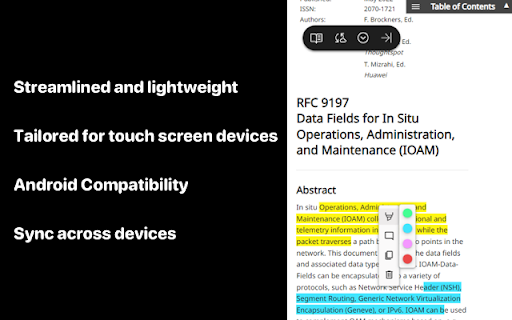
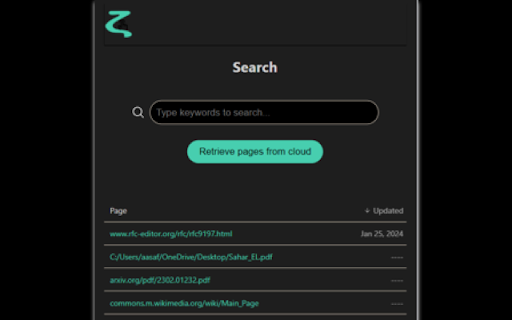
Free Highlighter & Annotator for touch screen & Android devices. Effortless syncing of highlights and annotations across devices. Introducing ZetaMarker Lite - Your Lightweight Annotation Companion for Touch Screen Devices! ZetaMarker Lite, the sleeker sibling of ZetaMarker, is tailored for touch screen devices and Android, providing a nimble and efficient solution for highlighting and annotating online articles. Streamlined and lightweight, ZetaMarker Lite ensures a focused experience with a primary emphasis on touch-based interaction. 🚀 Touchscreen Optimized: Tailored for touch screen devices, ZetaMarker Lite offers an intuitive and seamless experience for effortless highlighting and annotation on your touchscreen device. 📄 Mobile Productivity: Boost your productivity on the go with ZetaMarker Lite, designed to cater specifically to Android devices, providing a user-friendly interface for annotation tasks. 📱 Android Compatibility: ZetaMarker Lite is fully compatible with Kiwi browser, a web browser for mobile devices specifically designed for the Android operating system. Known for its speed, privacy features, and support for various web extensions. 1️⃣ Install Kiwi Browser: Head to the Google Play Store on your smartphone. Search for "Kiwi Browser" and install it on your device. 2️⃣ Open Kiwi Browser: Launch the Kiwi browser on your Android device. 3️⃣ Add ZetaMarker Lite: Visit the current page using the Kiwi browser. Follow the on-screen instructions to add ZetaMarker Lite to your browser. 🖍️ Streamlined Highlighting: Enjoy easy and precise highlighting on web pages, enhancing your reading and research experience. 💬 Simplified Comments: Add comments effortlessly, facilitating research insights and collaboration, directly from your Android device. 📂 Lightweight Design: ZetaMarker Lite is designed to be light on resources, ensuring optimal performance on touch screen devices without compromising functionality. 🚫 PDF-Free Zone: ZetaMarker Lite focuses on the essentials, omitting PDF support to align with the limitations of mobile browsers on Android devices. If you want to highlight on PDF files, install ZetaMarker on your PC or laptop: https://chromewebstore.google.com/detail/zetamarker-pdf-web-highli/ajaboiophmaflodkmglfpngnmiijkkle 🔄 Sync on the Go: Seamlessly sync your annotations and highlights between your device to ensure a cohesive research workflow. Install the PC version of ZetaMarker on your laptops and PC at https://chromewebstore.google.com/detail/zetamarker-pdf-web-highli/ajaboiophmaflodkmglfpngnmiijkkle, and enjoy the ability to access your annotations and highlights on all your devices. 🌐 Multi-Language Support: Like its predecessor, ZetaMarker Lite is available in multiple languages for a global user base. 🚀 Always Evolving: Expect regular updates and new features as we continue to enhance your annotation experience. 📱 No Account Needed: ZetaMarker Lite retains the account-free and permission-free philosophy, ensuring quick and hassle-free access. 🔒 Privacy Assurance: Your data remains under your control, aligning with our commitment to privacy. Learn more: https://zetamarker.com/legal/privacy. 🔍 Web Highlighter, Android Annotation, Touchscreen Optimized, Lightweight Design, Collaboration on the Go, Mobile Productivity, Effortless Highlighting, Privacy-Focused, Sync Across Devices, Free Annotation Tool, Intuitive Interface, Annotation Companion for Android, Account-Free, PDF-Free Annotation. Mobile Annotator, Marker.

ZetaMarker - PDF & Web Highlighter
The privacy-friendly tool for highlighting web pages and PDF files. ZetaMarker PC is a browser extension for higlighting, annotating, and organizing online pages and PDF files on your PC. It is compatible with Chromium-based browsers including Chrome, Edge, Brave, and Opera. 🔒 Privacy-Focused: Privacy is paramount with ZetaMarker, as our extension operates on a permission-free principle, ensuring that your sensitive data remains secure. ZetaMarker prioritizes your privacy, providing a seamless and secure highlighting and annotation experience without compromising your personal information. 🖍️ Easy Highlighting and Commenting: Easily capture Your Focus with our intuitive highlighting and annotation features, allowing you to mark important sections of PDFs or web pages for easy reference. Revisit annotated pages to access key insights and stay focused on essential information whenever you need it. 🔄 Cross-Device Sync: Stay in sync across all your devices with our annotation synchronization feature. Whether you're working on a desktop, laptop, or mobile device, your annotations are always up-to-date, ensuring you never lose your notes again. Your annotations are consistently accessible whenever and wherever you need them. 🔍 Powerful Search Tool: Quickly locate the information you need with our robust search tool, designed to search through all your annotations and labels in seconds. Whether you're searching for specific notes or insights, our powerful search functionality ensures you can quickly pinpoint relevant information, saving you valuable time and enhancing your productivity. 📤 Export Your Notes: Export your highlights and comments to PDF, HTML, Markdown or TXT formats, enabling sharing, collaboration, and knowledge dissemination. Whether you're compiling reports, integrating annotations into websites, or simply keeping a backup in plain text, our export options ensure flexibility and convenience for all your needs. 📱 Anywhere, Anytime Access: Experience access anywhere, anytime with our web app. Your notes are conveniently available at your fingertips, ensuring uninterrupted productivity and effortless organization. 🚀 Always Evolving: Stay ahead with our platform's continuous evolution, as we're constantly introducing exciting new features. Install now and reap the benefits of automatic updates, ensuring you always have access to the latest enhancements and functionalities, keeping your experience fresh and innovative. 📁 File Access: To highlight local PDFs, grant access to file URLs. 1️⃣ Open your browser's Extensions page. 2️⃣ Find ZetaMarker and click 'Details.' 3️⃣ Toggle on 'Allow access to file URLs.' More info: https://zetamarker.com/documentation 🔐 Your Data, Your Control: Your highlights and comments are yours. We don't sell or misuse your data. Learn more: https://zetamarker.com/legal/privacy. 📜 Terms of Service: Installing the extension or signing up means you agree to ZetaMarker's Terms: https://zetamarker.com/legal/terms.

Web Highlights: PDF & Web Highlighter + Notes & AI Summary
Productivity Highlighter & Annotation Tool for Websites & PDFs with AI Summary - free, easy to use, no sign-up required. Stay organized online with Web Highlights — a powerful Chrome extension to highlight text on websites, annotate PDFs, take notes, manage bookmarks, and generate AI summaries of your content. Whether you're a student, blogger, developer, researcher, or lifelong learner, Web Highlights helps you stay productive, save, organize, and revisit what matters — all in one place. Use it as your personal text highlighter for Chrome with smart note-taking, PDF annotation, tagging, full-text search, and AI-powered content summarization. Choose offline use or sync everything to the cloud via the web app. 🟢 Highlight websites and PDFs (including local files) 🎨 Multiple highlighter colors ✍️ Take notes and connect them with your highlights 🤖 AI Summary - Generate smart summaries of your highlights and websites 💬 AI Chat - Our AI understands the full context of the website, so you can chat with it and ask questions. 🔖 Save pages as bookmarks or use as a read-it-later web clipper tool 🏷️ Tag your highlights & bookmarks for easy filtering 🎥 Youtube Highlighting - Highlight & annotate Youtube video transcripts 🔄 Sync across devices and access highlights anywhere * 💻 Web app & sidebar with an overview of all your highlights, bookmarks, and notes 📖 Reader mode for focused and distraction-free article reading & annotating 🗂️ Import all your existing Chrome bookmarks 🔍 Powerful full-text search to find anything instantly 📷 Highlight images and visual elements * 𝐓 Highlight in various formats (headings, paragraphs, etc.) * 🧠 Daily recap of your highlights for better retention ⚡ Use keyboard shortcuts for ultimate productivity 📄 Export to Notion, Obsidian, Capacities, and other popular note-taking tools 📑 Copy to HTML and Markdown 📁 Export to PDF and HTML files * 📱 Bookmark on mobile with our web app * ⏰ Set email reminders for specific pages * 📚 Import Kindle highlights easily 💾 Backup and download your research * 🔗 Share your highlights * 👥 Discover content from others ✅ It just works – Highlight text in multiple colors on any website or PDF with a simple click. ✅ Persistent highlights - Your highlights stay visible even after reloading the page. ✅ Works offline – No account required for basic use. ✅ Sync across devices - Create an account to access your highlights anywhere from the web app. ✅ Unlimited AI summaries – Unlike other tools, we don’t place any limits on AI features. ✅ Reader Mode – Enjoy clean, distraction-free reading and keep a simple copy of articles. ✅ Integrate with Notion, Capacities, Obsidian, and other note-taking tools. ✅ Export your research — PDF, HTML, Markdown, or clipboard. ✅ Perfect for online deep work & and efficient research management. ✅ Help children learn - We proudly support the Save the Children charity and other great causes. You can use Web Highlights completely free without an account. Highlight, bookmark, and take notes offline anytime. Create a free account to enable cloud sync and unlock all features with a 7-day trial. Afterward, continue using the free offline version with basic features or upgrade for seamless access across all devices. Check out the current pricing here: https://web-highlights.com/pricing. ➡️ Enable/disable the highlighter popup via the settings and highlight using keyboard shortcuts or by right-clicking text. ➡️ Customize keyboard shortcuts at chrome://extensions/shortcuts ➡️ Some websites may have limited compatibility. ➡️ Local PDF support requires access to file URLs (see PDF setup guide: https://web-highlights.com/blog/how-to-highlight-pdfs-using-web-highlights). ➡️ Right-click images to save them to your sidebar of highlights & notes. ➡️ Use as a web clipper – Click the bookmark icon or right-click any website to save pages and add tags like "ReadingList" for easy reference later. ➡️ Disable extension on specific websites: Click the power icon in the sidebar to disable the highlighter on a site. You can also configure a blacklisted domain list with patterns in the settings under "Excluded" domains. ➡️ Sort highlights manually: Highlights should appear in the same order as on the page. If not, use the drag & drop or arrows in your annotation sidebar to rearrange them as needed. ➡️ Customizable Sidebar: Change the sidebar width by dragging its edge, and align it on the left or right side of the page for a personalized experience. ➡️ Switch to Advanced Highlighter Mode in settings to organize highlights with headings, paragraphs, and more in the sidebar. ➡️ Multiple Colors: Choose from predefined standard and pastel shades or click the plus icon to add your own custom color. ➡️ Note Taking: Use standard keyboard shortcuts like CMD + B for bold, CMD + U for underline, etc., in the note-taking editor for efficient formatting. ➡️ Reader Mode: Click “Open in Reader” to view any article in a clean, distraction-free layout with customizable fonts, colors, and spacing. A copy of the article is saved so you can read and highlight it with full focus — even if the original changes or disappears. ➡️ Focus highlights on website: Click on a highlight in the sidebar, and the page will scroll directly to the highlighted section for quick access. ➡️ Color Mode: Switch between dark and light mode by clicking the sun/moon icon in the sidebar. ➡️ Your data is always private unless you choose to share it. ➡️ You may be exposed to affiliate links on sites you visit while using this extension, and you may be encouraged to click on them, but you are never required to do so. 🔐 YOUR PRIVACY MATTERS We believe your data belongs to you. ✔️ Your highlights, notes, and bookmarks are private by default ✔️ Nothing is ever sold or used to profile you ✔️ Secure sync and export, only accessible with your account We never use your data for advertising, lending, or unrelated purposes. By installing the extension or signing up with an account, you agree to Web Highlights Terms of Service and Privacy Policy which you can find here: https://web-highlights.com/legal/terms-of-service ❤️ This is a one-person project I’m building with love and late nights. I hope you enjoy using this tool as much as I do. Feel free to share your feedback with me:

Highlighter Extension
Discover highlighter extension that auto-colors your keywords; finds and highlights what’s vital instantly! 📑 Tired of scrolling endless pages? Discover **highlighter extension** power that instantly surfaces what matters. Our minimalist yet mighty **highlighting extension chrome color** engine auto-colors keywords on any site so you focus, learn and decide faster. 🚀 With this **highlight extension**, you drop in a term list - dozens of keywords - and for any page open the icon badge answers the question every power-reader asks: _Is anything here worth my time?_ 🚀 It finds even the matches hidden in the collapsed page sections and highlights them with a beautiful glow. 1️⃣ **Quick start** 1. Install the **highlighter chrome extension** in one click 2. Paste or type your keyword list 3. Highlights bloom instantly across the page 🌈 4. Click on any match to quick-scroll to the match, even if it's hidden behind some menu 🎨 Researchers, developers, students and analysts rely on this **chrome highlighter extension** to jump between matches in docs, forum threads or huge webpages. ➤ Match text instantly ➤ Find even hidden content ➤ Navigate over the highlights with the keyboard shortcuts ➤ Organize search keywords ➤ Copy Markdown keyword export-import straight into-from Notion or Obsidian 🔍 Why settle for plain Ctrl-F? A single pass from our **highlight chrome extension** reveals clusters, density and context. That’s more than search - it’s visual triage for the impatient. ▸ **Performance promise** – Scans long pages in milliseconds – Lightweight due to using native browser Highlight API – Works even with most complex and dynamic pages as it doesn't touch the page layout – Memory-light: no tracking, no heavy scripts, pure client-side ✅ **Who benefits most?** 🔹 Recruiters scanning pages for skill names 🔹 Journalists verifying sources at speed 🔹 Product managers mapping requirements 🔹 QA engineers hunting error strings 🔹 Students revising key terms before an exam 🔹 Bloggers mining quotes for tomorrow’s post 📚 Under the hood our **highlighting extensions** algorithm maps matches, paints color bands and builds a summary panel with jump links. It feels like **chrome extension highlight** on steroids - no page reload, no context loss. 1️⃣ Create or paste a list 2️⃣ Choose whether you are interesting in finding even hidden content 3️⃣ Turn in on - the highlighter in chrome takes over while you sip coffee ☕ ⚡ Need the data elsewhere? Copy a Markdown block - plain text compatible with any editor. Every **text highlighter** fan can reuse keyword lists anywhere. ▸ Privacy first: everything runs inside your browser 🔒 ▸ Zero accounts, zero clouds, zero leaks ▸ Lightweight design keeps CPU cool on 100-tab sessions ▸ Frequent updates keep the **highlighting chrome extension** in sync with browser changes 🖍️ Whether you call it **highlight extensions chrome**, **chrome highlight**, or simply “my **highlighter**,” the mission stays the same: read at light speed. Early adopters already dub it the **best highlighter extension for chrome** because “it just works.” ➤ **Growing real-world stories** • HR teams screening 300 CVs in half the time • Cyber pros spotting IOC strings in leaked data dumps • Researchers extracting citations from 50-page whitepapers • Shoppers tracking coupon codes before checkout • Writers checking style-guide terms across archives 💡 Power tips for pro users 1️⃣ Start search with Ctrl-Shift-F 🔥 2️⃣ Use keyboard shortcut Ctrl-Shift-K to jump to the next match in sequence 3️⃣ Choose to show hidden content to highlight even what's in the collapsed sections 🔐 **Security & privacy details** – No external calls: logic lives fully in your browser sandbox – All keyword lists stay local; delete them with a click whenever you wish – Works under corporate proxies - perfect for locked-down environments – This webpage highlighter doesn't need a cloud to work - everything runs locally 🌍 **Compatibility FAQ** 🔸 Works on Windows, macOS, Linux and ChromeOS 🔸 Supports Brave, Edge and Arc (Chromium-based) via the same package 🔸 Handles dynamic sites like Gmail, Notion, LinkedIn, Figma embeds, dynamic log pages, and SPA dashboards without reloads 🔸 Recognises RTL scripts, emoji, superscripts and mathematical symbols for true **highlighter in chrome** versatility 🌐 As a **highlighter for websites**, it thrives on multilingual pages, emoji-filled chats and fast-updating dashboards. Even the trickiest SPA obeys the **auto highlight chrome extension** logic without a refresh. Ready to experience a superior way to **highlight webpages**? Add this **highlight tool** now and turn Chrome into your personal knowledge radar. One install, infinite clarity—because information overload isn’t going away, but your stress can.

Highlighter Guru
Highlight and save text easily in Chrome! This extension helps you mark important stuff and store it neatly in folders for later. Introducing "Highlighter Guru" - Your Ultimate Web Highlighting Chrome Extension! Elevate your online research and information organization with Highlighter Guru, a powerful Chrome extension designed to enhance your web browsing experience. Say goodbye to scattered notes and tedious searches for important information – Highlighter Guru lets you effortlessly highlight text on web pages, customize the highlighting and font color, add personalized notes, and organize it all in a neatly structured folder system. 1) Select the Text: Highlight the text you want to save or make note of on any web page. 2) Press 'h' on Your Keyboard: Instantly apply your chosen highlight to the selected text. 3) Right-Click on the highlighted text for More Options: Explore additional options by right-clicking on any highlighted text. Edit, add notes, or organize it into folders – all with a few clicks. ➤ Effortless Highlighting: Select any text on a web page and press 'h' on your keyboard to instantly highlight it. It's that simple! ➤ Customization Options: Tailor your reading experience by choosing from a variety of highlighting colors and font options. Make your highlights visually appealing and easy to distinguish. ➤ Folder Organization: Create folders to categorize and organize your highlights. Seamlessly store and access your highlighted content with ease. ➤ Notes and Annotations: Add context to your highlights by attaching notes. Whether it's a key point, a citation, or your thoughts, your annotations will always be just a click away. ➤ Keyboard Shortcuts: Customize your experience by setting your preferred keyboard shortcuts. Effortlessly integrate Highlighter Guru into your workflow. ➤ Right-Click Options: Gain quick access to additional features by simply right-clicking on any highlighted text. Edit, delete, or review your notes effortlessly. Highlighter Guru is your go-to tool for transforming your web browsing into a personalized and organized experience. Download now and revolutionize the way you interact with online content! Github : https://github.com/Abdelrahman286/Chrome-Text-Highlighting-Extension-with-React
