
efikihnnclcchnlkcenaeilncbbbdmmd
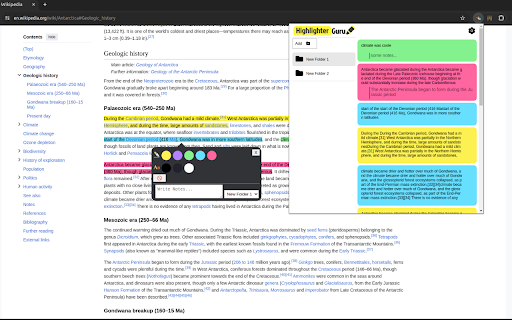
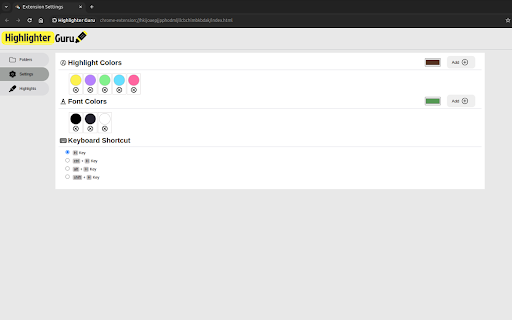
Highlight and save text easily in Chrome! This extension helps you mark important stuff and store it neatly in folders for later. Introducing "Highlighter Guru" - Your Ultimate Web Highlighting Chrome Extension! Elevate your online research and information organization with Highlighter Guru, a powerful Chrome extension designed to enhance your web browsing experience. Say goodbye to scattered notes and tedious searches for important information – Highlighter Guru lets you effortlessly highlight text on web pages, customize the highlighting and font color, add personalized notes, and organize it all in a neatly structured folder system. 1) Select the Text: Highlight the text you want to save or make note of on any web page. 2) Press 'h' on Your Keyboard: Instantly apply your chosen highlight to the selected text. 3) Right-Click on the highlighted text for More Options: Explore additional options by right-clicking on any highlighted text. Edit, add notes, or organize it into folders – all with a few clicks. ➤ Effortless Highlighting: Select any text on a web page and press 'h' on your keyboard to instantly highlight it. It's that simple! ➤ Customization Options: Tailor your reading experience by choosing from a variety of highlighting colors and font options. Make your highlights visually appealing and easy to distinguish. ➤ Folder Organization: Create folders to categorize and organize your highlights. Seamlessly store and access your highlighted content with ease. ➤ Notes and Annotations: Add context to your highlights by attaching notes. Whether it's a key point, a citation, or your thoughts, your annotations will always be just a click away. ➤ Keyboard Shortcuts: Customize your experience by setting your preferred keyboard shortcuts. Effortlessly integrate Highlighter Guru into your workflow. ➤ Right-Click Options: Gain quick access to additional features by simply right-clicking on any highlighted text. Edit, delete, or review your notes effortlessly. Highlighter Guru is your go-to tool for transforming your web browsing into a personalized and organized experience. Download now and revolutionize the way you interact with online content! Github : https://github.com/Abdelrahman286/Chrome-Text-Highlighting-Extension-with-React

Text Highlighter
An extension used to highlight and unhighlight the selected text.Highlighted texts are saved for you to view and use later. This extension lets you highlight and unhighlight a selected text in any chrome tab. All the texts are accessible to you in your dashboard at https://hp.zarvis.in/ . Lots of amazing updates to come by soon. Enjoy using it till then.

1Click Text Highlighter & Marker 2.0.1
Marks text with a click or selection. Simply press Alt or Option to activate. Easy to use. Highlight what matters with 1 Click Text Marker 2.0. Dive into long texts without losing focus, because with 1-Click Text Marker 2.0, highlighting essential points has never been this seamless. • One-Tap Magic: Click on a word or drag over a passage - highlighting is a breeze. • Precision, Guaranteed: No more partial word highlights. Get clean, full-word marking every time. • Customize Your Palette: From subtle shades to bold hues, choose the perfect color for your context. • Undo in a Snap: Made an error? Revert highlights with the same ease. Please note: 1) There is a short loading time when a website first loads as the extension only starts when it is sure the website has fully loaded. after upt to 2 or 3 seconds you can highlight. 2) The extension was only tested in google chrome, not other chromium based browsers. 3) The highlighting does not work in pdfs or locally stored html pages. There is also a small number of websites where the highlighting feature may not work as expected. • Enhanced Highlighting Algorithm: Effortlessly select with improved precision. Whether it's a single word or an entire passage, get perfect highlights every time. • Expanded Color Palette: More shades, more customization! Choose from an even wider range of colors to match your mood or the content's context. • Smart Undo Feature: Made a mistake? No worries! Reverting highlights instantly with a single click now works even better and more intuitively. • Optimized Performance: Faster, smoother, and more reliable. Experience lag-free highlighting even on the longest of web pages. Ready shortly after the page loads. • Intuitive User Interface: A sleeker design ensures you get the most out of every feature, without any hassle. The new onboarding page gives you an easy introduction of how highlighting works. I'm thrilled to present this revamped and fully optimized version of 1 Click Text Marker that allows you to highlight text with absolute ease. Whether you click on a word or drag to select, 1 Click Text Marker 2.0 just works, and all highlights are reversible just as easily. No need to be accurate when selecting text to highlight, the extension ensures that entire words are highlighted for a cleaner look. With a diverse color palette you can pick the perfect shade for every context. Experience effortless highlighting and enhance your reading, research, or browsing with 1 Click Text Marker 2.0.

Super Highlighter
Highlight text on web page with a simple right-click and keyboard shortcut. Custom highlight color. Saves highlights on your device. Highlight text on websites with a simple right-click or keyboard shortcut. Saves highlights on your device. Easiest way to highlight text on any webpage! Simply select text, then right click it to select the "Highlight" option. Alternatively, use the default keyboard shortcut 'Alt+H'. You can customize the colors of the highlighter, and you can switch these colors through shortcut keys. You can customize shortcut keys and use all functions without mouse. All highlighted texts are saved so that your highlights are not lost when exiting a page! Simply re-opening that page will bring back all the highlights.

Web Highlighter, Eraser, Black out marker and Multi copy tool
Highlight text in a web page. Copy multiple selections at once. Delete text or images. Black out. Print or save as anonymized pdf. Open a web page and activate the extension by clicking its icon. - Highlight the meaningful text fragments in a web page. - Delete the irrelevant text or images from a web page. - Copy multiple highlighted selections to the clipboard in one click. You do not have to paste into another window each time you select text. - Black out any private information before printing a web page. - Print the decorated text or save as a PDF. The highlights are retained during printing. In the PDF the blacked out characters are replaced by question marks. - You can also cross out or underline text like in Acrobat. How this tool is different from similar extensions: - It is simple to use. Its user interface is a toolbar popping up upon text selection. It has no options or settings. - It is open-source. The code inside is not mangled, you can check it to make sure that it is safe. - It is free.
