
eimkcffdakecfnjnkcbefpndphkgmjah


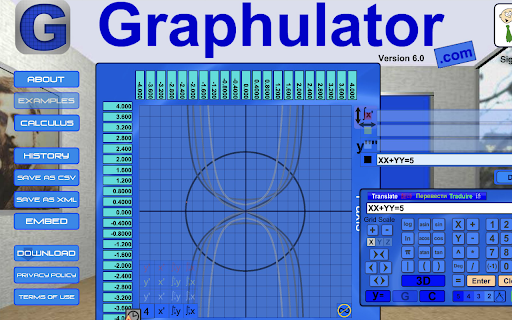
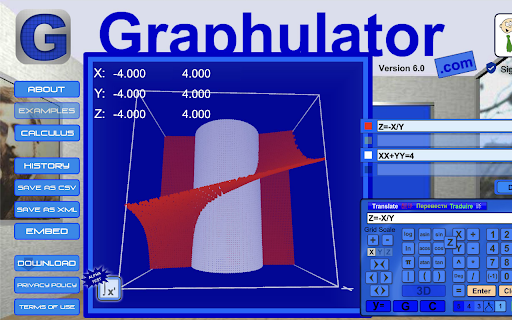

Graphulator with Calculus Graphulator is a numerical graphing calculator for 2 or 3 variable equations. Plot both functions and non-functions. Includes data output! Now includes numerical calculus. Graphulator boasts being the only calculator which can perform calculus on non-functions numerically (equations which cannot be reduced to a function). Graphulator boasts being the only numerical calculator which can plot three variable non-functions. (Equations of the form f(xyz) = f(xyz)). If you believe either of these claims to be untrue, let us know (contact@Graphulator.com).

Mouseless Stack-Calculator Ext
An innovative RPN and stack-calculator with keyboard input (as chrome extension) Mouseless Stack-Calculator is a innovative calculator and currency converter with fast keyboard entry. It has two modes: an RPN-mode and a stack-mode. The well known RPN stands for Reverse Polish Notation and it saves you time as it avoids the use of parenthesis. The only catch is that the entry of data is a bit different to what most people expect, so you have to learn to work with it. The stack-mode of this calculator is new. It's a bit similar to RPN in the way that is also uses a stack an avoids the use of parenthesis. But it's unique in the way that it has no reversed data entry but follows the 'normal' sequence. All calculations can be done by use of the keyboard, so no time consuming mouse clicks. It can handle both real and complex numbers and supports different notations. Mouse Stack-Calculator is available as Chrome extension, as desktop app and can run in a webbrowser window. - Flexible and intuitive user interface - Complete insight in entered expression - All the advantages of RPN in RPN-mode - Keyboard for all data entry (as you would expect from a calculator) - Most frequent used instructions only need 1 key; other instructions 2 keys - Integrated currency converter with actual rates - Arbitrary-precision decimal representation (no rounding errors), thanks to MikeMcl - Multi-level undo - Support for complex numbers and polar/rectangular conversions - Flexible number notation: normal, financial, integer, scientific, engineering, h:m:s, h:m, hexadecimal, octal, binary, fractions, complex (rectangular and polar) - 30 last answers - 30 memories to store intermediate results - Stack and memory are saved on your computer for future use - Copy results to clipboard for use in other programs - Mathematical calculations - Works with hours (or degrees), minutes, seconds - Statistical and probability calculations - Financial calculations like CAGR, Annuity and CashFlow - Physical constants and conversions Version 1.240 - Bug fix: accept entry with negative exponent correctly Version 1.230 - Extension ported to MS-Edge - Last position of window is saved - ECB now only provider of daily exchange rates (yahoo removed) - Minor bugs fixed Version 1.220 - No thousandseparator in case of hexadecimal, octal and binary numbers - Bug fix: corrected displayed expression in case of inverse function (1/x) - Extension now standard opens in seperate window; letter [b] no longer used Version 1.210 - Notation integer added - Bug fix: trig functions now work again with degrees - Bug fix: entry if digit f in hexadecimal now working - Minor bugs fixed Version 1.200 - Support for complex numbers - Support for multiple languages (now English and Dutch) - Exchange menu feeded with conversion results - New menu for notations - Last_x added Version 1.110 - Added ctrl-c and ctrl-v for copy and paste clipboard - Bug fix: clear stack now really cleared Version 1.000 - First release for PortableApps - Added notation for fractions - Data entry of fractions, e.g. 3\16 (internally calculated as 0.1875) - Bug fix: correct hex numbers entry - Bug fix: correct h:m:s numbers entry Version 0.810 - Fixed minor bugs - Desktop version (based on NodeWebkit) added - Version 5.01 of decimal.js included - Option to display, enter and calculate hexadecimal, octal and binary numbers Version 0.800 - Integration of decimal.js that provides arbitrary-precision decimal representation (thanks to MikeMcl) - Stopped using cookies, now uses local storage (as web-application) and chrome storage (as chrome extension and app) Version 0.723 - Added compatibility to work as Chrome extension, as packaged app and in webbrowser - Minor bugs Version 0.700 - Option added to work with hours:minutes:seconds (or degrees:minutes:seconds) - Changed initial precision to 16 to prevent rounding errors - Prevent display of e+0 and e-0 in scientific notation Version 0.603 - link to homepage in footer added - script for google analytics added Version 0.60 - Integration of stack-calculator and rpn-calculator - Improvement of data entry for financial calculations Version 0.50 - Major revision of layout to make user interface more simple - History sheet skipped in favor of calculated formulas + lastanswers memory - Formula of executed calculation in every stack memory - Lastanswer memory increased to 30 places - Improved user interface for financial calculations - Only one memory block (30 places) - Covariance and correlation functions skipped Version 0.44 - Last Answers as default memory - Option added to paste clipboard content in x-register - Corrected rounding in memories and history sheet - Entry of negative exponent in scientific notation with minus-key - Added thousands separator as option under [o] notation Version 0.40 - Financial calculations more logical and user friendly (submenus for CAGR, Annuity and Cashflow calculations) - Extra Memory-block with Last Answers (press [z] twice) - Scroll direction of History-box corrected - Some minor bugs Version 0.30 - First release as Chrome extension

Math Equations Anywhere
Add equations to your math page --Features Support * Support for Latex,MathML, AsciiMath * should work on most websites * Colored Equations * Multiple Sizes * Downloadable Images Type your math equation into the left text box and a preview of the image will be created on the right. When you are done it, click the "copy image" button and it will load the image into your clipboard. Then you can past the images with the command "Ctrl + V" or by right clicking and pasting. On website that support you can just drag the image into the webpage. message me with error or features at bafeaturerequest@gmail.com Code - https://github.com/brendena/MathEquations-ExtensionV2

IA4Chrome
Extension Interact For Chrome Browser Interact 4 Chrome is an “APP” dedicated to measuring the Usage and Performance of Web Business Application. Interact-performance measures the relevance of applications regarding your service commitments. By synthesizing several information in the APDEX global performance indicator, it shows the actual level of user satisfaction. BENEFITS: Polish your IT reputation, provide better user experience to your company employees Whether it’s web or internal, IA-Performance considers all your applications. By type of use, you can define your measuring points and the associated level of commitment to be achieved. IA-Performance collects and aggregates data and makes them available to you. Analyzing all the data in detail related to all the reference periods is at your discretion. You are thus able to detect any ad hoc frustrations or progressive degradations of user satisfaction levels. Principle: This Chrome extension enables enterprise deployment and monitoring of the enterprise SaaS applications, with no need to modify the application in any way. Interact provides visibility into end-to-end transaction time and availability, and browser page performance, errors, and availability, for your web applications. End-user data allows you to detect and react when users are experiencing slow response times and outages. Interact doesn’t monitor all web apps (SaaS applications), you must define which website should be analyzed, and which metrics to process. To complete this configuration, you need to access the administration Website of Interact (see Interact Documentation to complete this setting) Into your own Portal, you can access to your own dashboard about your Web Business Application used by your company. Data Analysis on each supervised Web App: 1. Request When Web Apps are monitored, each user request is considered. 1. Response time When Web Apps are monitored, each user request is analyzed to identify how long it takes and how long the user is waiting for the response. Response Time is an “end-to-end” transaction time that includes problematic parts (such as Ajax requests) of a web page. 1. Errors The extension can collect errors into each monitored website, like HTTP errors (404, 503 …) and chrome internal errors. All these errors could be analyzed to evaluate their impact on the User Experience and to define an action plan to solve or reduce these issues. 1. Threshold When “response time” is over a threshold, an incident is created to understand why this value is over 3 s or over 12 s. 1. APDEX When “response time” is over a threshold, the request is classified as Tolerated or Frustrated. With this classification, it’s possible to provide a performance score for each monitored web app: APDEX (https://www.apdex.org/) FEATURES to Interact + IA4Chrome: 1. Monitor & Analyze & Improve Real User Experience (Session Replay, Behavior Analysis, Issue Root-cause ). 2. Detect issue before the real user (via a synthetic script, predictive analytics, ml/ai) 3. Be Alerted when an issue or performance degradation occurs 4. Automate resolution of business and technology issues and define specific actions plan to complete it. 5. Analyze performance trends 6. Automate issues root-cause analysis Contact us: www.interact-software.com

Latex Math Equations for Google Chrome™
You can edit and then save it as an image to Google Drive. Do you need to finish up some math equations/online math homework on your computer? Are you struggling to write out the correct mathematical symbols on your computer for your math homework? Try using our software Latex Math Equations for Google Chrome™ today. You can write out complex mathematical equations in a user-friendly manner once you have installed Latex Math Equations for Google Chrome™. The main purpose of this software is to allow complex latex math equations to be typed out on the computer and allow students worldwide to finish their digital maths homework. Disclaimer: Please note this extension is NOT made by Google and is made by an independent development team. All copyrights belong to their respective owners. Google doesn’t endorse or sponsor this Chrome extension. Latex Math Equations for Google Chrome™ is not owned by, is not licensed by and is not a subsidiary of Google Inc.
