
gioiiinkphfmlagimjfjpamickecbnel


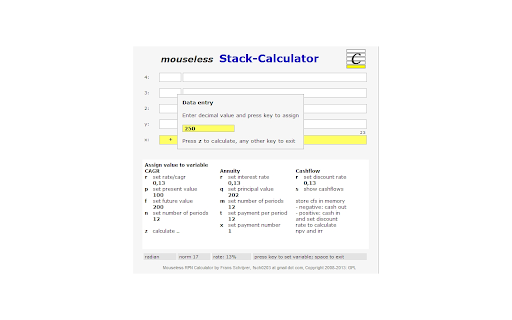


An innovative RPN and stack-calculator with keyboard input (as chrome extension) Mouseless Stack-Calculator is a innovative calculator and currency converter with fast keyboard entry. It has two modes: an RPN-mode and a stack-mode. The well known RPN stands for Reverse Polish Notation and it saves you time as it avoids the use of parenthesis. The only catch is that the entry of data is a bit different to what most people expect, so you have to learn to work with it. The stack-mode of this calculator is new. It's a bit similar to RPN in the way that is also uses a stack an avoids the use of parenthesis. But it's unique in the way that it has no reversed data entry but follows the 'normal' sequence. All calculations can be done by use of the keyboard, so no time consuming mouse clicks. It can handle both real and complex numbers and supports different notations. Mouse Stack-Calculator is available as Chrome extension, as desktop app and can run in a webbrowser window. - Flexible and intuitive user interface - Complete insight in entered expression - All the advantages of RPN in RPN-mode - Keyboard for all data entry (as you would expect from a calculator) - Most frequent used instructions only need 1 key; other instructions 2 keys - Integrated currency converter with actual rates - Arbitrary-precision decimal representation (no rounding errors), thanks to MikeMcl - Multi-level undo - Support for complex numbers and polar/rectangular conversions - Flexible number notation: normal, financial, integer, scientific, engineering, h:m:s, h:m, hexadecimal, octal, binary, fractions, complex (rectangular and polar) - 30 last answers - 30 memories to store intermediate results - Stack and memory are saved on your computer for future use - Copy results to clipboard for use in other programs - Mathematical calculations - Works with hours (or degrees), minutes, seconds - Statistical and probability calculations - Financial calculations like CAGR, Annuity and CashFlow - Physical constants and conversions Version 1.240 - Bug fix: accept entry with negative exponent correctly Version 1.230 - Extension ported to MS-Edge - Last position of window is saved - ECB now only provider of daily exchange rates (yahoo removed) - Minor bugs fixed Version 1.220 - No thousandseparator in case of hexadecimal, octal and binary numbers - Bug fix: corrected displayed expression in case of inverse function (1/x) - Extension now standard opens in seperate window; letter [b] no longer used Version 1.210 - Notation integer added - Bug fix: trig functions now work again with degrees - Bug fix: entry if digit f in hexadecimal now working - Minor bugs fixed Version 1.200 - Support for complex numbers - Support for multiple languages (now English and Dutch) - Exchange menu feeded with conversion results - New menu for notations - Last_x added Version 1.110 - Added ctrl-c and ctrl-v for copy and paste clipboard - Bug fix: clear stack now really cleared Version 1.000 - First release for PortableApps - Added notation for fractions - Data entry of fractions, e.g. 3\16 (internally calculated as 0.1875) - Bug fix: correct hex numbers entry - Bug fix: correct h:m:s numbers entry Version 0.810 - Fixed minor bugs - Desktop version (based on NodeWebkit) added - Version 5.01 of decimal.js included - Option to display, enter and calculate hexadecimal, octal and binary numbers Version 0.800 - Integration of decimal.js that provides arbitrary-precision decimal representation (thanks to MikeMcl) - Stopped using cookies, now uses local storage (as web-application) and chrome storage (as chrome extension and app) Version 0.723 - Added compatibility to work as Chrome extension, as packaged app and in webbrowser - Minor bugs Version 0.700 - Option added to work with hours:minutes:seconds (or degrees:minutes:seconds) - Changed initial precision to 16 to prevent rounding errors - Prevent display of e+0 and e-0 in scientific notation Version 0.603 - link to homepage in footer added - script for google analytics added Version 0.60 - Integration of stack-calculator and rpn-calculator - Improvement of data entry for financial calculations Version 0.50 - Major revision of layout to make user interface more simple - History sheet skipped in favor of calculated formulas + lastanswers memory - Formula of executed calculation in every stack memory - Lastanswer memory increased to 30 places - Improved user interface for financial calculations - Only one memory block (30 places) - Covariance and correlation functions skipped Version 0.44 - Last Answers as default memory - Option added to paste clipboard content in x-register - Corrected rounding in memories and history sheet - Entry of negative exponent in scientific notation with minus-key - Added thousands separator as option under [o] notation Version 0.40 - Financial calculations more logical and user friendly (submenus for CAGR, Annuity and Cashflow calculations) - Extra Memory-block with Last Answers (press [z] twice) - Scroll direction of History-box corrected - Some minor bugs Version 0.30 - First release as Chrome extension

Simple Units Converter (Lite)
Simple Units Converter is a general-use units conversion calculator good for converting from one set of units to another. Simple Units Converter (Lite) is a general-use units conversion calculator good for anyone interested in converting from one set of units to another. It was developed with ease of use as a primary objective. Has 458 different units and 22 different dimensions: Acceleration (27) Angle (21) Area (31) Cooking (27) Data Storage (16) Density (16) Energy (40) Flow (Volume) (22) Force (16) Frequency (7) Illuminance (5) Length / Distance (30) Luminance (8) Luminous Intensity (4) Magnetic Flux (6) Pressure (28) Speed / Velocity (14) Temperature (7) Time (20) Volume (71) Volume - Dry (6) Weight / Mass (36)

Discount Calculator
A basic caculator that also allows you to calculate common price discounts and tips with a single click. Calculate common discounts with a single click. This is a simple caculator that also allows you to calculate price reductions and see how much money you save! You can compare the reduced price and the amount of money you save. As a buyer, it works as a sale price calculator to see a final price after you factor in a discount - perhaps from that 20% price off coupon you have. Features: - A set of common discount percentage calculations. Takes your current calculation and rounds it to a price-friendly two decimal places. Displays the amount you would pay with the deduction and how much you save - invaluable! - Remembers your previous calculation when re-opened - History records last 10 calculations - Use the keyboard number pad for calculations - Copy results from the display - Re-sizable window - Enter key for "=" and "c" for clear - It's Free! Keyboard Shortcuts: - Number Pad or 0-9 for Number Entry - Equals (= or Enter) - Clear ("c") - Del or Backspace to delete - Divide (/) - Times (*) - Minus (-) - Plus (+) - Percent (% or F1) (Examples, 50%20 means 20 percent of 50; 40+50% means add 50% of 40) - Square Root (F2) - +/- (F3) - Decimal point (Period) - Copy results from the display (Ctrl-c) - Close Window (ESC or click in main Chrome tab)

Gematria Calculator - Gematrix.org
Gematria Calculator - by gematrix.org. Calculate Gematria values for words and phrases. See similar Gematria phrases online. An online Gematria Calculator Extension. This will allow you to calculate Gematria values while surfing the web. Calculating Gimatria real time inside your browser. Searching for similar Gimatria values in Hebrew Gematria or English Gematria by selecting text inside the web page, right clicking and seeing the results automatically or searching for similar values of Gimatria. Jewish or English.

Percentage Calculator
Users can perform the following percentage calculations:
