
gabklpcbgpilmpfpbingloinmdpojagl

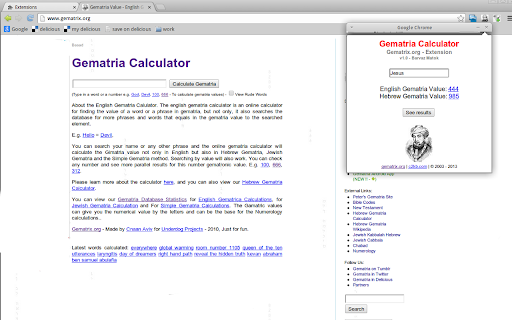
Gematria Calculator - by gematrix.org. Calculate Gematria values for words and phrases. See similar Gematria phrases online. An online Gematria Calculator Extension. This will allow you to calculate Gematria values while surfing the web. Calculating Gimatria real time inside your browser. Searching for similar Gimatria values in Hebrew Gematria or English Gematria by selecting text inside the web page, right clicking and seeing the results automatically or searching for similar values of Gimatria. Jewish or English.

Definio AI: Multi-Modal AI Sidebar
Definio runs every LLM model from one sidebar. Throw your question at any of them, switch on a whim, never open a new tab. Definio AI is a powerful AI assistant that brings multiple language models together in a single browser extension—helping you explore, reason, and research faster, directly within your browsing flow. 🚀 CHAT WITH THE TOP AI MODELS – ALL IN ONE PLACE: Models from all major providers. 🧠 ASK BETTER QUESTIONS, GET SMARTER ANSWERS: Select any text on a page and start a conversation with multiple AI agents at once. Cross-check facts, get diverse insights, or bring specialised models into the discussion—right from your browser sidebar. ⚡ BUILT FOR DEEP THINKING AND FAST WORK: Use AI to break down dense content, summarize complex topics, compare perspectives, or brainstorm ideas—all without switching tabs. Definio adapts to your browsing context for precise, real-time assistance. 📷 COMPUTER VISION & SCREENSHOTS: Capture the active tab or snip a region with one click and drop it straight into the chat. Vision-capable models read the screenshot for you—ask "what does this chart say," "translate this menu," "what's broken in this UI," or "summarise the page I just captured." You can also drop in your own image files (PNG, JPG, WebP) and combine selected text, screenshots, and typed questions in the same message for richer prompts. ⌨️ CHAT SHORTCUTS – TYPE "/" TO RUN COMMANDS: - /new — start a new chat - /model — switch the AI model mid-conversation - /search — toggle web search on or off - /think — toggle extended thinking on or off - /theme — flip between dark and light mode - /capture — screenshot the visible tab - /snip — screenshot a region you draw Plus Alt+Shift+O (Option+Shift+O on Mac) to open the side panel from anywhere—rebindable in chrome://extensions/shortcuts. 🔄 YOUR AI WORKFLOW, SUPERCHARGED: Whether you're a student, researcher, or professional, Definio helps you turn questions into knowledge. Use customizable shortcuts to boost productivity—summarize articles, extract key points, or auto-respond to content. 💡 WHY DEFINIO? Unlike traditional AI chatbots, Definio lets you bring multiple minds into the room. It's not about one model's opinion—it's about reaching clarity through comparison, consensus, and control. 📝 Whether you're researching, learning, or need quick explanations — Definio AI Chat is your intelligent companion right in your browser. Multiple Access Options: - Keyboard Shortcut: Press Alt+Shift+O (default shortcut, customizable in Chrome extensions settings) to open the AI Chat side panel instantly - Right-click Menu: Right-click anywhere on any webpage and select "Open Chat" to launch the AI Chat side panel - Extension Icon: Click the Definio AI extension icon in your browser toolbar to open the side panel Quick Access Methods: - Once the side panel is open, you can select any text on the page to automatically send it to the AI Chat for analysis or questions - Use the right-click "Open Chat" option for instant access without needing to select text first - The side panel stays open as you navigate between different websites, keeping your chat history accessible Chrome Limitations: - ⚠️ The extension does not work with PDF files viewed in the browser - ⚠️ For best experience with text selection, open the side panel first and then select the text you want to discuss with AI - Privacy First: Unlike popup extensions, Definio AI works in its own dedicated space without injecting content into web pages - Non-Intrusive Design: The side panel never covers or alters the content you're reading - Better Workflow: Ask questions about what you're reading without losing your place in the text or having floating boxes interrupt your flow - Persistent Chat: Keep your AI conversation visible while continuing to read and navigate the web - Seamless Integration: Instantly discuss any text you encounter while browsing

Definitions.net
Get instant dictionary definitions for any word or term that hits you anywhere on the web! Definitions.net is a free multilingual dictionary that provides instant definitions from many respected reference resources such as the Random House College Dictionary, Princeton WordNet, Wiktionary, Webster Dictionary, U.S. National Library of Medicine, DOD Dictionary of Military and Associated Terms and more. To use this extension simply select a word on any web page you're visiting and click on the extension icon. A pop-up window will open with all possible definitions for the selected word. Note: The extension will not work in tabs that were open prior to installation. After installing this extension, either reload your open tabs or restart Chrome.

Swisscows
Adds Swisscows as the default search engine in your browser. Swisscows is committed to your surveillance-free zone! Our extension enables a secure web search and offers optimal search results, private and anonymous! Make Swisscows your standard search engine in Google Chrome and protect your privacy! More and more people are angry about how online companies handle user data. As Swisscows team, we have made it our business to offer Internet users a protected space. To ensure the protection of personal data and privacy on the Internet, we have developed the data-secure search engine. By using Swisscows, you reduce the amount of data collected about you many times over. We do not create personal profiles, but anonymize all search queries after 7 days. • It is in our DNA to protect every user! • We do not save your data! • Here you are 100% anonymous! • We have our own servers and do not work with a cloud or with third-party providers! • Our data center is located in the Swiss Alps and this is the safest bunker in all of Europe! More privacy for all internet users! No monitoring, no data storage! Swisscows does not save any personal information and does not forward any personal information! Absolutely none! We make sure that your private life remains your private life. It is the efficient alternative for everyone who values data integrity and the protection of privacy. In contrast to other search engines, users leave no traces here. We do without countless analyzes of our visitors. Your topics, IP addresses and personal information will not be stored or used for additional business purposes. Our advertising revenues are also invested in social projects. At the moment, we support orphanages in Colombia and Haiti. Learn more: You can find more information about Swisscows, our team and our vision at: https://company.swisscows.com/ You can find us here: Facebook: https://www.facebook.com/swisscows Twitter: https://twitter.com/swisscows_ch LinkedIn: https://www.linkedin.com/organization-guest/company/swisscows

Extentie - extension manager
A simple and elegant Chrome extension manager allows you manage your extensions in a popup window. Extentie is a simple and beautiful tool that allows you to toggle and manage Chrome extensions in a popup. Latest update: - Now you can create your own groups to manage your extensions - Revamped from ground up, added more features
