
eicbbneajfipmpcjpcoeijpdmchnohfp
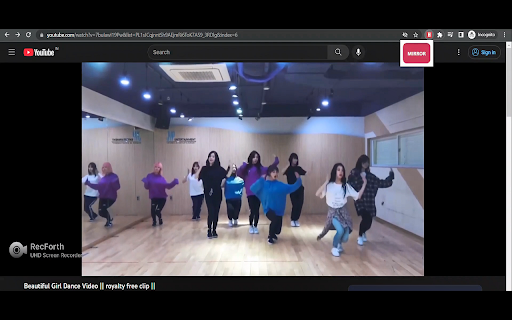

An Extension to laterally invert youtube videos MirrorPlay: Transform YouTube Videos with Ease MirrorPlay is a powerful Chrome extension that allows you to effortlessly invert and mirror YouTube videos with just a simple click. Whether you're practicing your dance moves or exploring artistic concepts, MirrorPlay provides a unique and convenient way to enhance your viewing experience. With MirrorPlay, you can easily flip the orientation of YouTube videos, creating a lateral inversion that gives you a fresh perspective. This feature is especially useful for dancers who want to learn choreography by watching mirrored videos. By seamlessly reversing the video playback, MirrorPlay enables you to follow along and mimic the movements effortlessly. Instantly invert and mirror YouTube videos with a single click. Perfect for dancers and performers who rely on mirrored videos for practice. Intuitive and user-friendly interface for seamless integration with YouTube. Enhance your creative process by exploring videos from a different viewpoint. Save time and effort by eliminating the need for manual video editing tools. Take your dancing practice to the next level with MirrorPlay. Install the extension today and experience the convenience and flexibility of laterally inverted YouTube videos like never before.

YT Mirror
YT Mirror adds a 'Mirror' button to the YouTube player, letting you flip videos and Shorts horizontally with one click. This extension seamlessly integrates with the YouTube player, placing a convenient "mirror" button alongside the native controls. With a single click, your video instantly reflects a mirror image. 🆕 Now, YT Mirror also adds a "mirror" button in the Shorts player, allowing you to flip Shorts videos just as easily. The button will appear in the bottom right corner of the Shorts page for easy access. 🔒 YT Mirror respects your privacy - no browsing history or private data is collected.

Video Transformer
Zoom, stretch, reposition, rotate, and flip video and images using hotkeys. This extension is a video manipulation tool that can perform transformations via hotkeys on most streaming videos (and images now too). The hotkeys and functionality are inspired by MPC-HC's Pan and Scan Rotate system and are fully customizable from the extension's settings page. These transformations are useful for fixing black bars via resizing the video (Zoom), correcting aspect ratios (Stretch) to make video full-screen, GoPro or POV (Point of View) or head mounted video perspectives (Flip aka Mirror, or Rotate). These transformations will also work in full-screen. Transformations Include: ✔ Zooming (in and out) ✔ Stretching (vertically and horizontally) ✔ Positional Movement (up/down/left/right) ✔ Rotation (clockwise ↻ and counter-clockwise ↺) ✔ Flipping/Mirroring (horizontally and vertically) You can also combine transformations. For example, you can zoom in on a specific area by using Zoom and Positional Movement. Supported Websites: ✔ YouTube™ ✔ Netflix ✔ Vimeo ✔ Dailymotion ✔ Bilibili B站 ✔ And many more, though this extension is targeting user uploaded videos that need tweaking. ✅ To get started, go to a webpage with a video playing on it. Then try the hotkeys below. ⚙️ Customizability: ▸ You can add, modify or delete any hotkey for any transformation operation via the extension's settings page. ▸ You can modify the amount of scaling (zoom/stretching), rotation, or positional movement in the settings page too. Default Hotkeys: ▸ Numpad 5 to reset all transformations back to the original ▸ Numpad 9 / Numpad 1 to zoom in/out ▸ Numpad 8 / Numpad 2 to stretch / compress vertically ▸ Numpad 6 / Numpad 4 to stretch / compress horizontally ▸ Ctrl + Numpad direction (1, 2, 3, 4, 6, 7, 8, 9) to move the element ▸ Ctrl + Numpad 5 to recenter the element ▸ Alt + Numpad 1 / Alt + Numpad 3 to rotate ↻ / ↺ ▸ Alt + Numpad 2 / Alt + Numpad 8 to flip vertically ▸ Alt + Numpad 4 / Alt + Numpad 6 to flip horizontally ▸ Alt + Numpad 7 / Alt + Numpad 9 to rotate 90 degrees ↻ / ↺ ▸ Alt + V will toggle on and off all of the hotkeys above or switch to Video mode ▸ Alt + I will toggle on and off all of the hotkeys above or switch to Image mode Alternative Hotkeys (please note that these have changed recently in the 2.0 release): (Note: For compact keyboards without a numpad like on laptops, and some mac keyboards. Enabled via a checkbox in the popup action options.) ▸ Shift + Arrow Left / Shift + Arrow Right to reset all transformations back to the original ▸ Shift + Arrow Up / Shift + Arrow Down to zoom in / out ▸ Ctrl + Shift + Arrow Right / Ctrl + Shift + Arrow Left to stretch / compress horizontally ▸ Ctrl + Shift + Arrow Up / Ctrl + Shift + Arrow Down to stretch / compress vertically ▸ Ctrl + Arrow direction (Up, Down, Left, Right) to move the element ▸ Alt + Arrow Left / Alt + Arrow Right to rotate ↻ / ↺ ▸ Shift + Alt + Arrow Left / Shift + Alt + Arrow Right to rotate 90 degrees ↻ / ↺ ▸ Alt + Arrow Up to flip vertically ▸ Alt + Arrow Down to flip horizontally ✅ You can also transform images with Alt + I. ⚠️ Troubleshooting and Notes: ▸ Garbled, corrupted, or missing video after a transformation? If possible try a different resolution/quality, otherwise try disabling hardware acceleration in your browser settings (then closing and re-opening the browser). ▸ Some sites may load a thumbnail of a video and not load the actual video, so you may need to start the video first before attempting to do video transforms. ▸ This extension tries to override browser and website shortcuts like Ctrl + Numpad 5 on YouTube. You may need to toggle off the hotkeys to use the overridden keys normally, for example using the numpad to type numbers into an input field. ▸ Sometimes I've noticed that I have to click away from a video or the address bar/top portion of the browser (to any content area on the page) to get hotkeys working. I suspect I could be pressing Alt (activating the borwser menu) or selecting the browser interface which is then trapping the keypress events instead of the page. ▸ Hotkey Capture Keypress function in Settings can disable hotkeys on websites. Capturing Ctrl + Numpad 5 for example will disable YouTube's jump to minute 5 hotkey. ▸ Feature requests and bug reports are welcome. ▸ I'm still actively developing this extension to make it the best that I can. Things may change or break and sometimes maybe even improve :) Mouse cursor in the way while streaming videos? Check out another extension of mine, Video Mouse Hider: https://chrome.google.com/webstore/detail/nmoomabnbphlcgjghcagjfkildcmpigi (I may simply add this functionality to this extension in the future.)

Reverse Youtube
Made to avoid torticollis while using a secondary screen. This extension swaps 'primary video' and 'related contents' layouts. This extension swaps 'primary video' and 'related contents' layouts in youtube.com

Mirror YouTube for Dance Practice 거울모드 안무 연습
You can mirror, loop, and change tempo of a video to practice dance. 댄스 연습을 위해 춤 동영상에 대해 좌우 반전, 템포 변경, 구간 반복 등 다양한 조작을 할 수 있습니다 A free tool to mirror and change the tempo of a dance video for practice. It is provided in both English and Korean. 이 앱은 무료로 유튜브 등 춤 동영상을 좌우 반전시키거나 템포를 변경하여 편하게 댄스 연습을 하도록 도와주는 툴입니다. 영어와 한국어 모두 제공됩니다 💯무료 제공 ✓ HTML5 video detection ✓ Mirror mode ✓ Tempo shift ✓ Remember settings for each video ✓ Unlimited usage 🔒This app does not collect your browser history or your private information ⭐️Upcoming feature We will soon add a feature that allows looping a certain part of the video. 구간 반복 기능을 조만간 추가할 계획입니다.
