
nokjcgeafjfhlbclmmgfeiiebgjfollb

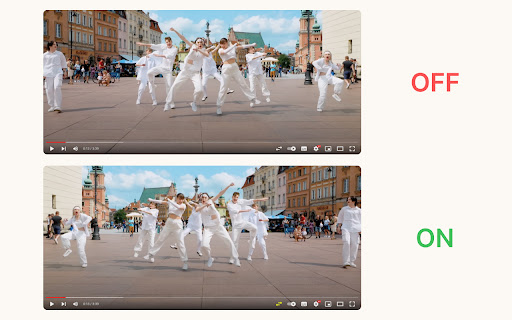
YT Mirror adds a 'Mirror' button to the YouTube player, letting you flip videos and Shorts horizontally with one click. This extension seamlessly integrates with the YouTube player, placing a convenient "mirror" button alongside the native controls. With a single click, your video instantly reflects a mirror image. 🆕 Now, YT Mirror also adds a "mirror" button in the Shorts player, allowing you to flip Shorts videos just as easily. The button will appear in the bottom right corner of the Shorts page for easy access. 🔒 YT Mirror respects your privacy - no browsing history or private data is collected.

Picture in Picture - Floating player
Picture-in-Picture mode allows you to watch a video in a floating window with playback video and volume controls. This extension brings a PiP view to all websites with an HTML video element. Press the extension icon to open the active player in the picture in picture mode. This extension automatically tries to use the active player. Now stream movies, series or sports on any tab. Install Picture in Picture chrome extension to enable the floating video. We support this feature on every streaming site. For YouTube, the extension also offers an in-player button next to the settings button to open the YouTube video in the picture-in-picture mode. You can use this extension to watch YouTube videos in a floating window that is on top of all other windows so tabs can be switched and still the player is visible. The floating window has play and pause buttons, and you can exit from the picture-in-picture mode anytime. How Extension works: 1. Find the video and run it. 2. Click the extension icon to reduce the video player on YouTube and other sites. 3. Select the “Floating Picture in Picture” and you're done. A floating video allows the viewer to scroll through your webpage and keep your video in view the whole time. Video Playback Controls Enjoy full control over your video playback with intuitive controls directly within the floating player: - Volume control; - Stop and play video; - Video speed control; - Switch to next video. Just click on the Floating Player and Video Control icon to display the video player on YouTube, Netflix or any other websites on the Web. This window will play the video on all pages of the browser on which there is a video resource. Pic-in-pic mode supports all video formats and works with popular video hubs like Youtube and many others We hope you find our tool useful! We are waiting for your feedback and ratings!

YouTube™ on Hover Preview
Watch YouTube videos instantly by hovering your mouse over any YouTube link on a webpage. "YouTube™ on Hover" extension displays a floating panel player once your mouse is over a YouTube link. This is useful to preview YouTube links without the need to open them in separate tabs. To hide the floating player, just click somewhere inside the page. For your convenience there are some options: 1. You can either place the player at the center of the screen or just beneath the YouTube link with custom offset. 2. For the player to appear, keep hover over a link for 1 second. This option is useful to bypass YouTube links that are accidentally been hovered 3. Once a link is previewed, it will be stroked-through to be distinguished from other YouTube links that are still not visited. Note that the strike-though is not permanent. Reloading the page will remove all the decorations. 4. As of version 0.1.4, you can watch previews in "Turn of the Light" mode. Open options page to change this setting. For FAQs please visit: http://add0n.com/youtube-hover.html For reporting bugs please use: https://github.com/schomery/youtube-hover/issues Permissions: Storage: to store internal preferences. This permission allow the extension to have access to chrome.storage API which is used for saving user preferences. History: This one is used to mark previewed links as visited. This is useful to prevent multiple preview of a single link Tabs: to open FAQs page Change Logs: 0.1.8 1. It is now possible to close the preview with ESC key 2. Clicking outside player is now blocked (to prevent accidental link redirect) 0.1.9 1. Supports start time 2. Fixes the youtube player is not accepting fullscreen attribute 3. Preview panel can now be activated on youtube.com as well (disabled by default)

Floating Video Player for Youtube™ Videos
Floating Video Player for Youtube™ Videos allows you to watch videos while browsing the web with Picture-in-Picture mode. Watch videos in a floating window while browsing other sites and applications with our software extension. Features: - Resume watching from the last stopped position - Videos are always on top - Supports Youtube playlist How to use the extension: Open the video on the video site and start playing the video Click the extension icon and activate floating mode. A miniplayer appears and you can continue watching the video. Please note that the original tab with the video stream should remain open while you browse the Internet. We are not affiliated with YouTube or an official extension. This extension is independently developed for use with Youtube YouTube is a trademark of Google Inc. Use of this trademark is subject to Google Permissions.

NotebookLM AI Sidebar
Use NotebookLM AI Sidebar to import web links into a notebook and add YouTube videos and shorts with one click! 📒 The NotebookLM AI Sidebar Chrome extension is a powerful tool designed to streamline note-taking and research. With AI-driven features, it allows users to easily create and manage structured links. Whether you're gathering documents, generating insights, or add webpages into a notebook, Notebook LM makes in-depth research seamless and efficient. This extension allows you to effortlessly create documents in NotebookLM and easily add various articles to existing documents. 🛠️ Quick Start Guide: 1. Install the extension by clicking 'Add to Chrome' from Google Chrome Store 2. Click the icon in the top right corner of the browser tab. 3. Start creating or adding sources to your projects effortlessly! Why Choose This Extension? 1️⃣ Instantly create a notebook lm sidebar with just a click 2️⃣ Easily add sources to existing projects, add YouTube links or YouTube shorts 3️⃣ Enhance your investigation experience with artificial intelligence-powered assistance 4️⃣ Seamlessly integrate with Google for a smoother workflow 5️⃣ Improve productivity and organization with notebook lm sidebar features 6️⃣ Quickly access, edit, remove and manage your notebooks anytime 7️⃣ Optimize information gathering with notebook lm sidebar 8️⃣ Maximize efficiency using the extension 9️⃣ Find the perfect notebook lm sidebar alternative for your workflow 🔮 Discover a smarter way to organize with NotebookLM! 📚 Take a Audio Deep Dive 👍 Easily compile documents for deep research 💡 Generate insights using notebooklm capabilities 🤝 Discover how to use effectively for various purposes 📱 Podcast Feature 🔄 Transcribe, summarize, and analyze podcasts 📈 Get structured insights from audio discussions 🎤 Enhance learning with the AI podcast generator 💡 What is this extension? 🦊 This NotebookLM AI Sidebar Chrome Extension is an advanced powered tool designed to help users organize, easily create new projects and seamlessly add sources and also generate insights with ease. Whether you're working on deep research or need an ai-powered assistant, it is the ultimate solution. 🛠️ How to Use It? 1️⃣ Install the extension from Google Chrome Store 2️⃣ Click on the icon of this extension to right corner of the broweser tab 3️⃣ Start adding documents or creating new notebook instantly 🔍 Explore Alternatives 🚀 Looking for a NotebookLM alternative? Explore similar AI Notebook solutions with comparable features, ensuring flexibility and efficiency. 💻 Enhance Your Research with Google LM 📡 Use artificial intelligence-powered tools to generate summaries ✨ Organize your notes with Notebook Google KLM 📃 Collaborate effectively using LM Notes 🌟 AI notebook lm for Smarter Research 🏷️ Improve productivity with NotebookLM Podcast tools 🖋️ Leverage the notebook lm for structured insights ⚛️ Utilize NotebookLM for academic and professional work 🎧 AI Podcast Generator & Learning 🗣️ Convert discussions into structured notes 💬 Learn how to generate artificial intelligence podcasts with google lm 🔑 Access key insights quickly using google lm features 💡 Google AI Podcast Generator 💡 Automate podcast transcription and summarization ⏳ Save time with artificial intelligence-generated text from discussions 📀 Enhance learning and research with AI-driven insights 🧠 AI Revolution 🚀 Google ai notebook transforms how you interact with information online. This NoteboolLLM solution provides intelligent assistance for: ➤ Summarizing complex topics ➤ Identifying key concepts ➤ Generating insights from multiple sources ➤ Creating connections between different pieces of information ➤ Producing comprehensive reports and analyses 💪 Boost Productivity with Google AI 📅 Stay organized with intuitive NotebookLM features 💰 Get instant insights from NotebookLM 🎚️ Simplify research with an advanced notebook ai 🔄 Source Management Made Simple Wondering how many sources can handle or how to download sources from extension? The extension offers robust documents management: ➤ Add unlimited documents to your projects ➤ Organize sources by topic, project, or custom categories ➤ Easily download and export source materials ➤ Track documents origins automatically ➤ Cite sources properly with built-in citation tools 💰 Great Value at Any Level Concerned about cost? Rest assured that the extension offers tremendous value: ➤ Free tier with essential features ➤ Affordable premium options for power users ➤ Enterprise solutions for teams and organizations ➤ Special pricing for educational institutions ➤ Flexible payment options to suit any budget 📱 Cross-Platform Compatibility The Google AI app works across your devices: ➤ Chrome browser on desktops and laptops ➤ Mobile browsers for on-the-go access ➤ Tablet compatibility for flexible use ➤ Consistent experience across all platforms ➤ Automatic syncing between devices 🔒 Privacy & Analytics To improve the extension, we collect anonymous usage statistics (e.g., which features are used and how often) linked to a randomly generated device identifier. No personal data, Google account info, notebook content, or browsing history is ever collected or shared. 🌐 Can I Use Offline? 📢 Currently, Its requires an internet connection. However, users can save content for offline access within their browser. 📝 How many sources notebooklm? ✈️ Google lm allows users to add multiple sources without restrictions ⛄ Ideal for deep research, content creation, and knowledge organization 💾 How to download sources from notebook lm? 🌊 Access your sources in google lm site 🦊 Use the built-in export function to download sources 🐶 Organize and store your data efficiently 📌 Can ai notebook generate content based on my sources? 💡 Yes! The ai can create summaries, reports, and even creative content based on your collected sources. 📌 Can I use Notebook LM for academic research? 💡 Absolutely! The extension is perfect for academic research with proper citation and source tracking capabilities. 📌 Does Notebook LM support multiple languages? 💡 Yes, the extension supports dozens of languages for truly global research capabilities. 📌 Is my data secure with NotebookML? 💡 Yes! Your data is protected with industry-standard encryption and Google's robust security practices. 🚀 Install the Chrome extension now and take your research experience to the next level with Notebook LM!
