
egmhoeaacclmanaimofoooiamhpkimkk


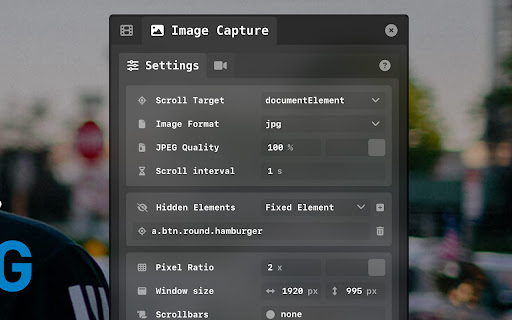

Record your websites and automate scrolling and mouse actions for your portfolio screen captures. Scroll Capture is aimed towards designers and developers that need to create beautiful video screen captures for their portfolio. The extension lets you automate scroll animations that smoothly ease in and out, and also add mouse events and gestures. It can also create full page screenshots. Update Log : 0.5.1 There's a new ZoomAction that lets you zoom into the page. 0.4.9 Fixed bug with some websites using javascript to insert FontAwesome svg icons. 0.4.7 Fixed the problem happening on websites with strict content-security policies 0.4.5 Chrome 126 bugs are fixed. Panel is scrolling and MP4 Format is working. 0.3.8 Interface is now resizeable and improvements were made for mobile browser size support. 0.3.4 You can now capture your full computer screen when you select 'desktop' under the Media Source option. Scroll. capture automation is only available for the 'tab' option which is the default. 0.3.3 You can now save a video as mp4, webm or mkv and audio as m4a, mp3 or webm. 0.3.2 The Scroll Action now lets you target your own custom javascript method! You'll need to provide the code to get and set the custom scroll values. 0.3.1 The Javascript action is back to let you run your own javascript code. 0.3.0 There's a new Input Text action to simulate input for text, textarea and select elements. Note that for checkbox and radio elements, the MouseEvent action should be used with a click event. 0.2.6 Some UI simplification, the action timeline and video settings sections have been merged. Image Capture mode can now hide fixed elements and custom element selectors. A link to the video tutorial is available in the Info section. 0.2.0 The scroll action has a new "Use speed" option which will automatically calculate the duration based on the scrolling distance. 0.1.9 The recordings are now saved as MP4 or M4V. 0.1.8 The Image Capture section now has a hidden elements list. You can add element selectors to make them dissapear after the first scroll. 0.1.7 Scroll target is now easier to use as a select box instead of a text input. Image Capture section can now capture the documentElement as well as scrolling overflow html elements. 0.1.6 There's a new section called Image Capture which creates a long image of the whole scrolling area. 0.1.4 The :hover css states are now getting triggered by the event action when using the mouseover and mouseout event types. 0.1.0 The purpose of the new URL action is to reload the browser tab to capture a website's intro animation. It is also now possible to record multiple html pages with the same timeline. Scroll capture will now keep recording after a browser refresh following a click event. 0.0.8 Added toggle buttons in the settings panel to turn sound or video on and off. You can now record video files without sound, or sound files without video! You can also hide the scrollbars and cursor while recording. 0.0.7 Added all the other video codecs supported natively by Chrome. The video codecs are "h264", "av1", "avc1", "vp8", "vp9" and sound codecs are "opus" and "pcm". 0.0.6 - The scrolling bug caused by scroll-behavior:smooth is now fixed. Transitioned to Chrome Extension Manifest V3. The JS action had to be removed because of the new security features in Manifest V3. The recording also now uses devicePixeRatio so high density screens like Apple retina can be recorded in their full resolutions.

Scrolling screenshot tool & screen capture
Scrolling Screenshot tool for screen capture and screen sharing This is the simple and quick version of the renowned “Awesome Screenshot” extension. Want to share your screen for cases like reporting technical issues, making product demos or how-to tutorials 【quickly】? Here are 7️⃣ reasons to choose Awesome Screenshot tool 1️⃣ Provide stable service for more than 10 years 2️⃣Loved by more than 3 millions users across different platforms 👍 3️⃣ Easy to use with shortcuts 4️⃣ No ads and respect your privacy 5️⃣Powerful features special designed for taking a screenshot quickly 6️⃣Quick Customer support 7️⃣ Most importantly, your voice matters! 🗣 & Continuous improvements Here are some features for this simple "Awesome screenshot" 📷 Screen Capture ▸ Capture a screenshot of the page you visit, full page, selected area or visible part ▸ Capture a screenshot of your entire screen or a specific application window (coming soon) ▸ Capture visible part, entire screen or app window after delay (Coming soon) 🖍 Annotate Screenshot ▸ Resize or crop a screenshot to the size you need ▸ Annotate your screenshot with rectangles, circles, arrows, lines, etc. ▸ Add text to your screenshot with or without background color, change text font and font size ▸ Blur sensitive information on your screenshot ▸ Highlight important part on your screenshot ▸ Select a local image or paste a copied image from your clipboard to annotate 📥 Copy & Save Screenshot ▸ Save screenshot as image in PNG or download screenshot as PDF ▸ Copy a screenshot directly when capturing selected area for quick pasting Shoot a message to care@awesomescreenshot.com if you experience any problem. Let us know your thoughts! Thank you.

Lumos Extension for Webflow
This extension is built to be used on Webflow.com. It provides shortcuts for working faster in Webflow. V1 of the extension generously developed by https://www.fri3nds.com/ • Fast Class Naming Pressing the right arrow key in the class selector field returns the class name of the nearest parent that has a component class (class containing underscores). • Style The Base Class Press shift key & up arrow key to select the base class. Press shift key & down arrow key to return to all classes. • PX to REM Type a number into any style panel field and press the space bar. The number will be divided by 16 and the rem unit will be attached to the end. • PX to % Divide the width of any element by the width of its parent to get a percent width. Example: type 562/1440 into any style panel field and press the space bar. 562 will be divided by 1440. The result will be multiplied by 100, and a % unit will be attached to the end. • Automatically wrap any --variable-name in var() and any math in calc() Example: type --grid-gap / 2 in any custom property value field and press the tab key. It will be converted to calc(var(--grid-gap) / 2) • Automatically wrap any --variable-name in color-mix() for transparency Example: type --theme--text%60 in any custom property value field and press the tab key. It will be converted to color-mix(in srgb, var(--theme--text) 60%, transparent) • Automatic data attribute buttons on component fields Add any embeds containing data attributes inside one div with the class of “page_code_wrap”. Apply those attributes to any element and link their value to a component field. The component field name should include the attribute name. Buttons will be automatically created for each attribute value in the embed. Learn about the Lumos Framework at https://lumos.timothyricks.com/

Relume Chrome Extension for Webflow
Boost your productivity in Webflow with the Relume Chrome Extension. ★ Access 1,000+ Webflow components from the Relume Library, right inside of Webflow designer. Copy components into your project with 1 click. ★ Class Sync enables you to sync Relume components with updated classes in the designer, preventing class duplication. When you turn on Class Sync and paste a component, the component will adapt to match the styles of your Webflow project. ★ Paste SVGs directly into your Webflow project, with Relume's free SVG to HTML embed converter. ★ Create and save components in your own private Relume Library. Share with with clients and your team. The Relume Library includes everything you need to start a Client-First Webflow project: ✓Navbars ✓Footers ✓Header sections ✓Feature sections ✓CTA sections ✓FAQ sections ✓Contact sections ✓Pricing sections ✓UI Elements (including Buttons, Accordions, Sliders, Dropdowns, Cards, Tabs & more) ✓Page Templates (including Home, About, Blog, Contact, Portfolio & more) Browse the full library online: https://library.relume.io/dashboard Don't waste time rebuilding layouts for every new project. Install the Relume Chrome Extension to access all of these components right inside Webflow. Some features require a Relume account or paid subscription. Find out more inside the extension or online: https://library.relume.io/pricing

F'in sweet Scrollbar Styler for Webflow
Style your scrollbar visually and generate clean CSS to add to your Webflow website. Created by Finsweet for the Webflow community.
