
eepndigbgjjgaikknekkghiinanoiaai
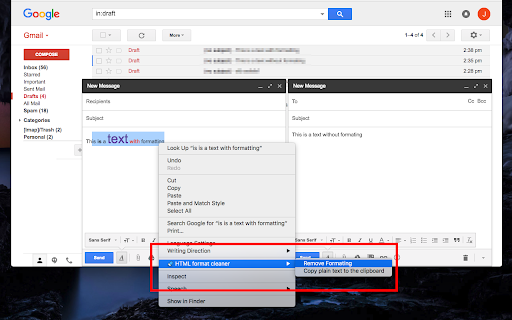
Clear HTML formattings such as bold, italic, foreground, and background colors, then copy as plain text or replace the node This extension introduces two convenient context menu items when you right-click over selected text: 1. HTML Formatting Removal: Use it to remove HTML formatting from the selected text. This action is like Gmail's "Remove formatting" button, ensuring the same convenience is available across various WYSIWYG HTML Editors and word processors. 2. Copy as Plain Text: Copy the selected text as a plain text version directly to your clipboard. This feature is useful when you want to paste non-formatted textual data into a WYSIWYG HTML Editor. Change Log: Version 0.2.2 1. Enhanced Formatting Cleanup: In this latest update, the extension extends its formatting cleaning capabilities to include boldface, bullets, and several more HTML formats. This comprehensive approach ensures that you can achieve even cleaner and more precise text without unnecessary formatting. 2. Preserving Line Breaks: Additionally, the extension now preserves line breaks, maintaining the structure and readability of your text. This enhancement ensures that your document's formatting remains intact while eliminating unwanted HTML styling.

Reader View
Removes clutter like buttons, backgrounds, adjusts text size, contrast, and layout for better readability Reader View extension brings Mozilla's open-source Readability implantation to Chromium. Using this extension you can strip clutters from webpages and read them on "Reader View" mode. The extension allows you to toggle between normal view and reader view by pressing the page-action button. Note that reader view mode works best for web pages that have a lot of content. There are some tools in the left side panel that can help you personalize your Reader View. You can change color, background-color, font-size, font-family and width of the reader view. Features: -> Remove distraction -> Read in fullscreen mode -> Remove advertisements -> Save in HTML format -> Print document -> Read content using a powerful Text to Speech (TTS) engine -> Edit HTML content (live editor) -> Email document (with title, body, and reference to the original document) -> Correctly display mathematical formulas (MathJax equations are Supported) -> Highlight selected text -> Move to the next and previous pages -> Keyboard shortcuts for almost all actions -> Resize images on the design-mode -> Display DOI (Digital Object Identifier) details -> Display publish date -> Add persistent sticky notes -> Bionic Reading -> Adjust number of columns *** 0.6.x releases *** The extension is now running on manifest v3! Make sure you have the latest version of your browser to use this extension (The minimum acceptable Chrome version is 104). There are a few changes to make it compatible, so please report bugs if you see broken features. For more info please visit: https://github.com/rNeomy/reader-view/ Change Log: 0.1.3: Calling a reader view by restoring it from history will trigger history.back 0.1.4: A more visible icon. Fixes a reader bug. 0.1.5: It is now possible to toggle the reader view using keyboard shortcut (define one from Chrome's settings page) 0.2.1: Document parsing is improved. Switched to the latest Readibility.js library. Ctrl + S now saves the document same as pressing the "Save" button. Reader View now supports both rtl and ltr languages 0.2.2: It is now possible to select some content and ask the reader view to convert only the selected part. This is useful if the automatic selection tool is not detecting the content correctly. 0.2.4: Speech engine is added. You can now ask the extension to read the article for you. Estimated reading time is displayed below the article title

HTML to Markdown
HTML to Markdown – a straightforward Chrome extension designed to convert most web pages into markdown format effortlessly. As a developer, I often found myself needing to pull high-quality documentation from websites and reformat it for use with AI chat tools. That's why I created the "HTML to Markdown" Chrome extension. This free tool quickly converts web page content into clean Markdown, making it perfect for feeding into large language models or any other AI powered chats. Bloggers & Content Creators: Easily grab content from articles or research pages for your own posts. Developers: Copy code snippets and documentation into README files, project notes, or for use with large language models. Students & Researchers: Quickly extract information from online resources for papers and reports. Technical Writers: Convert website content to create guides and documentation. AI Integration: Extract and convert relevant website information into markdown for input into AI powered chat tools.

Reader View
Strips away clutter like buttons, background images, and changes the page's text size, contrast and layout for better readability Reader View extension removes clutter from web pages to enhance their readability. The extension uses Mozilla's Readability library as the engine to provide similar experience from what you get if you are on the Firefox browser. After installation, a button is added to your Chrome toolbar area or Opera's address bar. Pressing this button once opens the current page in the "Reader View" mode. You will notice the button's color will be changed to orange while you are in the reader view mode. Clicking on this orange button or pressing the back button of your browser closes the "Reader View" mode and restores the normal rendering mode. Since the extension uses history API, the page scroll position and the entire session is restored when "Reader View" mode is terminated. ✔ Open website directly in reader view ✔ Open website's links directly in the reader view ✔ Access the reader view button from a page action button ✔ Fullscreen reading ✔ Advertisement removing ✔ Save in HTML format ✔ Text to Speech (TTS) ✔ Move to the next and previous pages ✔ Keyboard shortcuts for almost all actions Try our software now. Its 100% free to use, and you can access the test results onto your hard drive or Google Drive.

HTML to Markdown
Select and convert headers, paragraphs, images or links on the web into Markdown text quickly and effortlessly
