
eepgnffgkekpdkbkooopffobhfpcgnnh


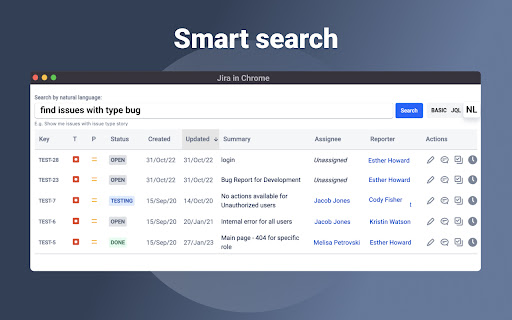
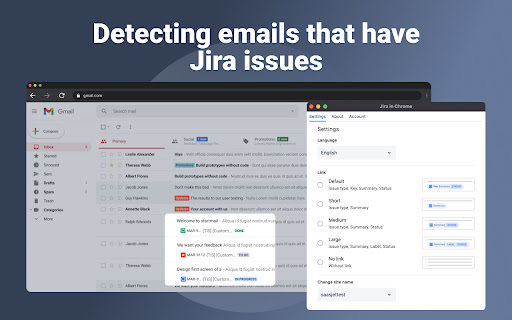
Jira & Chrome Extension: Manage Issues Effortlessly Without Switching to Jira. With this Chrome extension for Jira, you can connect your browser to the Jira instance and fully manage your issues directly from any tab. That way you get less distracted while working in a multitasking environment. Every Jira ticket is created in seconds. The Jira in Chrome extension also arranges a quick and easy way to track the status of Jira issues, view linked attachments and comments, and add comments and updates directly from any tab of your browser. Jira in Chrome extension provides you with full basic functionality to organise your everyday work with Jira issues. So, you can easily: ⏺ Generate a task or subtask from any webpage or directly from your Gmail ⏺ Search for any issue you have in your Jira projects ⏺ Smart search option, by transforming natural language to JQL query ⏺ Edit each Jira issue with ease if you need to make quick changes ⏺ Add comments to tickets to improve your team communication ⏺ Log your work time effortlessly whenever you need You can perform most of the options above by using specially designed hot buttons. Regarding issues search, you can do it with predefined alternatives such as: ⏺ Search by Project ⏺ Search by Issue type ⏺ Search by Status ⏺ Search by Assignee ⏺ Search by Label ⏺ Search by Text ⏺ Search by JQL Also, this Chrome extension allows you to detect issues and issue types in every email. As a result, you get one extra Gmail to Jira ability to optimize your workflow and prioritize important assignments. 1-click installation: extension automatically detects your Jira site and is connected. Just select your site from the list. That's all. Now, you can quickly manage personal tasks, as well as a team and subordinates Jira tickets. If you need any assistance or want to ask questions, please email us at support@saasjet.atlassian.net. ✔ THE SUIT OF JIRA IN CHROME APPLICATIONS To get even more possibilities for extension functionality, you can download the app from the Atlassian Marketplace. Here is a 30-day trial to check if the app is good for you. https://marketplace.atlassian.com/apps/1228960/email-tasks-jira-cloud-for-gmail?hosting=cloud&tab=overview Additionally, install the connector application for your Gmail. *Email&Tasks: Jira Cloud for Gmail™ app is a plugin that integrates the Jira Cloud project management with the Gmail email platform. The app adds a button to Gmail's interface, allowing users to quickly convert emails into Jira tasks, view and update Jira task information within their email, and stay updated on task progress without leaving their Gmail interface. This integration helps streamline workflows and increase productivity by providing a seamless connection between email communication and project management. By integrating Gmail to Jira Cloud, you will be able to transform any email to Jira issues. The Email&Tasks application package is based on AI and aims to simplify your everyday work and increase your efficiency. Try to convert your assignment from Gmail to Jira issue/ticket without extra effort. *Work with the application suite is absolutely safe and confidential.

Jira Assistant: Worklog, Sprint report, etc
Help to track & upload work done on a Jira Ticket on timely basis and generate Worklog, Sprint and other custom reports. Discover Jira Assistant: Your Ultimate Worklog & Reporting Management Solution! 🚀 Experience the Power of Jira Assistant 🚀 Visit https://www.jiraassistant.com for comprehensive details and alternative browser installation options. Always use latest build of Jira Assistant by using Web version of tool, explore https://app.jiraassistant.com. 🎥 Dive Deeper with YouTube Videos 🎥 Learn about the rich features of Jira Assistant: https://www.youtube.com/watch?list=PLxDBQLgpBhsDGppYrDqARYULukk7XFJPV&v=HsWq7cT3Qq0 📊 Streamline Work Tracking and Reporting 📊 Are you seeking a seamless way to track and upload your progress on Jira Tickets while effortlessly generating Worklogs, Sprint Reports, and Custom Analytics? Look no further than Jira Assistant, your dedicated partner in efficient project management. 🔍 Key Features Overview 🔍 * Effortlessly log work with drag & drop and copy features. * Track time using an integrated timer for precise worklogs. * Bulk import worklogs and issues with CSV files. * Access diverse reports on worklogs, sprints, estimates, and customized insights. * Seamlessly integrate with calendars for automated meeting worklog creation. * Enjoy customization with personalized dashboards, skins, and quick views. * Connect with multiple Jira accounts and switch between instances effortlessly. * Foster team collaboration with inbuilt planning poker. * Export reports in CSV, Excel, and PDF formats. * Gain insights from status-wise time spent reports. * Craft personalized dashboards, add gadgets, and arrange layouts. * Share your custom gadgets and reports with ease. * Reorder gadgets with drag and drop functionality. 🗓️ Calendar and Worklog 🗓️ * Log and upload work on Jira Tickets seamlessly, visualized in a calendar format. * Monitor missing or pending worklogs for better accountability. * Clone and adjust worklogs with drag & drop functionality. * Sync with Google / Outlook Calendar for automatic meeting worklogs. 📅 Simplify Your Menu Experience 📅 * Customize the JA icon menu to show preferred features or dashboards. * Launch selected pages or dashboards with a small popover. 👥 Simplify Team Management with Groups 👥 * Create and link Jira groups, manage team members effectively. * Leverage groups for enhanced reporting and time zone adjustments. 📊 Comprehensive Reporting Options 📊 * Generate day wise reports for user groups, leveraging customized time zones. * Sprint-based reporting with options for multiple boards. * Pivot report with row and column level grouping. * Detailed user project summaries and filters for enhanced insights. * Say-Do-Ratio report for getting insights on Say do ratio, growth in velocity, Status wise time spent on sprint, etc. * Estimate vs. Actual analysis with story points or hours estimation. * Craft custom reports with tailored fields and formatting. ✨ Additional Features ✨ * Dark skin for personalized aesthetics. * Receive Chrome notifications for daily work log reminders. * Stay updated with new Jira comments via notifications. * Enjoy a user-friendly and intuitive interface. 🎥 Setup Assistance 🎥 Follow this video guide for easy setup: https://www.youtube.com/embed/HsWq7cT3Qq0?rel=0&autoplay=1&showinfo=0&cc_load_policy=1 🙌 Support Us 🙌 If you find value in Jira Assistant, consider supporting us with a donation: https://paypal.me/shridhartl 🔥 Elevate your Jira experience, simplify tracking and reporting, and harness the capabilities of Jira Assistant today! 🔥

JIRA Notification Notifier
Enhance your Jira experience with the JIRA Notification Notifier Extension, a powerful tool designed to streamline communication and keep your team informed in real-time. This extension is crafted to provide instant notifications for critical updates, ensuring that no important information slips through the cracks.

Ride With Jira
Ride With Jira Chrome Extension Ride With Jira ⭐ All of the missing features We've ever wanted in Jira! New Version! (3.3.0) Includes: *️⃣ Fix sticky header in issues *️⃣ Fix showing sprint value on child issues and sorting by it Version (2.5.2) Includes: *️⃣ Fix for the new Chrome update (Security adjustments to make the extension work) Version 2.4 major fix: *️⃣ Sprints display is now fixed for everyone! Following some complains that the sprint value showed "none" in child issues the code was updated to dynamically find the custom field which represents the sprint value so now it should work! Features: *️⃣ Supporting custom domains: The extension will run on every domain/subdomain that contains the word "Jira". Custom domains can be set from the Options page of the extension *️⃣ QUICKLY OPEN issues from anywhere - by clicking on the extension's icon or by using keyboard shortcut Ctrl+Alt+J (mac: Option+J), and type the issue ID *️⃣ STICKY HEADER in Issue view! No more guessing what issue is it while scrolling down to the content/comments *️⃣ SORTING by sprint all child issues in Epic view! Now you can quickly tell which child issues belongs to what sprint (and which doesnt have a sprint at all) *️⃣ FAVORITE fields in Create Issue modal - set and hide non-favorites fields to easily access only your personal relevant fields *️⃣ Mark in RED any pinned field with "None" value in Issue View *️⃣ Backlog feature: hiding the Issue ID to have more room for the title *️⃣ Backlog feature: split the sprints view to be side by side *️⃣ Copy Issue ID button inside issue page: copy an HTML formatted issue id *️⃣ BOLD out (with red color) the "BLOCKED" status *️⃣ Support for both Light and Dark modes of Jira Have a productive ride with Jira! Q: Is this Chrome extension safe to use? A: The extension is completely safe as it uses your existing credentials and functions solely on your personal computer, ensuring data security and integrity. Q: Why is it free? What's it in for you? A: I offer the extension free of charge to share its productivity benefits with the community, without any personal gain, as a way to contribute positively to others' work experiences. Disclaimer: This extension is designed to enhance the experience of Jira users by providing additional functionality. Please note that this extension is independently developed by the Developer and is not officially endorsed, authorized, or affiliated with Atlassian, the company behind Jira, or with any other company and its subsidiaries and affiliates. Jira is a trademark of Atlassian and is used here only to describe the compatibility and purpose of this extension. All rights belong to their respective owners. This extension is provided 'as is' without liability or warranty of any kind. Under no circumstance shall the Developer have any liability to you for any loss or damage of any kind incurred as a result of the use of this extension. Your use of this extension is solely at your risk. Additionally, this extension does not store any data, does not send any data to external servers, and utilizes only the existing Chrome user credentials, ensuring a high level of security and privacy for users.

Jira Issue Quick Open
Open issue in Jira by keyboard shortcut or by highlight and right click context menu. Omnibox. Recently visited issues. This extension allow users to open issues in Jira by: 1. Clicking on the extension icon and providing issue id like 56 or SOC-56 2. Choosing option from the context menu by right click after selecting the issue id. This is helpful when the story/issue id is mentioned in email or pull requests etc.. User can just select the issue id and right click to open issue in jira. 3. Supports keyboard shortcuts. (A) Alt+J to open issue opener popup (B) Alt+Shift+J to open the selected/highlighted issue id in jira directly 4. Supports Omnibox. In the address bar type J + TAB then issue id to open issue in current tab. This also suggests matching issues. 5. See recently visited issues. * This extension does not make any api calls to JIRA ** This extension does not share any data with the extension developer
