
eeldlbdmidapagmcffiobdlhcmgpkgcc
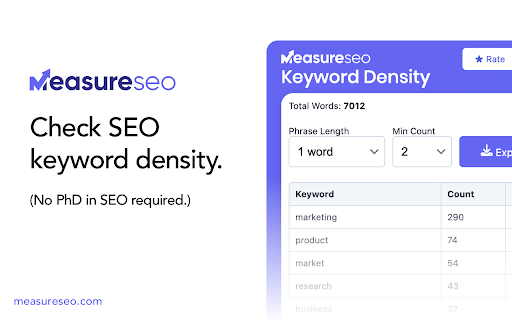

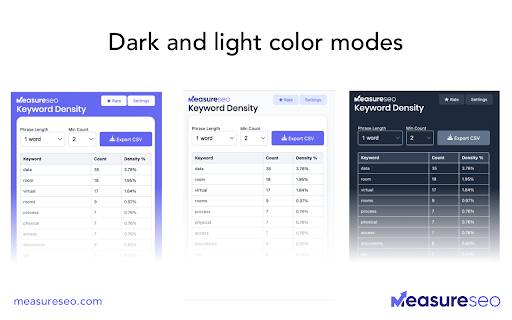
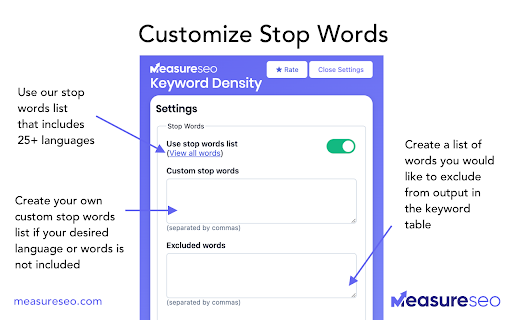
SEO tool for checking the keyword density and frequency of words. Easy to use SEO keyword density checker that shows the most frequently used keywords by count and density of any web page. We’re excited to release new features based on customer feedback and support questions. Here’s a few of them… 🆕 What's new - We've improved extraction support for pages in different languages that do not use English letters, such as Greek, Russian, Chinese, etc. This is still being refined so please provide feedback if there's a language specific issue that comes up. - Improved UTF-8 character recognition ✅ Features - Adjust the phrase length of keywords displayed in the keywords table - Set a minimum count of words to display in the table. - Export keywords you find on the page as a CSV - Multilingual stop words added with stop words in 25+ languages. View the complete list of languages here: https://www.measureseo.com/stop-words-list/ - Custom stop words: add your own stop words list (comma separated) - Excluded words: add words you don’t want to appear in the keyword table (comma separated) - Multiple color modes. - Total words for the web page are displayed above the keywords tables. - List of all keywords used on a page (Note: "stop words" are removed from analysis by default) - Count of how many times each keyword appears on the page - Percentage breakdown of how many times that keyword appears relative to the total number of words used on the page. ✨ Tips & tricks - Recommended min word count setting is 2 words. Why? If a word does not occur on a page frequently, it’s probably not an important key word for the page. If a word occurs multiple times, that’s a positive indicator that it’s important. - The easiest pages to analyze tend to be blog posts and landing pages. - Forums, web apps like Facebook, etc, tend to be harder to analyze as most of their content is rendered with Javascript. If you encounter a site with too much Javascript, you can add some of the Javascript phrases/tags you see to the “excluded words” table to help hide it from the keywords table. In most cases it's best for SEO to keep each keyword used to under 3% of the total word count. Google and other search engines have started penalizing excessive and unnatural use of keywords to avoid keyword stuffing and other practices that encourage poor content. This free tool is brought to you by: MeasureSEO.com

SEO Extension [Metrics, Backlinks, On-Page]
Speed up your SEO routine with SEO extension by Mangools. See the important metrics & website insights on a click. CHECK THE DOMAIN AUTHORITY AND POPULARITY The most popular SEO metrics by Moz, Majestic and popularity charts give you a great overview of any website. Metrics included: - Domain Authority - Page Authority - Citation Flow - Trust Flow - Alexa Rank - Referring IPs - Facebook shares - Followers on social profiles See what the currently visited website already ranks for without visiting any keyword tool: - See the list of keywords with positions in search results - Get the exact search volume for each keyword - See the estimated visits of the currently visited website - Check PPC metrics - Evaluate the keywords with Keyword Difficulty by Mangools rated as (one of) the most accurate metrics on the market Get the list of your competitor's backlinks directly in your browser. The “Backlinks” tab includes the backlinks with the most critical metrics: - The Link Strength developed by Mangools - Source URL - Citation Flow - Trust Flow - HREF - Anchor text - DoFollow/NoFollow tags Click on the "Expand" button to proceed to LinkMiner if you want to further backlink analysis. ON-PAGE SEO ANALYSIS What's the appearance of the website in Google SERP? Are there any on-page errors? Find out with: - Google SERP snippet preview tool - Meta tags, Headings and Structured data checker - Keyword usage analysis - Outbound links analysis (broken link checker) - Page Speed checker - Social previews Identify what long tail keywords are used on the website, what's their density and where are they used. - 1/2/3 word terms - tags usage - title tag and the meta description usage - keyword count - keyword density. If you want to analyze the keywords, just click on the magnifier to see the keyword difficulty and other metrics in KWFinder. You can also copy and import all the keywords. This is super-useful to find any broken links on the website. They are a great opportunity for broken link building or if you look at your own website, you'll be able to fix any errors thanks to the following information: Track the organic positions of your website or competitors: - Start tracking the keywords the currently visited website already ranks for (we'll show you their top organic keywords) - The Dominance Index and Estimated Visits inform you about the overall organic traffic share - Spot the biggest ranking changes with the Top Rankers and Top Outrankers We've included quick context menu integrations so you can access all the popular features of the Mangools SEO tools package at any time. Advanced features that are available directly in SERP to boost the SEO analysis are great huh? And that's exactly what's included in the search results: - SERP positions - Shortcuts to Mangools SEO tools for further analysis You can use this extension with the 10-day FREE trial account. No strings attached, no credit card required. If you are already subscribed to Mangools SEO tools, you'll see the data from the tools in the extension ;)

Keyword Surfer
Keyword Surfer allows you to generate keyword ideas and see search volumes directly in Google search results. Keyword Surfer generates fresh keyword ideas and search volumes, right from your Google search results. Each time you search in Google, you'll uncover valuable insights on search volume, CPC, keyword suggestions, related terms, visibility metrics, and on-page data. Download the extension and add it to any Chromium-based search engine. Once added, make sure to grant the extension any required access and you’re good to go. Then, start by Googling a term—Keyword Surfer will appear on the side panel of your Google results page, however, you may be required to scroll down the page to see it. With Keyword Surfer, you can also store keywords for quick access, without having to google them separately every time. Plus, you can conveniently export collections as a .csv file whenever you need to. Streamline your whole content creation research process without ever leaving Google results page. NEW! Keyword Surfer can now be used in ChatGPT to humanize the written content. It also shows you how likely your content is to be detected as human-like. Check more in our [Keyword Surfer in ChatGPT article](https://docs.surferseo.com/en/articles/9956100-keyword-surfer-in-chatgpt). Looking for our Google Docs extension for effortless writing with SEO optimization in mind? [You can find it here!](https://chromewebstore.google.com/detail/surfer-for-google-docs/faapilcgnafanfcdhlkjijhoimmlhmjn) ______________________________ Data for the extension are provided by Surfer: surferseo.com. Surfer transforms SEO into a clear, predictable path for business growth by offering smart solutions that boost organic traffic. We pave the way for simpler, smarter SEO for agencies, teams, and marketers. Our toolkit empowers these groups to automate content management tasks and increase traffic without breaking the bank. Crafted by a dedicated team of engineers, marketers, and SEO specialists, our platform is designed to simplify the SEO content creation process, making it efficient and user-friendly. Thanks to our reliance on reverse-engineering algorithms, users have come to trust our advice. Our Content Score sets the industry standard, removing uncertainty from on-page SEO. Count on our tool for relevant, data-supported recommendations. We make SEO straightforward.

Serpstat Website SEO Checker
Instantly check your website's SEO, analyze competitors and get advantage of powerful search analytics in one place. Serpstat Website SEO Checker allows you to find the key metrics of any site or page in just a few clicks. It provides you with an extensive list of SEO metrics, analysis, and tips. To examine a domain/page, you don't need to open a new tab. Click on the icon and you'll get an SEO audit of domain or page: visibility, traffic, number of keywords, top competitors in the region, etc. Three sections are now available: * On-page SEO parameters - Free Lifetime * Page analysis - Freemium * Domain analysis - Freemium Some features work without API requests to Serpstat servers so they are available without signing up, right after installation of the extension. Some reports require to sign up and get a token for API access. Serpstat Website SEO Checker makes analyzing competitors data easier than ever. The extension helps you to provide quickly a keyword research and trust me, it's much better than Keyword Planner tool. The major features: #1 On-page search engine optimization: Page Source Google Cache PageSpeed Insights Site start date Meta tags HTML tags Words Count / Symbols Count Favicon checker and many others. #2 Page analysis: Top 10 keywords in Google ranking URL that ranks for this request Ranking position for this keyword Position change and search volume Keyword CPC URL Competitors Keywords the site ranks in Missing keywords #3 Domain analysis Domain visibility Domain traffic Number of keywords Improved and declined keywords New and lost keywords PPC keywords Number of results in Google, Bing Yandex Quality Index Number of images in Google Image Search Alexa Rank. Visibility change graph In fact, we've brought together the most useful SEO features, so you no longer need a bunch of tools like Ahrefs, Semrush, Majestic and others. Keep an eye on this - it's just the beginning, you'll see many exciting updates soon. Important: To get full access to all functionality, you'll need to sign up on Serpstat.com For information regarding data collection please visit: https://serpstat.com/users/privacy-policy/

SEO Pro Extension
Are you ready to save at least 5 hours/week on daily SEO checks? If your answer is yes, then SEO Pro is exactly what you need.… Are you ready to save at least 5 hours/week on daily SEO checks? If your answer is yes, then SEO Pro is exactly what you need. SEO Pro helps you get all the necessary information about a website page at a glance. Here are 11 examples of what you can do with this free extension in under 3 seconds: 1️⃣ See all main page information at a glance, including: ✅ Title tag ✅ Meta description ✅ Canonical URL ✅ Meta robots ✅ Core Web Vitals (Field data) ✅ Word count on the page 2️⃣Export all page copy in just 1 click 3️⃣ Instantly check Core Web Vitals metrics for a page The SEO Pro extension shows the Core Web Vitals: The SEO Pro extension will show you hints when the page you’re looking at: • Has meta-robots set to ‘noindex’ • Has the canonical tag pointing to a different page 5️⃣ Easily analyze the headings hierarchy of any page It’s handy when you want to see how many H1s the page is using. Or when you want to spot any heading opportunities your competitors are using. 💡 You can also export all the headings found on a page in a CSV with just 1 click! 6️⃣ See status codes and redirect chains at a glance 💪 Pro tip: You can also check if the most common duplicates – like http/https and www/non-www – are handled properly on the website you’re analyzing. 7️⃣Get the number of links on a page, their type and anchor text - Internal links - External links - Anchor text for each of these links 💪 Pro tip: Export the links and their anchor text for further analysis 8️⃣ Highlight nofollow links on a page You can easily see nofollow links on any page with the SEO Pro extension. On the Images tab of the SEO Pro extension, you can easily see the alt tags of the images on a page. It will help you quickly spot the images that are missing alt tags. 💪 Pro tip: Export all images along with their dimensions in a CSV in 1 click for further analysis. 🔟 See what a page preview will look like when shared on social media No need to look for Open graph tags in the source code anymore! The SEO pro extension will show you the preview image, website, title and description of any page so that you can make sure it looks great when you share it online. SEO Pro extension makes it easy for you to check all types of Schema markup so that you don’t need to open the Rich Snippets tool and wait minutes for it to show the results. Just check out the Schema tab.
