
eekkbigfifdabokecancejangeoallck
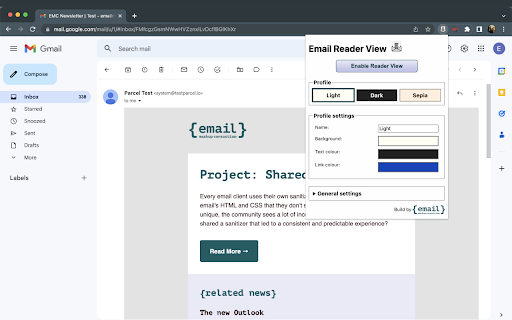
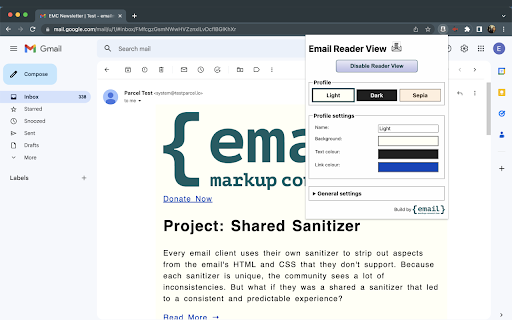

Simplify Email Reading with Email Reader View Streamline your email reading experience. Email Reader View is designed to help you focus on the content that matters most, and it's compatible with popular web based email services, including: Customizable Styles for a Tailored Experience With Email Reader View, you have the power to personalize the styles of emails you receive to match your preferences. Customize various aspects of your reading experience, including: * Background Color: Set a background color to enhance readability. * Content Width: Define a maximum width for content, ensuring optimal readability. * Text Color: Choose the color of the text to suit your visual preferences. * Link Color: Customize the color of link text for easy identification. * Text Alignment: Align text as per your language and reading habits. * Font Selection: Pick from options like serif, sans-serif, monospace, or cursive. You can also use specific fonts by configuring them in your Chrome settings. * Font Size: Adjust text size to your comfort level, even beyond the provided range in Chrome settings. * Line Height: Set the spacing between lines of text for improved readability. * Word Spacing: Define the space between words for enhanced legibility. * Letter Spacing: Customize letter spacing to match your preferences. * Image Control: Choose to hide images and display alt text for an uncluttered reading experience. By removing distractions and/or altering colors and text sizes, this extension can be helpful for people who have: Make email reading easier and more accessible for everyone with Email Reader View. Install now and tailor your email reading experience exactly as you’d like it to be.

Only Read
A feature Packed, customizable reader extension! You can open any website or online document in a straightforward and uncluttered environment called Only Read thanks to the lightweight, multi-browser Only Read add-on. The Only Read UI can be accessed by simply clicking the toolbar button. A plain version of the current page (active tab) will be reloaded. When the Only Read UI is active, a toolbar can be seen in the upper left corner. The close button is the first button down from the top. This button will reload the page in the default view when you click it. To access the settings popup, select the second button from the top. For Only Read, three themes are available. Features + Using the toolbar popup UI, access any website directly in reader view. + has a indigo, indRed, hotPink, teal, sepia, light, or dark mode. + has a font size, line height, or page width adjustment option. + Very lite and easy to use Extension.

Email Characters
A tool for email copywriters that showcases where subject line and preheader text will cut off on devices based on character count. A easy to use tool for email copywriters that allows you to highlight copy intended for email subject lines and preheaders and determine if the text will cut off on email client devices. The current devices it checks against are: 1. Mobile and Desktop Gmail Apps 2. iPhone Mail App 3. Mobile and Desktop Outlook Apps 4. Desktop Yahoo App 5. and more. This extension will help you as a marketer increase email open rates by ensuring the important information reaches your user instead of being cut off on major email clients.

Better Text View
Makes webpage text larger and readable. Small text on a screen of device takes less pixels than larger text, causing loss of clarity and definition of text. If this small text is enlarged, the page and website becomes easily readable (especially for far-sight condition of eyes). This extension enlarges text and makes text colors a contrasting black / white color and a few subroutines. Text contrast can be increased by the 'Strength' slider, with high positive values making text more black / white and negative values keeping text color unchanged. The strength slider also determines the Zoom %, with default zero strength giving 175% (1.75) zoom value. The text size is increased inversely depending on its size. This means small sized text is made much bigger than larger text, which is slightly increased in size. All text within size of Threshold setting is increased in size with text closer to Font Threshold size increasing less than text much lower size than Threshold, depending of Font Increase % setting. Text size of ANY TEXT IS NOT DECREASED (unless '--g_smaller_text' is enabled) to less than its normal size. Smaller text becomes as large as (or larger than) text of Threshold size. Text near the Threshold size is unchanged or changed very slightly. NEW CHANGES In 'Start 3 letters bold', change weight addition of bold font to add 300 instead of 400. Added '%' / '#' .. 'U' options to --g_start3_caps for changing number / percentage of letters to make bold / capitals. Setting Filter rule of hue rotation now will not affect most of images. Remove 'CORS bypass' non-working code to prevent sites with CORS enabled showing error page. New filter rule to set hue rotation of BODY element by specified degrees when enabled. Bring back the old rule that ODD "strength" values make INPUT elements high contrast. "Input Border" and "All CAPITAL text" are changed dynamically without a "refresh/reload" of page. Keycode of pressed key is displayed after Version number on 'All settings' page. This keycode can be specified in the variable '--g_zoom_keycode' to set key for zooming and spoken audio. Changes (or 'mutations') to webpage after loading are now considered when dynamically changing text size through popup settings. The sizing of text when 'Font increase %' is less than 8 has been changed to keep the 'small text big' rule consistent with values more than 8. WEBSITE SETTINGS having "Font increase %" less than 8 will have different text size(s). Sliders of font sizing now have markers for 5/10/15/20.. values. If 'Font increase %' is set to zero, the sizes are updated correctly and if a font name is set ( through 'Font name' in popup or '--g_btvfont' in custom CSS ), that font does not change when updating size. Bugfixes for Font name, size and weight updates without page refresh. Update text size WITHOUT PAGE REFRESH when adjusting font increase %, threshold and weight in popup settings. Copy / paste of settings from / to site now uses the Clipboard of the OS (and the internal "#preset999" as well). The 'fast' option now has 'faster' to reduce hue correction processing time a little bit more. New option '--g_font_weight_offset' which when set to non-zero value, makes differential font weight change. The font weight of text is increased / reduced by the DIFFERENCE of font weight slider and 400 (normal font weight). Font Weight changes are now dynamic and no need to refresh page (except at beginning) Allow ADDING to existing list when clicking "Import whitelist / blacklist settings" after file selection. REPLACE existing list will work as old "Import settings". Add '--g_tags_to_include' to include any of CANVAS / EMBED / IMG / OBJECT / SVG / VIDEO tags to process instead of skipping. Add '--g_btvfont' variable to set font for all sites, through All settings custom CSS. Can also be set in popup custom CSS. Setting '--g_start3_caps' to "fast" or 'fast' (with quotes) improves speed of reverse colors processing. BEWARE, the text/background colors on some sites will not be same as before if 'fast' option is set. Audio text through TTS now WORKS FOR NON-ENGLISH language pages after bugfix. "Reset Settings" button added to reset all settings to default values. When page is being processed, a 'modal' (non-interactive) layer is set to prevent mouse / keyboard events modifying the styling of page. Bugfix for style changes always marked 'important' in stylesheet processing. Bugfix for style rules of images in reverse colors. Bugfix for text, that is also child element of an image, becoming 'invisible' due to Invert image filter in reverse colors. This fix depends on EVEN values of '--g_load_crossorigin' and the length of text less than '--g_load_crossorigin' value. Bugfix for VERY slow processing when 'Process :before/:after elements' is enabled. Bugfix for 'lazy' loaded images, and images set by 'content' attribute in reverse colors and Invert image colors enabled. Another bug causing 1 second delay in processing fixed. Documentation updated and icon changed. Bugfix for disabled (false or zero) values of some variables not correctly set. If '--g_avoid_negative' variable is not enabled, browser will process somewhat faster (or look faster, as all changes are made visible). If enabled or 'nowait', there will be no (or very little) image 'negative' colors (though page loading might appear slower). Bugfix for 'Disable temporarily' not working when '#full_url' is appended to URL. 'High contrast dark mode' disabled in 'Dark mode' will prevent images from changing color due to brightness / contrast setting (as was case long ago). Bad bug of buttons on some sites turning 'invisible' FIXED. Fixed major bug of 'Force max opacity' that, when enabled on some sites, would make backgrounds black. Images in reverse colors do not get 'negative' effect for short time that occurred in older versions. '--g_avoid_negative' only use is the 'nowait' option (which does not wait for loading of background image of BODY element). The numeric value of '--g_load_crossorigin' is now compared with text length to skip color inversion of image if there is text beside image and the text length is more than this value. Previously, it was hard-coded to 95. Setting '--g_skip_css' to 'emo' will disable hue correction for emojis in reverse colors, which is enabled by default. New variable '--g_site_reminder' which can be set to text that is displayed in alert box on visiting site. "Strength" slider value now added to '--g_bg_threshold' value and total compared with text foreground color brightness to decide black / white color. New variable '--g_load_delay' to delay start of processing. Bugs fixed. In hue correction of reverse colors, slightly complex CSS variable values for color / background / border can be processed by setting '--g_skip_css' to 1998. If the color variables values have only one variable and start with 'var(', they are processed even without setting the variable '--g_skip_css' ( to 1998 ). If size (area) of background images of BODY tag is greater than 100 times '--g_min_image_size', their colors are preserved in reverse colors. '--g_smaller_text' now does normal scaling of font sizes, instead of inverse increase. Text sizes will appear similar to original text. The amount of smallness of text sizes is adjustable by "Increase font %". Style sheet processing for colors is skipped if 'Dark mode' is set. Bugfix for images with 'PICTURE' tag not displayed in reverse colors on some sites. Stop the mutation observer when applying settings. Mark as done the parent nodes of new mutation nodes. If content is 'appended' to page after it loads, the page settings will now also apply to the new content. In 'Start 3 letters bold', the variable '--g_start3_caps' can now be set to line / paragraph mode, in which starting LETTER of line / paragraph is changed to different style specified in the variable value. Added Pause / Resume function of speak out loud when zooming text. The Escape key pauses the reading, and pressing Escape again resumes the speech from where it was stopped. Enabling 'Process black text' now changes originally black text to white color if background color brightness is less than '--g_min_bg_brightness'. New variable '--g_skip_css_colors' which skips hue correction (and contrast) of elements processed in stylesheets. Setting '--g_skip_css_colors' to greater than 10 skips more elements than less than 10, and if greater than 99, skips text contrast. Default value is disabled. The '--g_svg_bg_white' now also works for PNG images. Set this to enabled / 'dontinvert' if icons do not appear correct in reverse colors. Bugfix for speak out loud text-to-speech, which would stop speech after few sentences. Now it might stop in long sentences, but less often. Simplified contrast calculation. If text color brightness is more than background color brightness, text is made white, otherwise black. SOME SITE SETTINGS will need adjusting. As the calculation relies on background color being correct (text color is generally always correct), most adjustment will be setting background color, through custom CSS, of elements having mismatch in color of background displayed vs. background calculated in CSS. For SVG images in reverse colors, setting '--g_svg_bg_white' to 'dontinvert' will not apply invert filter to the images. If icons are not appearing correctly in reverse colors, try setting '--g_svg_bg_white' to 'dontinvert'. Many small bugfixes. The '--g_skip_css' now processes only pseudo elements/classes (:before/:after/:selection/:hover) part of stylesheet. To skip ALL processing of stylesheets, either set '--g_max_css_rules' to 0 (zero) or '--g_skip_css' to 99 (which skips pseudo class/elements AND rest of stylesheet). New variable '--g_smaller_text' which is opposite of 'inverse text increase'. Text size is decreased proportionally to size. So sizes near the threshold get much more small than sizes away from threshold. New variable '--g_min_image_size' in place of hardcoded value 199 for images less than this size to skip applying 'Invert image' filter in reverse colors. Part of the stylesheet processing is now done by new variable '--g_change_vars' which changes variables of color values. Set this to enabled if some site colors are different. '--g_keep_colors' now works with text background / border colors and :hover/:selection/:before/:after classes of text. Support for loading of cross-origin stylesheets which depends on variable '--g_load_crossorigin'. "Process :before/:after elements" now does ::hover/::selection colors for hue correction in reverse colors. Use with '--g_load_crossorigin' and '--g_max_css_rules' to load all stylesheet rules. Default value of '--g_max_css_rules' changed from 1000 to 100. "Start 3 bold" option now has variable '--g_start3_caps' which, when enabled, makes start 3 letters CAPITAL and bold. Text is now READ OUT LOUD by speakers through Text-To-Speech engine when a page element having text is zoomed. The language of speaking is set by webpage language. "Avoid colored text" option works correctly with reverse colors. The amount of colorfulness is specified by '--g_min_colorfulness' below which text can be made high contrast. A value of 256 / 300 will make all text high contrast, depending on strength slider. Copy/Paste icons on popup menu to copy settings of one site and paste the settings to another site. New option 'Process gradient colors' to enable / disable processing of background gradient colors in hue correction to keep original color pattern. Keep text color same as original for short text with colorful backgrounds in reverse colors hue correction, which is enabled by setting --g_keep_colors to true or 1 (one). New option 'Process black text', which is false by default, that allows processing black text when enabled or skip black colored text if disabled. New variable "--g_svg_bg_white" which set to true, will make background of SVG images white in reverse colors. Child elements of shadow root are processed similar to HTML elements. Variables to allow skipping classes/tags/ids of elements from being reverse colored. A new variable "g_max_css_rules" sets the maximum CSS rules count. If style sheet exceeds that, it is not processed. Default value is 1000. Background color is preserved in reverse colors if the colorfulness is more than "--g_min_colorfulness" value (default: 41) Adding "#full_url" to URL in Address box will store the settings with the full URL of the page so settings of special pages can be changed by adding "#full_url" to the Address box URL. Variable '--g_max_child' which sets maximum child elements a node should have to set its line height. Variable "--g_foot_re" in either custom CSS or global CSS rules will make footer areas of website colors as normal in reverse colors. Zoom value (and the keycode assigned to it) can be given in custom CSS rules. as following : html { --g_zoom: 5.0; --g_zoom_keycode: 17; } which sets the zoom value of 500% (not possible by Strength slider) and the 'Control' keycode (17) to press (along with Numlock enabled). Setting Strength to -300 (minus 300) skips doing high contrast text changes totally, resulting in faster processing. Rest of changes described in Help.

Reader View
Open any page in reader view mode; light, dark or sepia and clutter free. Reader View extension enables you to open any website in a simple and clutter-free environment. Simply click on the toolbar button to open the reader view UI. The current page will be reloaded in a plain format. Once the reader view interface is open, you can see a toolbar in the top left corner. Click on the second button from the top to open the settings view. There are three themes available for the reader view. The default theme is the - Light - color. But you can choose, Dark or Sepia options as well. Moreover, font size, line height, and page width can also be adjusted in the settings popup. The reader view is a format with minimal distractions. No, buttons, toolbars, background images, ads, or banners are allowed in reader view. It is much easier on your eyes and reduces eye strain if you spend a long time surfing the web. Please note that all changes are auto-saved to the memory in the add-on. Note 1: There are a few options available to open the reader view interface. Please right-click the toolbar button to see all the choices. By default, the reader view opens in the same-tab. Please note that, if you opt for the popup or sidebar view, the first time you access the reader view for a particular page, you will need to press the toolbar button twice to open the interface. Note 2: The reader view extension uses the Readability open-source library to render the page in a simple format. You can get more info about this library here: https://github.com/mozilla/readability To report bugs, please fill out the bug report form on the addon's homepage: https://mybrowseraddon.com/reader-view.html
