
lncfanejfkceajibgniagejmjkjoknhc

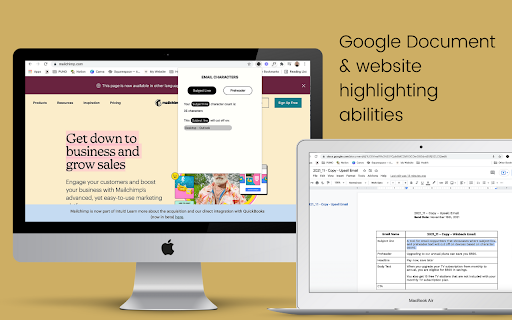
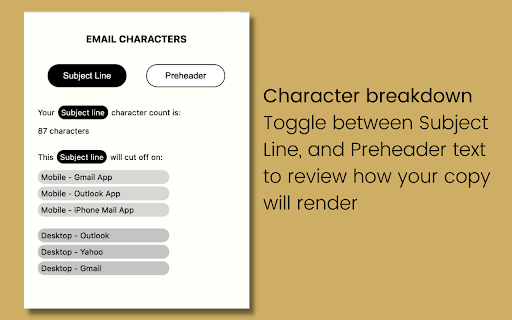

A tool for email copywriters that showcases where subject line and preheader text will cut off on devices based on character count. A easy to use tool for email copywriters that allows you to highlight copy intended for email subject lines and preheaders and determine if the text will cut off on email client devices. The current devices it checks against are: 1. Mobile and Desktop Gmail Apps 2. iPhone Mail App 3. Mobile and Desktop Outlook Apps 4. Desktop Yahoo App 5. and more. This extension will help you as a marketer increase email open rates by ensuring the important information reaches your user instead of being cut off on major email clients.

YouTube Bookmarker
Bookmark your YouTube video timestamps Keep track of your timestamps with this handy little tool. No need to forget where you left off in that lengthy YouTube video anymore. Just click on the plus button in the player options and you can access that timestamp anytime using the extension. Features: - Easy to Use - Fast and minimal package size - Unobtrusive UI - Easy way to track all the timestamps you have saved - Theme based on your preference. Leave a star if you liked my work. https://github.com/nirzon47/youtube-bookmark-extension/

Zipshot
Takes Easy and secure screenshots Zipshot: The Ultimate Screenshot App for Teams | Free for life 😁 Capture, Share, and Collaborate with Your Team Effortlessly Zipshot is the premier screenshot tool designed specifically for teams. While other screenshot apps cater to individuals, Zipshot brings the power of seamless collaboration to your team's fingertips. Join thousands of teams who rely on Zipshot to capture, share, and annotate screenshots while maintaining complete control over their privacy and data. With Zipshot, you can instantly share screenshots with your team through a simple link. It's the fastest and easiest way to capture and collaborate, whether you're reviewing an email or writing a product design specs. Capture screenshots with precision and ease. Available on Windows, macOS, iOS, and Android. Choose from full-screen, window, or custom area captures. Share your screenshots faster than ever. Generate a shareable link immediately after capturing. Share links via email, Slack, Microsoft Teams, or any communication platform. Keep your screenshots private and secure. Set view, edit, and download permissions for each screenshot. Ensure compliance with industry standards and regulations. Store your screenshots in Zipshot's secure private cloud. Access your library from any device, anywhere. Organize your screenshots with folders and tags. Add annotations to highlight important details. Use arrows, text boxes, and shapes to draw attention to specific areas. Leave comments and reactions for real-time collaboration. ## Use cases - Make your Bug reports powerful - Cleaner Product Documentation - Add proof to your processes with the power of hyperlinks - Easier communication ## EVERYTHING YOUR CREW NEEDS AND MORE With Zipshot, your team can capture, annotate, and share screenshots effortlessly. Spend less time explaining with words and more time collaborating visually. Say goodbye to lengthy emails and hello to clear, concise visual communication. ## About Zipshot Zipshot is the leading screenshot tool designed for team collaboration. Engineered for simplicity and security, Zipshot empowers teams to capture, share, and annotate screenshots, ensuring everyone stays on the same page. Whether you're in the office or working remotely, Zipshot is your team's visual communication solution. Discover how Zipshot can elevate your team's collaboration. Start capturing and sharing with Zipshot today!

InfoSE
Quickly access relevant information for selected word Introducing "InfoSE," the ultimate extension for lightning-fast access to relevant information right at your fingertips. With InfoSE, effortlessly explore top relevant results for selected word, neatly organized within accordion-style panels, each offering a concise summary for quick insights. Key Features: Effortless Access: Simply highlight any word or phrase on your browser, and InfoSE springs into action, fetching relevant information instantaneously. Accordion Interface: InfoSE presents search results in a sleek accordion format, allowing you to expand and collapse each panel effortlessly. This intuitive design enables efficient browsing without cluttering your screen. Comprehensive Summaries: Dive into succinct summaries within each accordion panel, providing essential details without overwhelming you with excessive information. Whether it's definitions, explanations, or background context, InfoSE delivers the highlights at a glance. Wikipedia Integration: Seamlessly explore Wikipedia entries directly within InfoSE. With a single click, delve into comprehensive articles, gaining in-depth understanding on your chosen topic without leaving your browsing session.

Michael's Upgrade for TrakED
Upgraded features for TrakED in the THS. (This extension is not an official product of the THS or Intersystems TrakCare software.) Upgraded features for Trak ED in the LGH. Features: - Re-enable spell check in the triage page - Use the enter key when logging in - Handover sheet for ED Main Floor and EMU - ED Main Floor filters and persistent sort - Triage Summary print out - Filter and count results of an enquiry - Count patients currently breaching length of stay targets -- This extension is not an official product of the LGH or InterSystems Trak software.
