
eeiccdhnfoogkfonjcnaekcbdkdmpeda


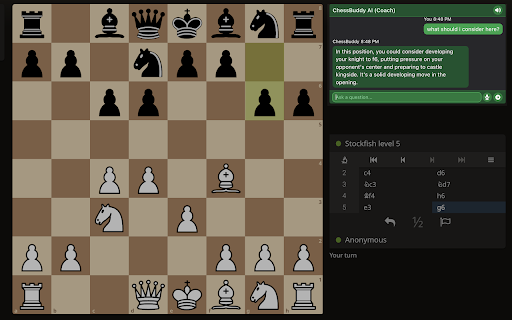
An AI Chat interface for chess ChessBuddy AI - Your Personal AI Assistant for Lichess Elevate your chess game on lichess.org with ChessBuddy AI, your intelligent companion for real-time improvement and analysis. ChessBuddy AI seamlessly integrates with lichess.org, adding a compact chat window to the site. In this chat window, you can interact with an advanced AI that simulates a chess coach. This advanced AI assistant offers three specialized modes to enhance your chess experience: Coach: Acts as a personal trainer, guiding you to improve your skills through targeted exercises and prompts. Analyst: Provides detailed analysis of games and moves, offering in-depth insights without additional prompts. Assistant: Focuses solely on answering your specific chess-related questions without unsolicited commentary. Additional Features: - Text-to-Speech: Listen to AI responses with customizable voice settings, allowing you to focus on the board while receiving advice. - Speech Recognition: Interact with the AI using your voice, enabling hands-free operation during analysis or study sessions. Whether you're a beginner or an experienced player, ChessBuddy AI adapts to your level, providing tailored guidance to enhance your chess journey on Lichess. Unlock your potential and take your chess game to the next level with ChessBuddy AI - your versatile AI chess companion, always ready to help! This extension contains no in-app purchases, but you need an active chessbuddy.ai premium subscription to use this extension. Note: This extension is designed exclusively for use on Lichess.org and requires an active internet connection. To ensure fair play, ChessBuddy AI cannot be used during live rated games and is not intended for cheating.

TradingView Remix: AI Chart Copilot
AI-powered chatbot interface for TradingView Your official AI-powered chart copilot for TradingView. Analyze markets, automate your charts, manage alerts, paper trade, and get actionable insights — all through natural conversation. TradingView Remix lives in your browser's side panel and works directly with your TradingView charts. Just ask, and it does the rest. Market Analysis & Research: Ask about any stock, crypto, forex pair, or commodity and get instant analysis powered by TradingView's real-time data. Get live quotes, fundamental metrics (P/E, EPS, revenue, margins), technical ratings (RSI, MACD, moving averages), earnings calendars, economic event schedules, and the latest news — all synthesized into actionable insights, not raw data dumps. Chart Automation: Stop clicking through menus. Tell the AI to switch symbols, change timeframes, add or remove indicators, set up multi-chart layouts, overlay comparisons, change chart types (candles, Heikin Ashi, Volume Footprint, Market Profile, and more), and navigate to specific dates. It reads your current chart state and works with what you already have set up. Smart Drawings: The AI draws directly on your chart to illustrate analysis — support/resistance levels, trend lines, Fibonacci retracements, price zones, entry/exit signals, and text annotations. It positions drawings accurately using your chart's visible range and current prices. Alert Management: Create, list, pause, restart, and delete price alerts through conversation. Set alerts with specific conditions (cross, cross up, cross down, above, below) and delivery preferences (push, email, popup, webhook). No more navigating alert dialogs. Paper Trading: Practice trading without risk. Place market, limit, and stop orders with optional take-profit and stop-loss brackets. Manage positions, review trade history, and track P&L — all through chat. The AI always shows you the trade plan and asks for confirmation before executing. Portfolio Tracking: Manage your TradingView investment portfolios through conversation. View all your portfolios, check holdings with live valuations, and review performance metrics — total gains, unrealized/realized P&L, annualized yield, and period returns (YTD, 1M, 3M, 6M, 1Y, all-time). Get risk analysis with Sharpe ratio, Sortino ratio, and beta vs. benchmark. Record buy/sell transactions, log cash deposits and withdrawals, and create or reorganize portfolios — all without leaving the chat. Stock Screener: Find trading opportunities using TradingView's powerful screener. Filter by price, volume, market cap, P/E ratio, technical signals, sector, and more across US stocks, crypto, forex, and international markets. Watchlist Integration: Scan your TradingView watchlists for setups. The AI reads your active watchlist, pulls batch quotes and technicals, and ranks symbols by how actionable they look. Pine Script Assistant: Write, edit, and deploy custom Pine Script indicators directly from the chat. The AI opens the editor, writes the code, compiles it, and adds it to your chart — handling errors automatically. MCP Server Integration: Connect your own external tools and data sources using the Model Context Protocol (MCP). Add any MCP-compatible server — private APIs, databases, proprietary analytics — and the AI can discover and call those tools during your conversation. Supports OAuth and API key authentication. All requests are proxied through your browser, so your credentials never leave your machine. Persistent Notes: Save analysis, trade rationale, and key findings to TradingView's built-in text notes. The AI uses these as long-term memory to recall past analysis across sessions. Works across all markets — stocks, crypto, forex, commodities, futures, and indices. The AI automatically adapts its analysis style to the asset class you're viewing. - Open any chart on TradingView - Click the TradingView Remix icon to open the side panel - Sign in with Google - Start chatting Pricing: Free during Public Beta. Every user gets a weekly usage limit that scales with their TradingView plan: Free 0.25x, Essential 1x, Plus 2x, Premium 5x, Ultimate 20x. Free-tier users have all analysis features but the Pine code authoring assistant is reserved for Essential and above. Insiders are unlimited. No credit card required — see the pie indicator in the side panel header for live usage and the upgrade link. Privacy: Your TradingView session data stays in your browser. The AI processes your questions server-side but never stores your trading data or chart history.

AI Chat for Search
🔥Display intelligent answers from leading AI models alongside your search engine's general results. Enhance your browsing experience with AI! AI Chat for Search is an extension that shows AI responses alongside Google, Bing, DuckDuckGo, and other search engines. Compared to the scattered and chaotic information from search engines, our AI has already summarized and categorized this information for you, allowing you to see the results you want more intuitively. Moreover, you can ask further questions based on the AI responses to gain a deeper understanding of the topic. 💪The Key Features: 👉Search Enhance: Obtain concise, accurate answers to your questions right within the search engine interfaces you already use. 👉Search Agent: Just ask a question, and AI Chat for Search will search using multiple keywords, review all the results, and find the right answer for you. 👉All-In-One-Chat: Compare the answers from several powerful AI models on one page to enhance your search experience. 👉Quick Ask: Enter "gpt" in the browser address bar, then press "Tab" or "Space" to enter quick ask mode. In Quick Ask mode, enter your query and hit "Enter" to instantly send it to your selected AI model. 🥳 How AI Chat for Search Outshines the Competition? ✔️ Supports all popular search engines: Google, Bing, DuckDuckGo, and other search engines. ✔️ Supports connections to official APIs (including advanced and turbo models). ✔️ Markdown rendering ✔️ Code highlights ✔️ Dark mode ✔️ Custom trigger mode ✔️ Custom content text size ✔️ Supports 50+ languages — ❓ Frequently Asked Questions: 📌 What is AI Chat for Search? AI Chat for Search is a browser extension that enhances search engines with the power of advanced AI. It works by showing AI-generated responses alongside normal search engine results. 📌 Is AI Chat for Search free to use? Yes, we offer limited use for free. For unlimited access, you can choose the Premium Plan. 📌 What search engines are supported? Currently, AI Chat for Search supports Google, Bing, DuckDuckGo, and other search engines. More search engines will be supported in the future. 📌 Do I need an account with an AI provider? AI Chat for Search offers two usage modes: a free mode and a subscription-based mode. In the free version, users can utilize the search enhancement feature by either signing into their personal account with an AI provider or by applying their own API key. Conversely, the premium mode allows users full access to all features without the need for any external API keys or accounts.

OneClickPrompts
One Click Prompts for AI chat interfaces Tired of typing the same instructions into AI chats? OneClickPrompts adds a simple menu of your custom prompts right inside the chat window. Create a button for any prompt you use often—like "respond in a markdown table" or "act as a senior developer"—and just click it instead of typing. Convenient menu for editing prompts. You can see how it works on video. Has multi-profile prompt library functionality and tries to count tokens! FREE | Open Source Works in All Major AI Chats: This extension works on the most popular AI chat websites: ChatGPT, Claude, Gemini, and others! (Store policy prevents listing them here, but the full, updated list of supported sites is on the GitHub page.) 🔥Now with token counter for ChatGPT and most sites! (Well, it 𝘢𝘱𝘱𝘳𝘰𝘹𝘪𝘮𝘢𝘵𝘦𝘴 tokens, so it is not precise, but with better precision than other extensions I tried. Enable counter in modules and it will work. Settings allow you to select one of FIVE prediction models with calibration, or just turn it on and forget about it! You can also count tokens for what you write and for what is already in chat thread separately) What It Actually Does: ✅ Custom Prompt Buttons Create buttons for any text you want. Use an emoji or a few characters for the label so you can find it quickly and click. Click the button to put the text in the input box. Or press hotkey. ✅ Floating Panel & Prompt Queue Click the '🔼' button to open a floating panel you can drag anywhere on the screen. Inside, you'll find the Prompt Queue. This lets you: Add multiple prompts to a list. Send them one by one with a delay you can set. Useful for tasks that require several steps, like get news updates once an hour or something like that - and each prompt is controlled by you. ✅ Profiles Organize your buttons into different sets using profiles. Create one for coding, one for writing, one for a specific project, etc. Switch between them with a dropdown. ✅ Keyboard Shortcuts If you want, you can enable shortcuts (Alt + 1-9) to trigger your first nine buttons without using the mouse. ✅ More Customization: Auto-Send: Each button can be set to automatically submit after inserting the text. Holding Shift reverses this behavior. | Separators: Add visual lines between buttons to keep them organized. Backup/Restore: Save your entire setup (profiles and buttons) to a JSON file and load it back later or on another computer. Modules: Modules: 🛜Cross chat prompt sharing: Want to send a message to all chats you have opened? Just type your prompt, and then, either click on the button ⬆️ that will send prompt to ALL open tabs (Each tab can block incoming messages via Shift-click!) or use the store and paste prompt buttons: can be better than copy-pasting as does not clutters clipboard. To use you will have to activate it in settings under "Modules", and you choose either broadcast option or store-send option. 🔢Token approximator: like best effort token counter, displays token usage in chat on a webpage. For Tinkerers: Edit CSS Selectors: If a site update breaks the button placement, you can go into the advanced settings and edit the CSS selectors yourself to fix it.... or place in other place you want. The Important Stuff: 🔒 Private: Your prompts and settings never leave your computer. They are stored locally in your browser. There is no tracking, no accounts, and no data sent to any server. 🌐 Open-Source: The code is public on GitHub. You can check it yourself to see how it works. ⚡ Simple: while this extension has a lot of settings, you don't have to use them. You can only use what you need and leave other settings untouched. ⁉️How to Use: Install the extension. Click the icon in your toolbar to open settings. Create a button. It will show up in your next chat session. Support & Feedback If something doesn't work, try reloading the page. If it's still broken, please open an issue on GitHub. I appreciate bug reports and suggestions. GitHub: https://github.com/MaxITService/OneClickPrompts

Chat AI - SideBar AI by Fusion
Premium AI model. Chat with all AI models. Chat with AI on any webpage Chat AI for search engines by Fusion Chat AI Imagine this: you perform a regular online search, and alongside your results, a smart AI Chat box pops up, ready to answer follow-up questions, summarize information, and dive deeper into the topic. It's like having a research assistant instantly available! It has the following main features: ➤ Search Engine Integration: Get an AI Chatbox when you search online.Works on all your favorite search engines. ➤ AI Image Generator:Generate High Quality images from your imagination ➤ Helper Popup, Call Fusion on any page you want by just right clicking
