
bflmnoacgfmbdfinmbiapbanfobpglba


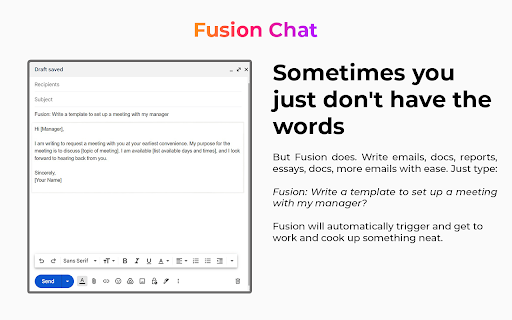

Premium AI model. Chat with all AI models. Chat with AI on any webpage Chat AI for search engines by Fusion Chat AI Imagine this: you perform a regular online search, and alongside your results, a smart AI Chat box pops up, ready to answer follow-up questions, summarize information, and dive deeper into the topic. It's like having a research assistant instantly available! It has the following main features: ➤ Search Engine Integration: Get an AI Chatbox when you search online.Works on all your favorite search engines. ➤ AI Image Generator:Generate High Quality images from your imagination ➤ Helper Popup, Call Fusion on any page you want by just right clicking

AI Assistant for Chrome | SidebarGPT
Access AI language model everywhere with SidebarGPT for Chrome. Enhance writing and communication skills with AI tech. SidebarGPT - AI Assistant for Chrome is a powerful browser extension that brings the convenience and efficiency of virtual assistant technology to your web browsing experience. By installing this extension, you can easily access AI, a cutting-edge language model that has been trained by OpenAI, as a sidebar on every website you visit. With AI by your side, you can get quick and accurate answers to all of your questions, without ever having to leave the website you're on. Whether you need help with a complex research topic, want to know more about a particular product or service, or just need some general advice or guidance, AI is there to help. One of the great things about this extension is how easy it is to use. Simply type in your question or query, and AI will use its advanced natural language processing capabilities to provide you with a response. The assistant is designed to be highly intuitive and responsive, so you can get the information you need quickly and easily. Another benefit of using this extension is that it can help you save time and be more productive. Instead of wasting time searching for answers on different websites or trying to navigate complex research topics on your own, you can rely on AI to provide you with accurate and useful information, all from the comfort of your web browser. Overall, the SidebarGPT - AI Assistant for Chrome is an incredibly useful tool for anyone who wants to improve their web browsing experience and get more done in their day. With its advanced features and intuitive design, this extension is a must-have for anyone who wants to stay informed and up-to-date in today's fast-paced digital world.

Multi AI Sidebar
Access to all AI apps like OpenAI ChatGPT, Bing AI, Microsoft Copilot, Google Gemini and more in a single Sidebar. Get the best AI. ★★★★★ Access to many Artificial Intelligence Apps and many more in a single Sidebar with OpenAI ChatGPT, Microsoft Bing AI - Copilot or Google Gemini - Bard, xAI Grok, Anthropic Claude 😱 See this link for a full list: https://jitt.wwevents.fun/project/multi-ai-sidebar/ 🚧 This Multi AI Sidebar allows to fast switch between all the AI Apps 🚨 You can enable/disable the AI Apps that you want to be active 🔥 Explore the amazing possibilities of AI, such as generating text, images, music, code and more in real time 🏆 Non-intrusive, by showing the number of active AI Apps in the Sidebar icon on the Browser Toolbar 🥊 FEATURES ★ ChatGPT: Allow to chat with the lastest GPT iteration from OpenAI. ★ Microsoft Copilot: Copilot and Bing AI have can read text and files and provide real-time web serach and information. ★ Google Gemini: Chat with the latest AI from Google that was upgraded from Google Bard to Gemini Nano, Gemini Pro, and Gemini Ultra. ★ xAI Grok: Check the latest AI for X, called Grok. Developed by xAI. It's one of the most advanced in the world. ★ Anthropic Claude: Now available the latest Claude LLM, give it a try! ★ For image and video manipulation the extension also provide easy access to Microsoft Designer, Microsoft Image Creator and Magic Studio. ★ Sidebar shows as a slide-out panel and runs the web versions of the available AI Apps meaning less CPU/RAM/Internet consumption 👑 ★ Your computer will run faster with more resources available without having to sacrifice functionality. ★ Choose your preferred AI App from a wide number of available options 😍 ★ Combine all the cutting-edge AI Apps into one simple panel! ★ Multi AI Sidebar is a wrapper for worldwide AI Apps. It allows you to have access to the official services quickly from a standalone sandboxed panel 🔥 ✔ Best extension for Artificial Intelligence 🔧 You can fast-switch between all AI Apps 🎓 ✔ Clean and simple interface 💻 ✔ Very Low CPU/RAM/Bandwidth consumption. ✔ HTTPS and on official platforms for maximum security 🔑 No share of credentials to third party 🔓 💎 Building Apps and Extensions for Google Chrome and Android 🔥📣 📔 Available on the product page: https://jitt.wwevents.fun/project/multi-ai-sidebar/#changelog Multi AI Sidebar is a trademark of WWEvents. All websites are a trademark of their own company's, registered in the U.S. and other countries. This is an independent project developed by WWEvents and has no relationship to them. By installing this product you agree to our privacy policy & terms of service: https://jitt.wwevents.fun/privacy-policy/ You may consult the list of permissions and the reason why they are required on the product page: https://jitt.wwevents.fun/project/multi-ai-sidebar/#permissions “notifications” – Used to send desktop notification. For example when a new message arrive or App is updated. “contextMenus” – Allow to add more settings when right click in the App icon in the browser toolbar and browser context menu. “storage” – Used to save settings on your local computer. “scripting” – Used to be able to insert JS or CSS on the required host/domains. “system.display” – Used to detect the display size and position the Extension window. “unlimitedStorage” – Storage is limited to 5MB of data that may not be enough to store all configs. “host_permissions” – Permission to access to some hosts/domains that we must modify in order to provide the desired functionality detailed in the functionality. It also allows that you can share content (links or text) from other pages directly to inside the App and send it as a message to a friend for example. Also used to allow intercommunication with other Apps (i.e. Emojis). “activeTab” – Permission to access the window that the extension is running and is show to the user. “all_urls” – Permission required for users be able to take screenshots of the current window – captureVisibleTab. “declarativeNetRequestWithHostAccess” - Used to get the iframe version of the websites. Only impact the Extension Window. “declarativeNetRequestFeedback” - Used to get the iframe version of the website by changing the iframe requests. “alarms” - Used to update App icon badge. This information is also available inside the App: Options -> About

OptiSearch
OptiSearch is a powerful Chrome extension that revolutionizes your web search experience. It seamlessly integrates with your favorite search engines and enhances your search results with useful content retrieved from popular websites and forums such as the StackExchange sites or Wikipedia. With OptiSearch, you can find answers to your questions faster and more easily. The extension parses relevant and high-quality information from various sources and displays it alongside your search results, giving you a comprehensive view of the topic you're interested in. OptiSearch also includes advanced features such as graph plotting and math expression evaluation. It's a reliable and efficient tool that helps you find what you're looking for faster, and makes your search journey more enjoyable and rewarding. Download OptiSearch now and discover a new way of searching the web that's smarter, faster, and more fun!

ChatGPT for Google: Search GPT
Integrate ChatGPT into your search engine! Access ChatGPT on any website. The ultimate browser extension for anyone seeking fast and accurate information. Powered by With ChatGPT, you'll never have to waste time scrolling through countless search engine results again. Instead, you'll see ChatGPT's response right alongside your regular search engine results, allowing you to quickly and easily find the information you need. Chat directly with the AI model, allowing you to ask questions and get answers in a natural, human-like way. And with support for all popular search engines, including Google, Bing, and DuckDuckGo, you'll be able to access ChatGPT no matter which search engine you prefer. Please note that extension does not support or endorse the use of other ChatGPT extensions in parallel. To ensure the best experience, please uninstall any other ChatGPT extensions before installing this one.
