
fchmejnoncmdhlebgdgifdnehoibalnd


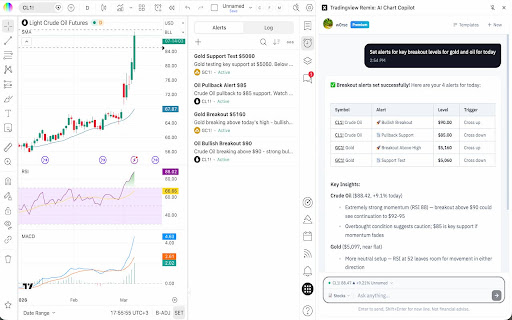
AI-powered chatbot interface for TradingView Your official AI-powered chart copilot for TradingView. Analyze markets, automate your charts, manage alerts, paper trade, and get actionable insights — all through natural conversation. TradingView Remix lives in your browser's side panel and works directly with your TradingView charts. Just ask, and it does the rest. Market Analysis & Research: Ask about any stock, crypto, forex pair, or commodity and get instant analysis powered by TradingView's real-time data. Get live quotes, fundamental metrics (P/E, EPS, revenue, margins), technical ratings (RSI, MACD, moving averages), earnings calendars, economic event schedules, and the latest news — all synthesized into actionable insights, not raw data dumps. Chart Automation: Stop clicking through menus. Tell the AI to switch symbols, change timeframes, add or remove indicators, set up multi-chart layouts, overlay comparisons, change chart types (candles, Heikin Ashi, Volume Footprint, Market Profile, and more), and navigate to specific dates. It reads your current chart state and works with what you already have set up. Smart Drawings: The AI draws directly on your chart to illustrate analysis — support/resistance levels, trend lines, Fibonacci retracements, price zones, entry/exit signals, and text annotations. It positions drawings accurately using your chart's visible range and current prices. Alert Management: Create, list, pause, restart, and delete price alerts through conversation. Set alerts with specific conditions (cross, cross up, cross down, above, below) and delivery preferences (push, email, popup, webhook). No more navigating alert dialogs. Paper Trading: Practice trading without risk. Place market, limit, and stop orders with optional take-profit and stop-loss brackets. Manage positions, review trade history, and track P&L — all through chat. The AI always shows you the trade plan and asks for confirmation before executing. Portfolio Tracking: Manage your TradingView investment portfolios through conversation. View all your portfolios, check holdings with live valuations, and review performance metrics — total gains, unrealized/realized P&L, annualized yield, and period returns (YTD, 1M, 3M, 6M, 1Y, all-time). Get risk analysis with Sharpe ratio, Sortino ratio, and beta vs. benchmark. Record buy/sell transactions, log cash deposits and withdrawals, and create or reorganize portfolios — all without leaving the chat. Stock Screener: Find trading opportunities using TradingView's powerful screener. Filter by price, volume, market cap, P/E ratio, technical signals, sector, and more across US stocks, crypto, forex, and international markets. Watchlist Integration: Scan your TradingView watchlists for setups. The AI reads your active watchlist, pulls batch quotes and technicals, and ranks symbols by how actionable they look. Pine Script Assistant: Write, edit, and deploy custom Pine Script indicators directly from the chat. The AI opens the editor, writes the code, compiles it, and adds it to your chart — handling errors automatically. MCP Server Integration: Connect your own external tools and data sources using the Model Context Protocol (MCP). Add any MCP-compatible server — private APIs, databases, proprietary analytics — and the AI can discover and call those tools during your conversation. Supports OAuth and API key authentication. All requests are proxied through your browser, so your credentials never leave your machine. Persistent Notes: Save analysis, trade rationale, and key findings to TradingView's built-in text notes. The AI uses these as long-term memory to recall past analysis across sessions. Works across all markets — stocks, crypto, forex, commodities, futures, and indices. The AI automatically adapts its analysis style to the asset class you're viewing. - Open any chart on TradingView - Click the TradingView Remix icon to open the side panel - Sign in with Google - Start chatting Pricing: Free during Public Beta. Every user gets a weekly usage limit that scales with their TradingView plan: Free 0.25x, Essential 1x, Plus 2x, Premium 5x, Ultimate 20x. Free-tier users have all analysis features but the Pine code authoring assistant is reserved for Essential and above. Insiders are unlimited. No credit card required — see the pie indicator in the side panel header for live usage and the upgrade link. Privacy: Your TradingView session data stays in your browser. The AI processes your questions server-side but never stores your trading data or chart history.

Screener to TradingView
Effortlessly copy your screen result and analyse it in TradingView Features: ✨ Multi-Page Scraping: Automatically collects stock symbols from all pages containing your results. 🔄 Token to Symbol Conversion: Replaces exchange tokens with actual stock symbols using a powerful API. 🏷️ Exchange Differentiation: Distinguishes between symbols listed on NSE and BSE exchanges. 📋 Clipboard Copy: Instantly copies the final list of stock symbols to your clipboard in CSV format. 🔔 User Notifications: Get real-time popup messages about scraping progress and completion. How to Use: 1. Navigate to Screener.in 🌐 - Open your screen. 2. Start Copying 🖱️ - Click the extension icon in the Chrome toolbar (pro tip: pin it to your tool bar). - Hit the "Start Scraping" button in the popup. 3. Monitor Progress 👀 - Watch popup messages for real-time updates on the scraping process. 4. Copy Symbols 📋 - Once done, the extension replaces exchange tokens with symbols and copies the CSV list to your clipboard. This can be pasted directly into your TradingView watchlist. Why You'll Love It ❤️ - Save Time: Automate the tedious process of collecting stock symbols from multiple pages. - Easy to Use: Simple interface and seamless integration with your browsing experience. Transform the way you power your trading. Perfect for traders, analysts, and finance enthusiasts! Download and try it today! 🌟 Did this extension save you time? If your answer is yes, feel free to buy me a ☕️ cutting chai below. For questions or feedback, please contact me at me@devagam.com

TradeSage - TradingView Enhancement Suite
Your trading copilot with ChatGPT Pine Script generator TradeSage is your trading copilot, bringing you the power of ChatGPT optimized specifically for traders and Pine Script code generation as well as a plethora of convenience features including screener notifications and strategy optimizer. 💻 Generate Pine Script indicators/strategies in seconds. ⏮️ Optimize your strategy and find the most profitable inputs with ease ✍️ Inline Pine Script edits: apply changes to any existing script by simply explaining the changes you need, in plain English ✅ Fix Pine Script errors with the click of a button within the editor 📚 Learn with TradeSage: our AI can act as your learning buddy as you dive deeper into your trading journey. 🚨 Screener Alerts: get desktop notifications when a new symbol shows up on your active screener. 📖 Frequently Asked Questions: ❓ What search engines are supported by you? 🟢 Currently, we support Google, Bing and other search engines, and more search engines will be supported in the future. ❓ Do I need a ChatGPT/OpenAI account? 🟢 No, you only need to create a free account through our extension ❓ ChatGPT is banned in my country. Does it work in my country? 🟢 Yes. Our extension works in all countries. ❓ Is it free to use? 🟢 Yes, you get limited credits on sign up for free. For unlimited access, you can choose the Premium Plan. ❓ How is this better than ChatGPT Plus? 🟢 Our product leverages an advanced version of GPT-4, meticulously optimized with contextual understanding and precision-tuning. This ensures the delivery of more reliable outcomes, free from syntax errors— a notable advancement beyond the capabilities of ChatGPT Plus. Any questions or suggestions? Please contact us at hellotradesage@gmail.com © 2024 TradeSage. Made with ❤️ in 🇨🇦

AI Trading Graph Analysis Extension | TRAID | Multi-Strategy Chart Analyzer
AI Trading Graph Analyzer. Multi-strategy Tool for Forex, Stocks & Crypto. Instant SL/TP recommendations. You lost again didn't you? It's because you are alone in front of a graph! Are you scared to lose even more money? We got you! Do you realize that you don't stand a chance against Rich Market Manipulators? Now imagine you had 10 unique experts sitting next to you, each with a different strategy. They will analyze the graph for you all at the same time and tell you when to trade but also.... WHEN NOT TO TRADE! Stop second-guessing your trades. What if you could have 10 expert analysts debate any chart on your screen and give you one single, unified trading signal in under 15 seconds? It provides a SHORT / LONG Signal, Stop Loss, Take Profit, Entry point and explanation of the graph! Updates V5.5 Patched the banner which says LONG SHORT. It will be correct. V5 SIDEBAR EXTENSION CONVERSION - now the extension stays on the screen instead of closing after every action. V4.5 Better user experience, once a Signal is ready the extension scrolls down to show you the signal. V4.4 -Improved speed of result for 10 trading strategies -Upgraded to the most powerful AI model that looks at your graph V4.1 -Simplified user interface -Enhanced user interface V4 -NEW! During the trial its completely free to use the single strategy functionality. -To use the multi strategy functionality, a gemini API key will be required. -Updated user interface that helps you choose the right trading strategy -Made it easier to understand each strategy V3.3 You can now check up to 10 strategies in 1 click and it works simultaneously so results will be received in under 10 seconds. Tired of the endless analysis, the conflicting indicators, and the nagging uncertainty that leads to missed opportunities? Traid is your personal AI chart strategist, built to deliver institutional-grade analysis with a single click. It ends the confusion by harnessing the collective wisdom of up to ten proven trading strategies, consolidating their insights into a clear, actionable plan. No more analysis paralysis. Just the confidence to act decisively. The Ultimate Advantage: AI-Powered Consensus Imagine selecting the Wyckoff Method, Elliott Wave Theory, and Fair Value Gaps. Traid’s AI doesn't just run them in parallel—it makes them debate each other. It intelligently weighs the agreements, evaluates the conflicts, and forges a single, high-conviction recommendation from their combined intelligence. It’s the ultimate confirmation, delivering a result that is far more robust and reliable than any single strategy could ever offer on its own. Transform Your Trading Workflow Gain Unshakeable Confidence: Receive a single, unified recommendation (LONG or SHORT) backed by the combined power of multiple proven strategies. Trade with conviction, knowing your decision is supported by a deep, multi-faceted analysis. Reclaim Your Time: Forget spending hours manually marking up charts and wrestling with conflicting data. Go from a complex chart to a complete, actionable trade plan—including entry, stop loss, and take profit—in less than 120 seconds. Achieve Crystal Clarity: Every analysis comes with a transparent explanation of how the AI reached its conclusion. You'll see which strategies were in agreement, which were in conflict, and why the final signal is the most probable outcome. Drill Down with Precision: Want to see what a single strategy says? Instantly run a deep-dive analysis using any of the ten methods. You’ll get a detailed report with a 5-star confidence rating and a full rationale, perfect for refining your own skills. Your Complete Trade Blueprint Includes: A consolidated Entry Point, Stop Loss, and Take Profit An overall Confidence Level for the signal A detailed Explanation of the AI's reasoning Ready to stop guessing and start analyzing like a team of quantitative pros? Click 'Add to Chrome' now and transform your trading with the power of AI consensus! IMPORTANT DISCLAIMER Trading financial markets, including stocks and cryptocurrencies, involves substantial risk of loss and is not suitable for every investor. The information and analysis provided by the Traid extension are generated by an AI and are for educational and informational purposes only. The AI's output should be considered as a tool to supplement your own research and decision-making process, not as a direct instruction to trade. Always conduct your own due diligence and consult with a qualified financial advisor before making any investment decisions. The developers of Traid are not liable for any financial losses you may incur. Past performance is not indicative of future results. By using this extension, you acknowledge and agree to these terms.

HorizonAI - Expert TradingView AI
HorizonAI is a AI tool designed to help you with your Pine Script coding 🎉 Introducing HorizonAI, the ultimate coding assistant for TradingView Pine Script 🎉 HorizonAI integrates into TradingView to create a seamless environment for creating indicators and strategies. Use an AI Powered Script Builder to craft custom strategies in a visual builder by dragging and dropping blocks. Connect blocks to easily create advanced strategies in minutes. HorizonAI Chat builds on top of the latest AI tools like ChatGPT, by specifically fine tuning the AI model the learn Pine Script code and the learn latest trading concepts. Concepts such as Smart Money Concepts, ICT Type Concepts, Fair Value Gaps (FVG), Order Blocks and a lot more. -------------------------------- FAQ ✅Can I try HorizonAI for free? HorizonAI is free to use, no credit card details needed on sign up. Start making strategies today! ✅How is this better than ChatGPT? HorizonAI is specifically fine tuned to be better at coding Pine Script. HorizonAI is also connected to a large knowledge base that is updated regularly to include all the latest trading concepts in addition to how to code them in Pine Script. ✅Do you need a ChatGPT Subscription? No, you don't need any subscription to ChatGPT or any other AI services.
