
eecaejegccegjjjngokgelmehfkmpico


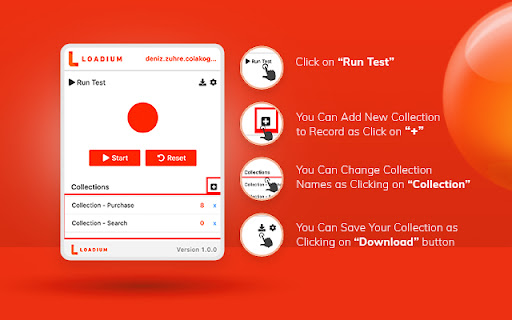


This extension helps Loadium users to write fast and better automate tests. Loadium Record & Play helps Loadium users to write fast and better-automated load tests. You can easily record, browse, upload, edit and run. The Chrome extension records all HTTP/S requests, creates synced JMeter scripts and automatically uploads them to Loadium as a collection, where you can edit and execute the collection with just a single click. In addition, collections can be used repeatedly by editing. No need to know and install JMeter for recording and running your performance tests. FEATURE - 100% Compatible with Apache JMeter. - Runing tests without test scripting applications - Editing your tests both locally and via Loadium - Recording all HTTP/S requests made by your browser. - Adding transaction labels (for JMeter) during recording - Saving your tests as both json and jmx so you can use them again later. - Running API Functional Test - Storing your tests on Loadium REQUIREMENTS - Recommended minimum Chrome version is 58

LoadFocus - JMeter Cloud Load Testing & Website Performance
Record JMeter tests while browsing, upload JMX files to the cloud, and run load tests with thousands of users. Instant JMeter Test Recording and Cloud Load Testing at Your Fingertips. The LoadFocus JMeter testing extension lets you effortlessly record JMeter tests while browsing your website and run cloud-based load tests with thousands of virtual users—all with just a few clicks. Boost your website and API performance testing strategy with key features, including: Automatic JMeter script generation Cloud-based load tests with virtual users Detailed performance metrics Easy file uploads and downloads In-depth reports and insights on modern metrics FEATURES: 📋 Automatic JMeter Test Recording Simply navigate your website, and the extension captures your actions into a JMeter script (JMX) for seamless testing. ☁️ Cloud-Based Load Testing Run large-scale performance tests with thousands of users from multiple cloud locations, no coding needed. 📊 Detailed Performance Metrics Analyze key metrics like Response Time, Latency, Hits/second, and Percentiles with live charts to uncover performance issues. 📂 Easy Uploads and Downloads Upload your JMeter files to the cloud or download test results locally for further inspection. 📑 In-Depth Reports & Modern Insights Get comprehensive performance reports that include modern metrics such as error rates, response times, and percentile breakdowns. These insights help you identify bottlenecks and optimize your application’s performance.

Ranorex Selocity
Auto-generate robust XPath, link text, RanoreXPath, and CSS selectors for use with Selenium. * Rapidly generate selectors with one click directly in the DevTools sidebar panel. The smart selector generator automatically detects and ignores dynamically generated IDs. * Manual selection: Ranorex Selocity generates XPath, link text, RanoreXPath, and CSS selectors. Because only you know which selector fits your needs the best. * Instantly generate selectors for elements within iframes, both same-origin and cross-origin. * Exploratory selector creation: If you choose to modify a selector yourself, Ranorex Selocity provides instant feedback to ensure the selector is useful. * Automatic escaping of selectors: If desired, quotes and escape characters are automatically added to your selector, ready for instant use in locators in Selenium tests. * Unique RanoreXPath selector: The generated RanoreXPath (RxPath) simplifies the XPath and provides additional attributes and operators, making the resulting selector shorter and more robust against changes. * Dark theme and light theme

JMeter Script Generator
Captures HTTP requests and responses for JMeter script generation JMeter Script Generator is a Chrome extension that captures HTTP(S) network requests made by your browser as you interact with web applications. With a single click, it exports all captured traffic in the industry-standard HAR (HTTP Archive) format. This HAR file can be directly imported into tools like Apache JMeter for automated performance and load testing, or for debugging and analysis. Why should you install it? Effortless Recording: Start and stop capturing network requests with a simple button—no complicated setup. Accurate Script Generation: Export your recorded session as a HAR file, ready for JMeter or any tool that supports the HAR format. Debug & Analyze: Easily inspect what your browser is sending and receiving, making it invaluable for developers, QA testers, and performance engineers. Privacy & Control: All data stays on your machine; nothing is sent to external servers. No Coding Required: You don’t need to write scripts or code—just record, export, and use! Ideal for: Developers needing to generate JMeter scripts from real browser traffic QA and performance testers who want to automate load testing Anyone who needs to debug or analyze web application requests

TestCraft
Introducing TestCraft, a free and open-source browser extension with the power OpenAI LLMs, designed to be a companion to your software testing. AI-Powered Test Idea Generation: Leverage the power of OpenAI to generate comprehensive test ideas based on webpage elements. Automated Test Creation: Generate ready-to-run test scripts for popular automation frameworks, Playwright, Selenium, and Cypress, in your preferred programming language: JavaScript, TypeScript, Python, C#, and Java. TestCraft eases your test creation process and saves time. Accessibility Checks: Empower your web applications to be inclusive for all users. TestCraft identifies accessibility issues and provides actionable insights to improve. Test Idea to Automated Tests: Seamlessly convert your AI-generated test ideas into automated test scripts. Additionally, you can edit the test ideas to improve them before generating automation tests. Unlock the full potential of your testing process with TestCraft. Download it now and experience the future of software testing!
